How to Block Semi-Nude Adult Content on BlockP Android
Block semi-nude content on Instagram, Reddit, X, and other apps using BlockP for Android. Reduce distractions, stay focused, and improve productivity.
Get Started with BlockPKnowing how to block semi-nude adult content on your phone might not seem that important at first. After all, we are kind of used to seeing semi-nude content on our social media feeds and even other mainstream websites by now.
But, for a teenager or someone who is trying to quit adult content, semi-nude content is not just an embarrassment. If they keep encountering it, such content can easily lead them towards more explicit content and eventually adult content.
And most importantly, whether you search for it or not, semi-nude content will keep showing up. And even if you use regular adult content blockers, they can block the explicit content, but semi-nude content often slips through.
That’s exactly why BlockP has features that not only block adult content on Android but also options that block semi-nude adult content.
How BlockP Blocks Semi-Nude Content on Android
Here is how to block semi-nude adult content using BlockP settings:
Step 1: Install BlockP.
Download the BlockP app from the Google Play Store and install it on your Android phone.
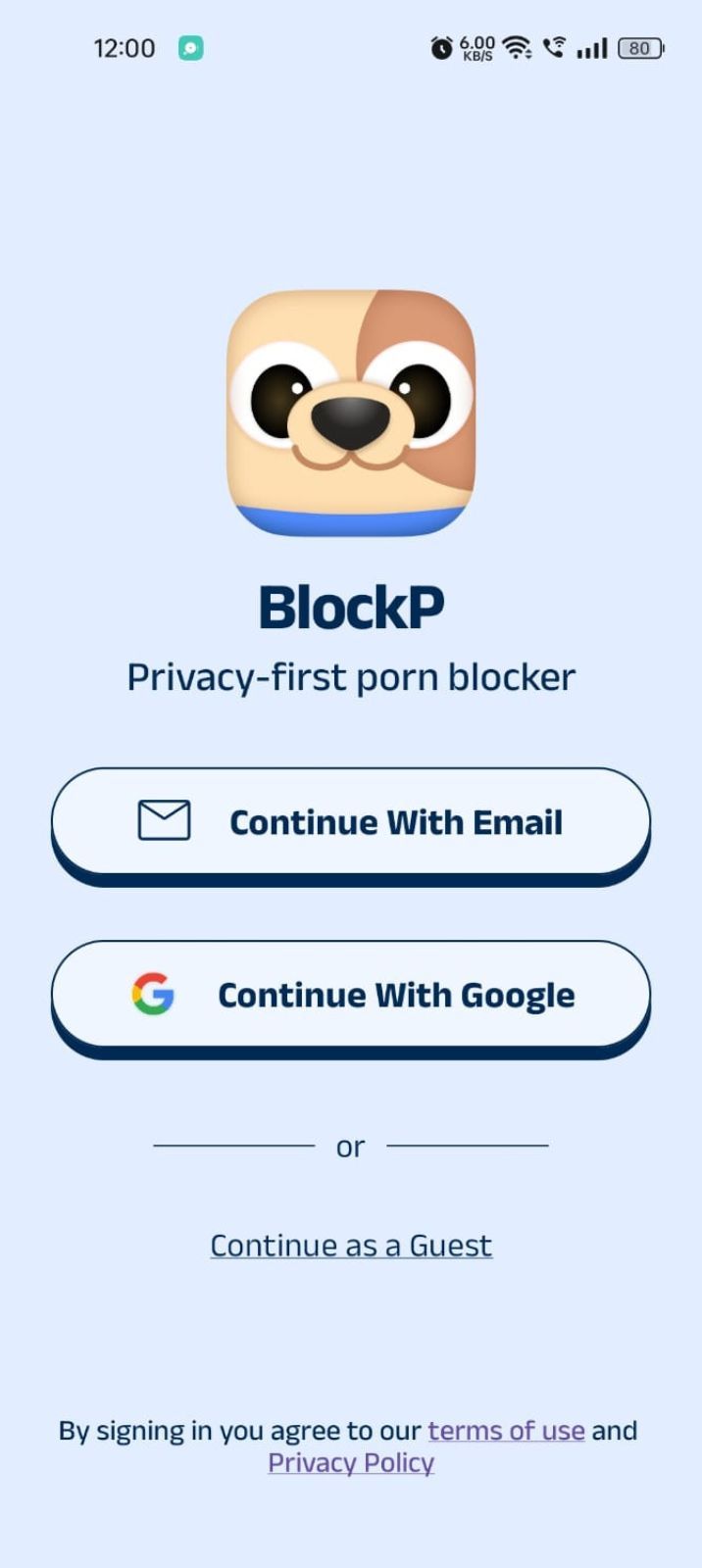
Step 2: Sign Up on BlockP
- Open the BlockP app.
- Sign up using Email or Google.
- Or tap Continue as a Guest to get started without creating an account.
Step 3: Give Necessary Permissions
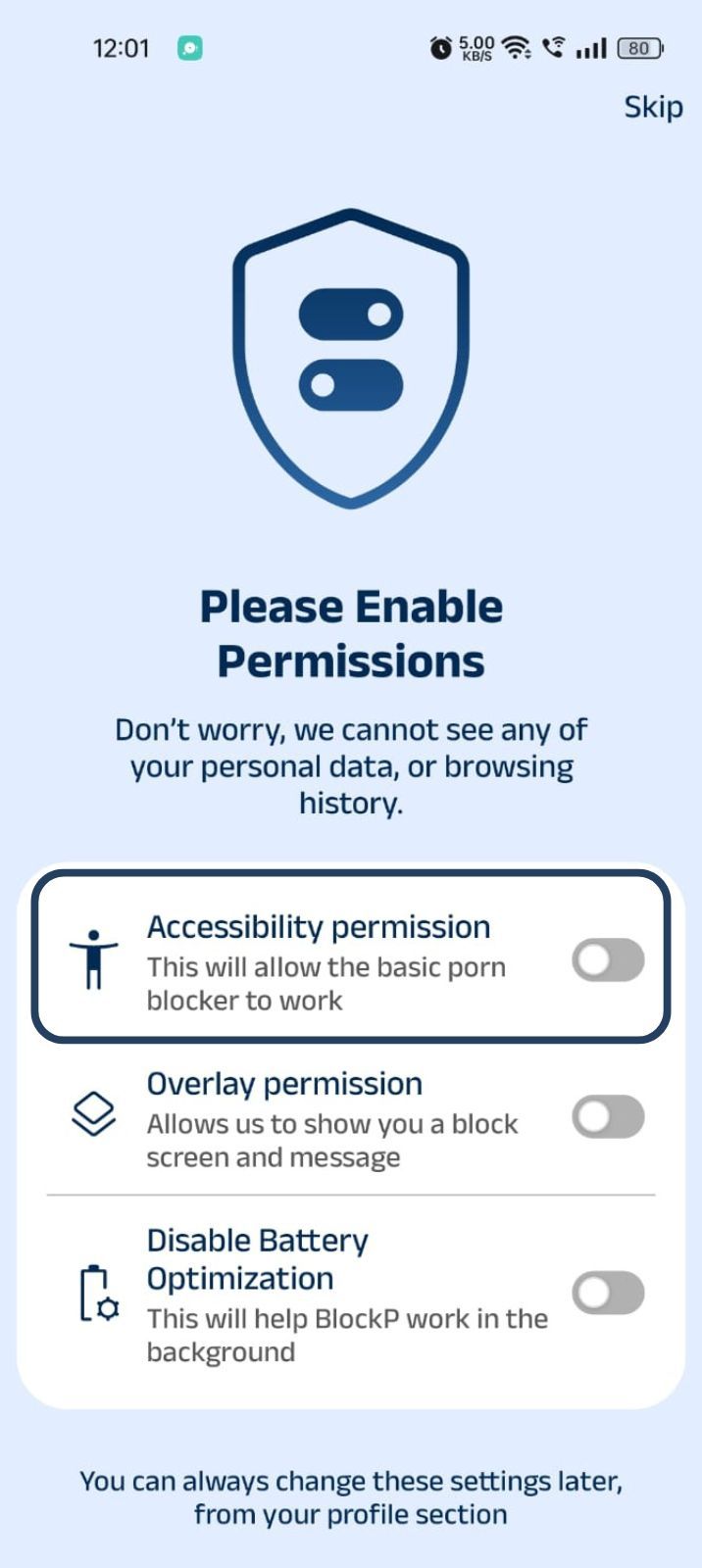
1. Accessibility - Lets the Android adult content blocker see what you are watching on your screen. Here is how to let BlockP use it:
- Click on the Accessibility permission toggle.
- Then click on "Let BlockP Access Accessibility Services"
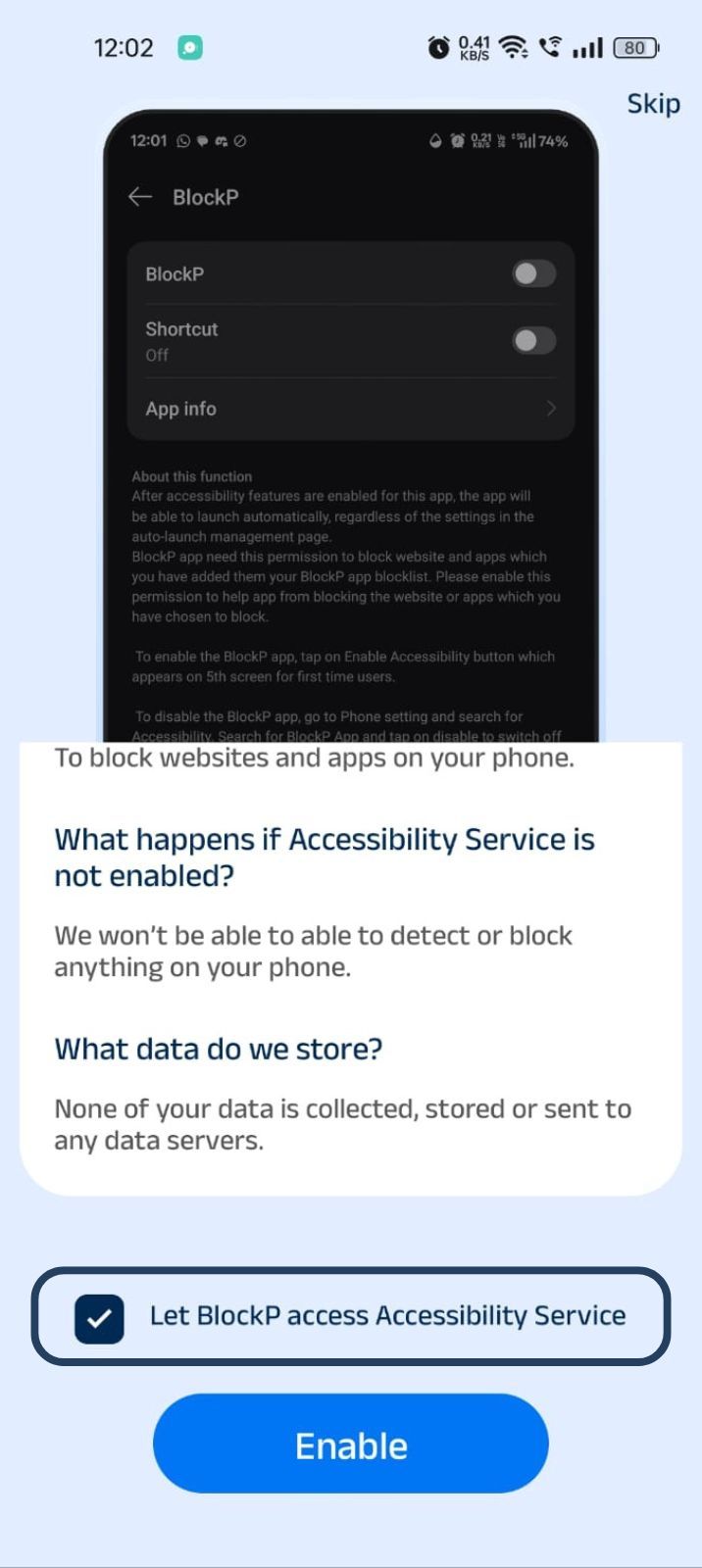
- Next, click on the Enable button
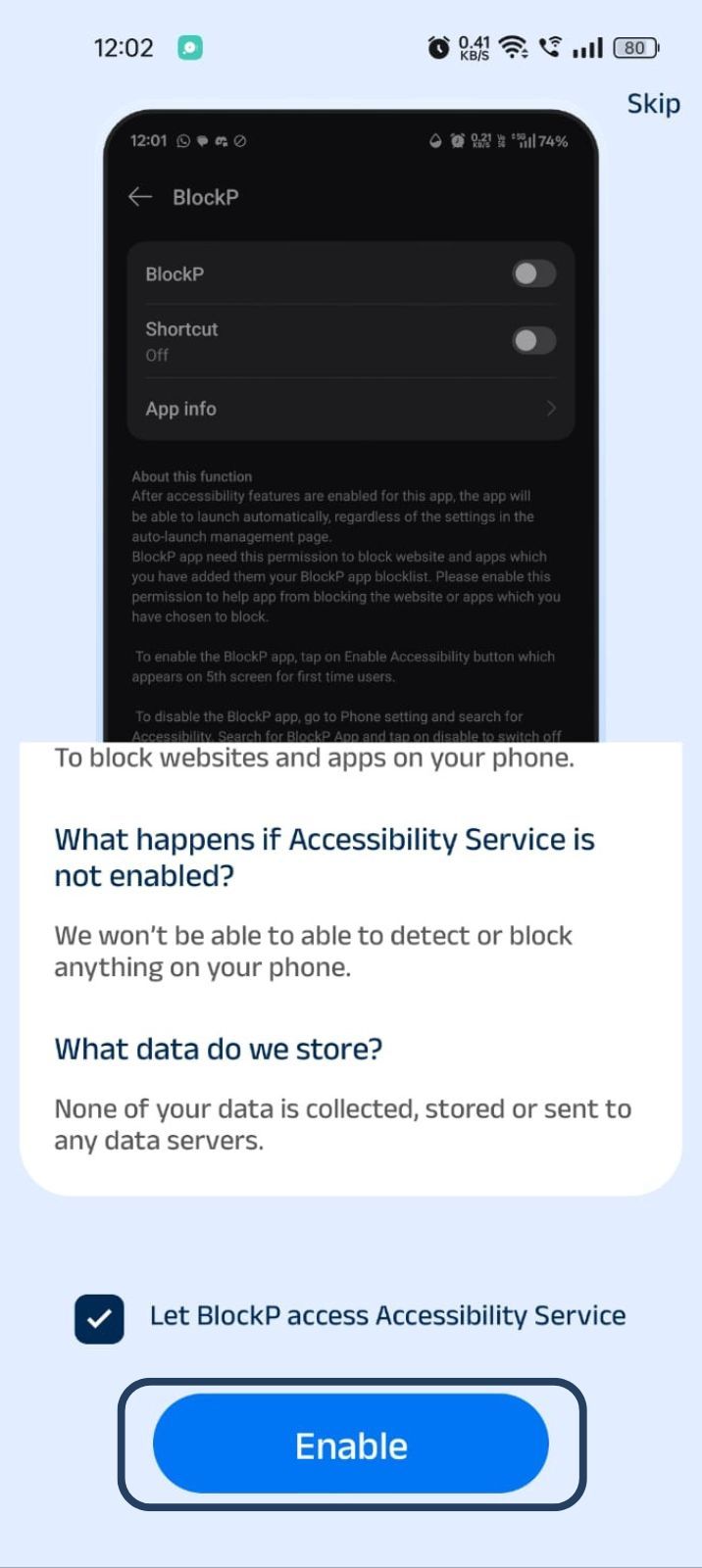
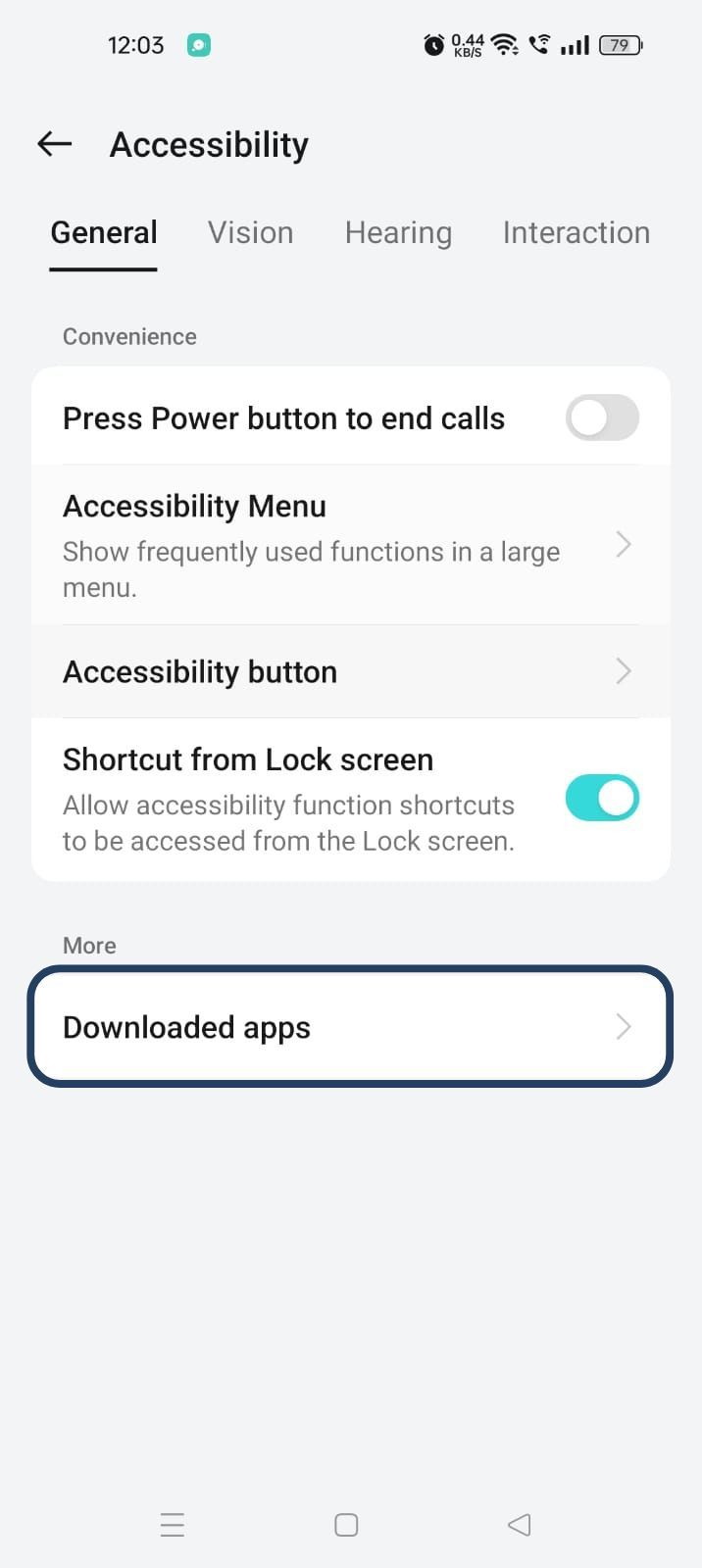
- Next, click on the downloaded apps button.
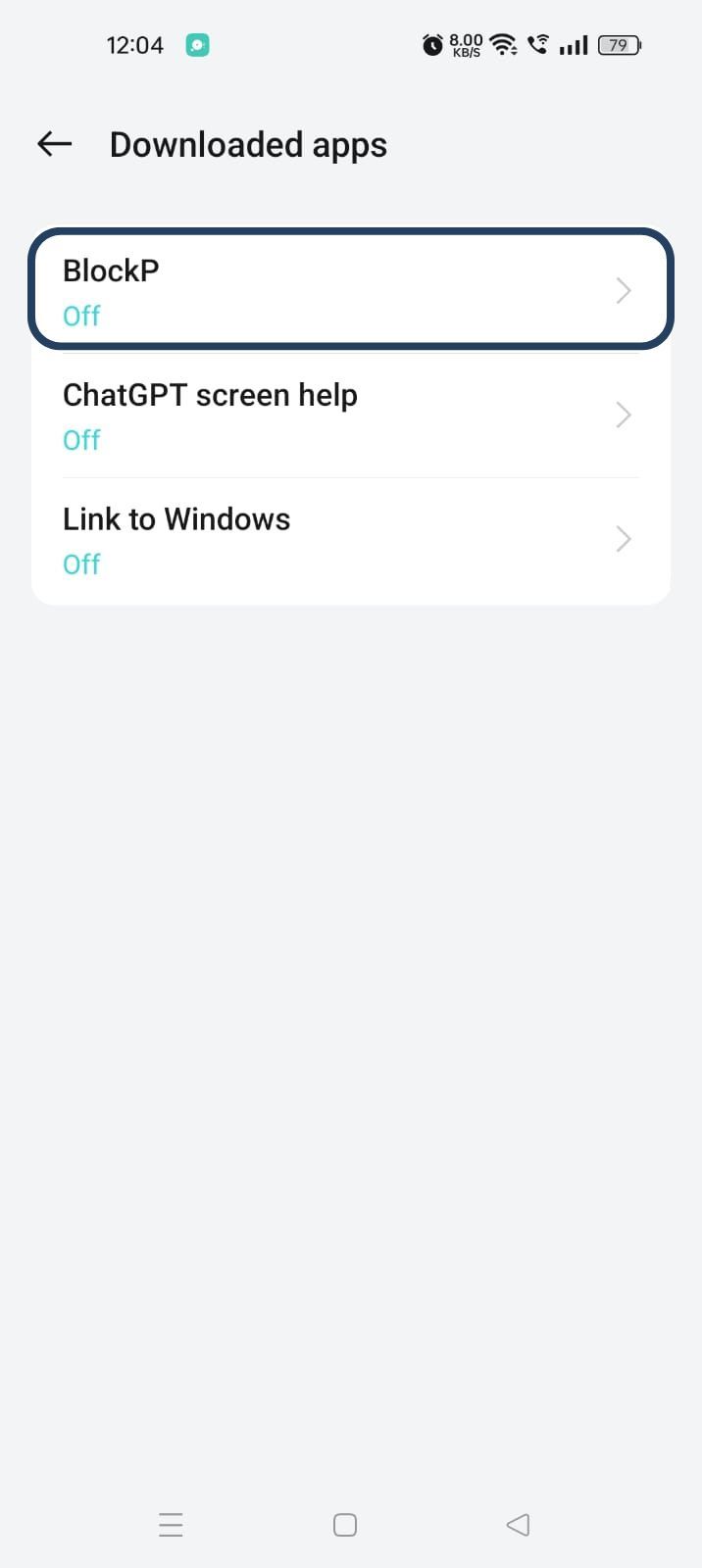
- Now, you will find Blockp - click on BlockP.
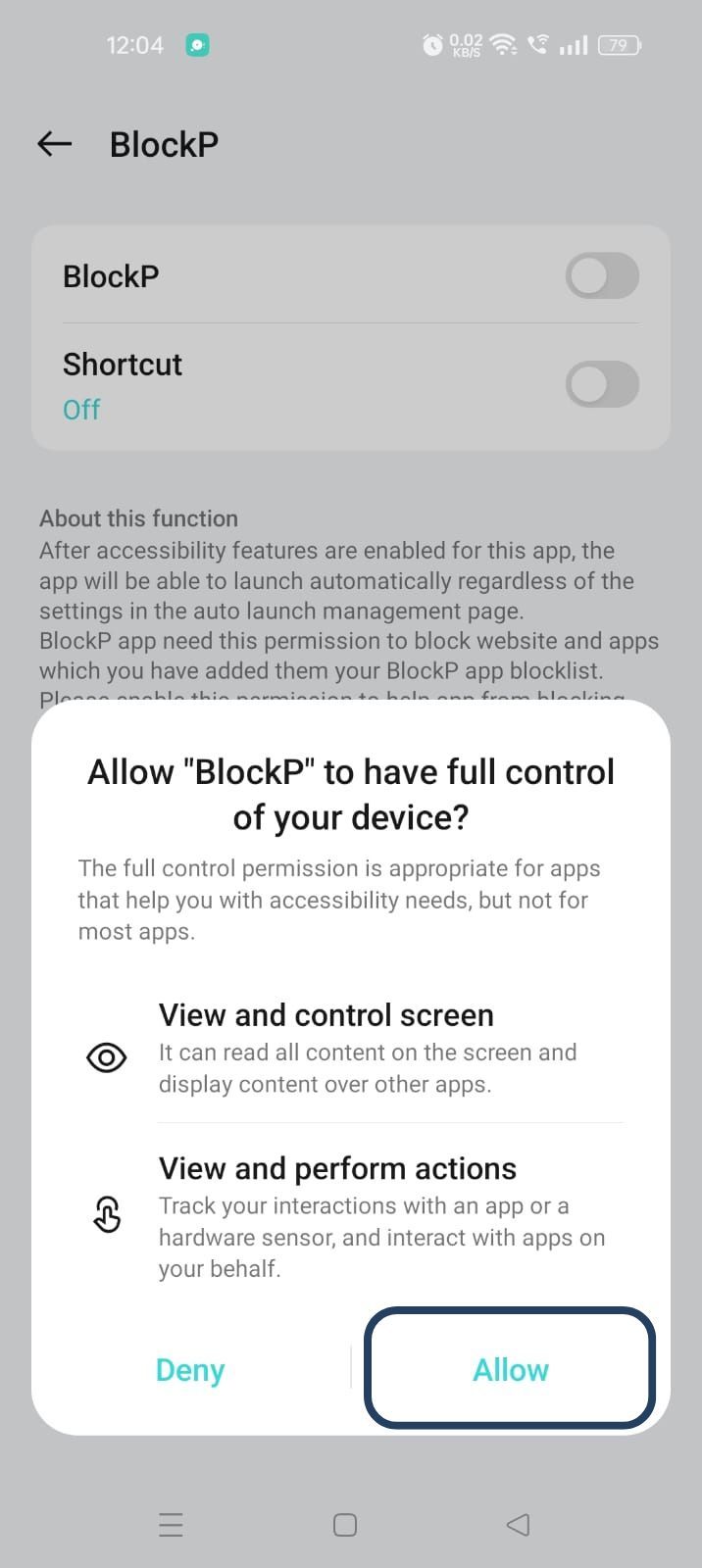
- The new screen will show a toggle in front of BlockP - enable the toggle and then click on the Allow button to complete the accessibility permission.
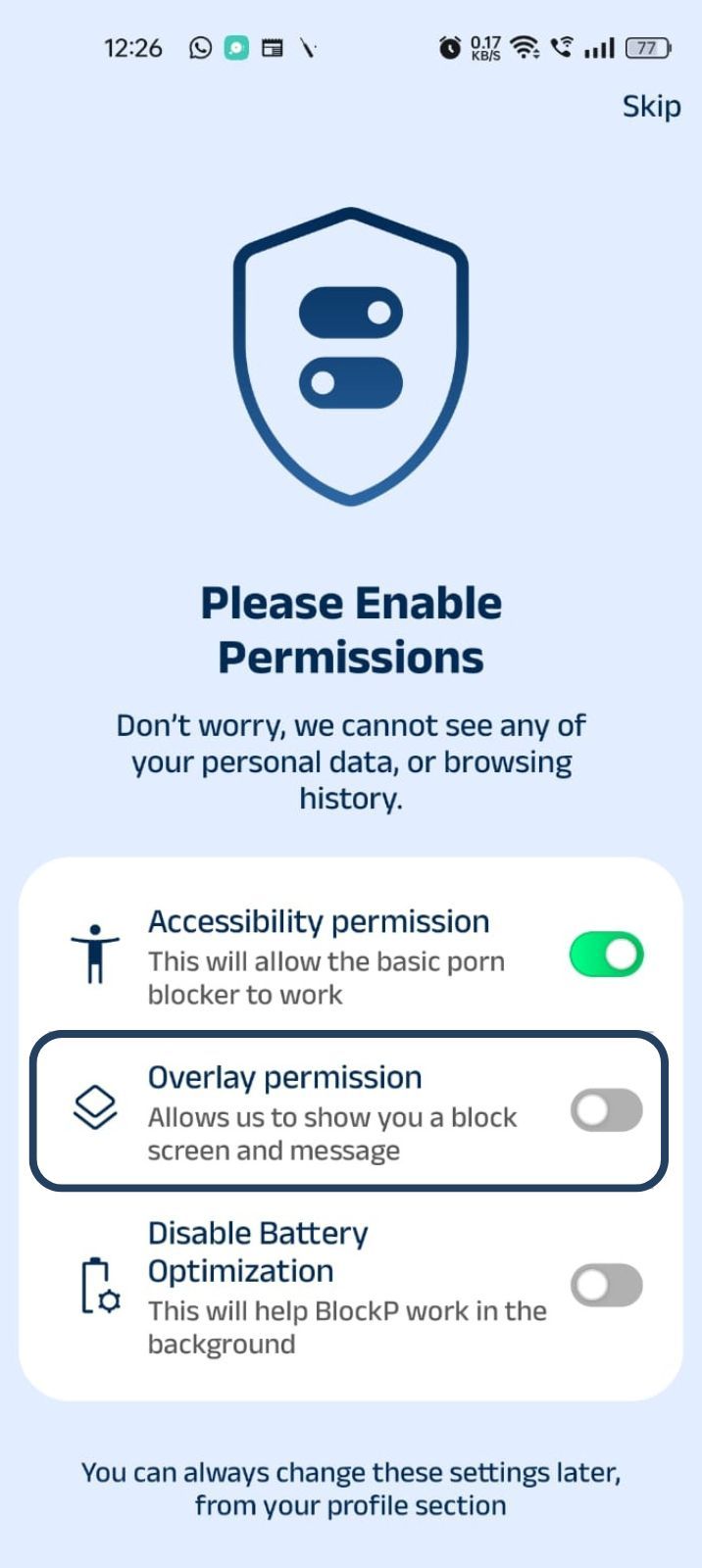
2. Overlay - lets BlockP show you a blocked screen and message when you try to access adult content.
- Click on Overlay permission toggle.
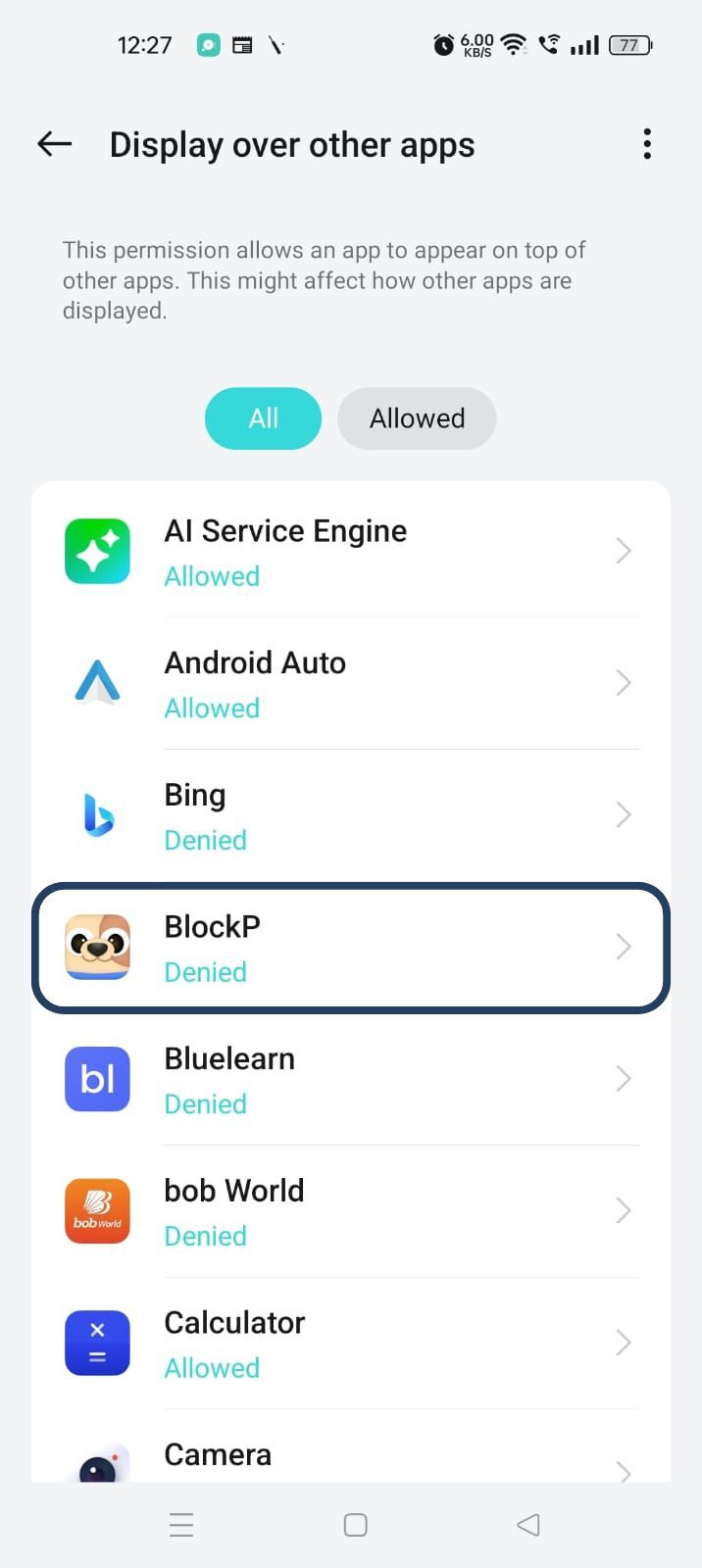
- You will get a menu with a list of apps titled - Display over other apps. Find BlockP in this list and click on it.
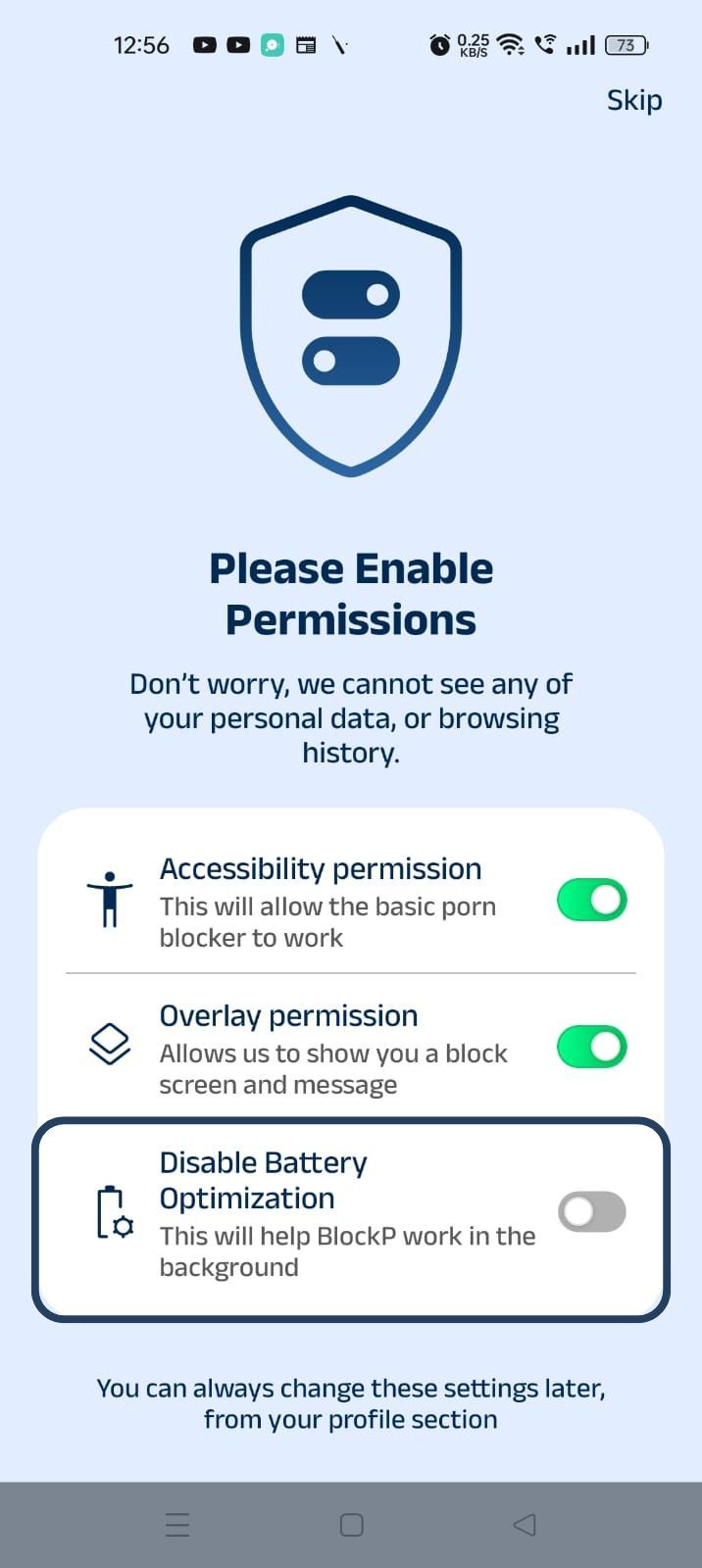
3. Disable battery optimization - so that BlockP can keep working in the background to filter adult content.
- Click on the Disable battery optimization toggle
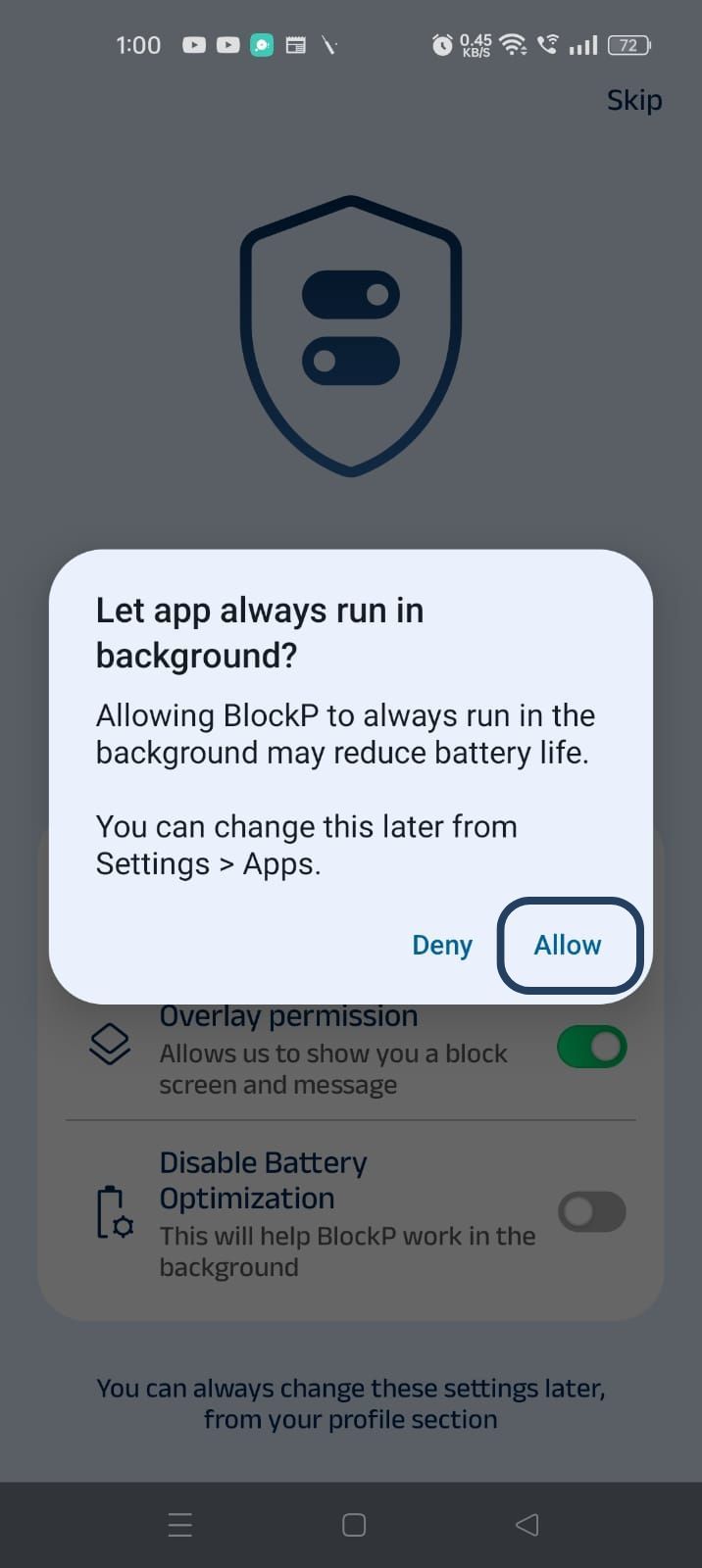
- When prompted, tap Allow to let BlockP run in the background. This helps BlockP stay active and block content without interruption.
Step 4: Select Your Adult Content Blocking Mode
On the BlockP home screen, you will see three adult content blocking options:
- Off - There is no restriction; you can access the adult content freely.
- Normal Mode for basic adult content blocking (AI-powered blocking of all nude content, network-level blocking of URLs, keyword-based blocking, and blocking all unsupported browsers)
- Strict Mode for complete adult content blocking, including nudity and semi-nude content across your Android device.
Select the Normal or Strict Mode based on your preference.
Now BlockP will instantly begin to block adult websites on Android.
Step 5: Go to Advanced Settings
Locate the advanced settings icon in the top right corner of BlockP’s home screen and click on it.
Step 6: Go to the ‘Block Semi-Nude Content’ setting.
In general settings, the first section shows the controls for your adult content blocking mode - normal or strict. Under it you can see the options for
- Standard adult content blocker
- AI-powered blocking
- Block semi-nude content
- Block VPN
The Block Semi-Nude content option is a premium feature. So, you can opt for a monthly or yearly subscription plan (which you can cancel anytime) to activate the feature.
There is also an option for a 3-day trial which can help you experience how the Block semi-nude adult content option works on BlockP.
What Is Considered Semi-Nude Content?
Semi-nude content online comes in many forms. People often post sexually suggestive poses where nudity is covered just enough to pass the posting restrictions on online platforms.
App moderation systems often miss such content that comes in the form of shirtless pictures, bikini-clad images, or poses where body parts are strategically covered - just enough so that the content can slide past the age and explicit content restrictions.
So, semi-nude content easily slips in front of children who are using shared systems, teenagers using social media, or someone who is trying to quit adult content.
Why is there a concern regarding semi-nude content? The risk of semi-nude content is not limited to just an unpleasant or embarrassing online experience.
Escalation
The problem is that creators on paid platforms often use semi-nude content as a preview to lead the viewer towards their adult content. So, semi-nude photos are not the end point of consumption, but they can become an on-ramp to adult content.
Even on social media platforms, semi-nude content can make the algorithm show the user more and more similar content, eventually leading them to fully explicit material.
Online Predators
In 2025, Parents together surveyed US teens aged 13 to 15 who were using Instagram. 58% of the teen Instagram users admitted that they had come across unsafe content and unwanted messages.
So, semi-nude content can become a way for online predators to slip past the age protection safeguards and lure the children.
Body Image and Mental Health Issues
Repeated exposure to sexualized content like semi-nudity can create unrealistic body expectations and anxiety, especially for adolescents.
The BlockP Protection Against Semi-Nude Content
As the semi-nude content is designed to escape the usual filtering and age restrictions, most content filtering tools may not always recognize it.
Simple blocking of adult websites is not enough, as semi-nude content can show up anywhere on the internet, including your social media feed, searches, and private messages.
That’s exactly why BlockP has a dedicated feature to block semi-nude adult content. Its AI-powered filters scan the pages or apps you are using and block nsfw content like semi-nudity before it can load.
Why Choose BlockP?
The traditional content blockers depend on a URL database or keyword filters for blocking. This approach was very effective in the initial days as adult content and semi-nude content lived mostly on dedicated adult websites.
But, over time, what passes as safe content on mainstream websites and social media platforms has changed a lot. Semi-nudity or a sexually suggestive photo can show up anywhere - from an ad in a shopping app to your social media feed.
So, if you want to block semi-nude adult content, you have to go beyond the basic adult content blocker. You need an adult content blocker for Android like BlockP that can filter the content based on the merit of the content instead of trusting the website or platform where it is available.
- BlockP uses AI filters to recognize semi-nude content that might slip past basic filters.
- As the blocking happens at the network level, the semi-nude images are blocked before they load on your phone, which means complete protection from accidental exposure.
- It can block semi-nude content on all apps on your phone - social media, browsers, or messaging apps.
- BlockP can detect and block semi-nude adult content on the device itself so your data never leaves your phone or computer.
Frequently Asked Questions
Can BlockP block Instagram models?
BlockP’s AI-filters scan the actual images and block any content that has semi-nudity. So, even if the content is from a verified or mainstream Instagram model, if it has semi-nude content, then BlockP will block it.
Does it work on Reddit?
Yes. BlockP can scan and block adult content on platforms like Reddit.
Will it slow down my phone?
Not at all. BlockP is a lightweight app that runs quietly in the background. You will not see any difference in your phone’s speed or battery performance.
Is the feature free?
On BlockP, blocking fully nude content is a core adult content blocking feature. Blocking semi-nude content is available on the premium version.