How to Block Instagram Search on Android Using BlockP
Block Instagram Search on Android with BlockP to reduce exposure to adult, semi-nude, and suggestive content while staying focused online.
Get Started with BlockPFor many of us, the search option on Instagram is not just a helpful tool. It is a gateway for hours lost in endless scrolling of content that we had no real interest in looking up at all. That’s why features like BlockP’s block Instagram search have become valuable.
Not to demonize any specific feature, but Instagram search exposes us to a particular vulnerability. It creates the ideal conditions for the dopamine-chasing scrolling habit. And thanks to the algorithm, Instagram search often pushes explicit content and predatory profiles.
Most content blockers that we use to block Instagram adult content often end up completely blocking the app. But many of us and our children do need other features of Instagram, like posts, stories, or messaging, for staying connected or for work.
BlockP’s Instagram search blocking feature finds the solution to this dilemma by blocking the one feature that hijacks most of your time and attention and carries a high risk of unsafe content while keeping other necessary features fully functional.
How to Block Instagram Search on Android with BlockP
Here is how to block Instagram search on your Android phone with BlockP:
Step 1: Install BlockP
Download the BlockP app from the Google Play Store and install it on your Android phone.
Step 2: Sign Up on BlockP
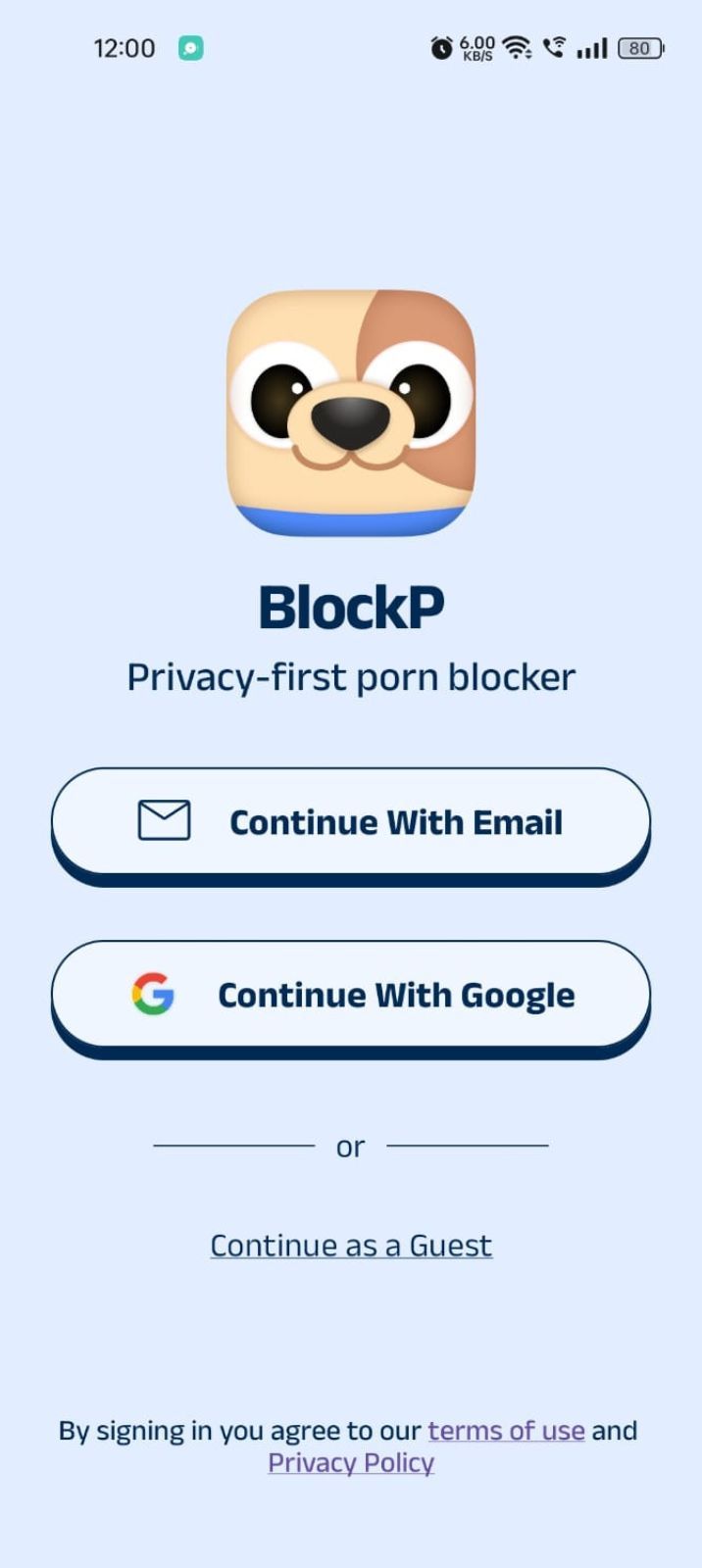
- Open the BlockP app.
- Sign up using Email or Google.
- Or tap Continue as a Guest to get started without creating an account.
Step 3: Give Necessary Permissions
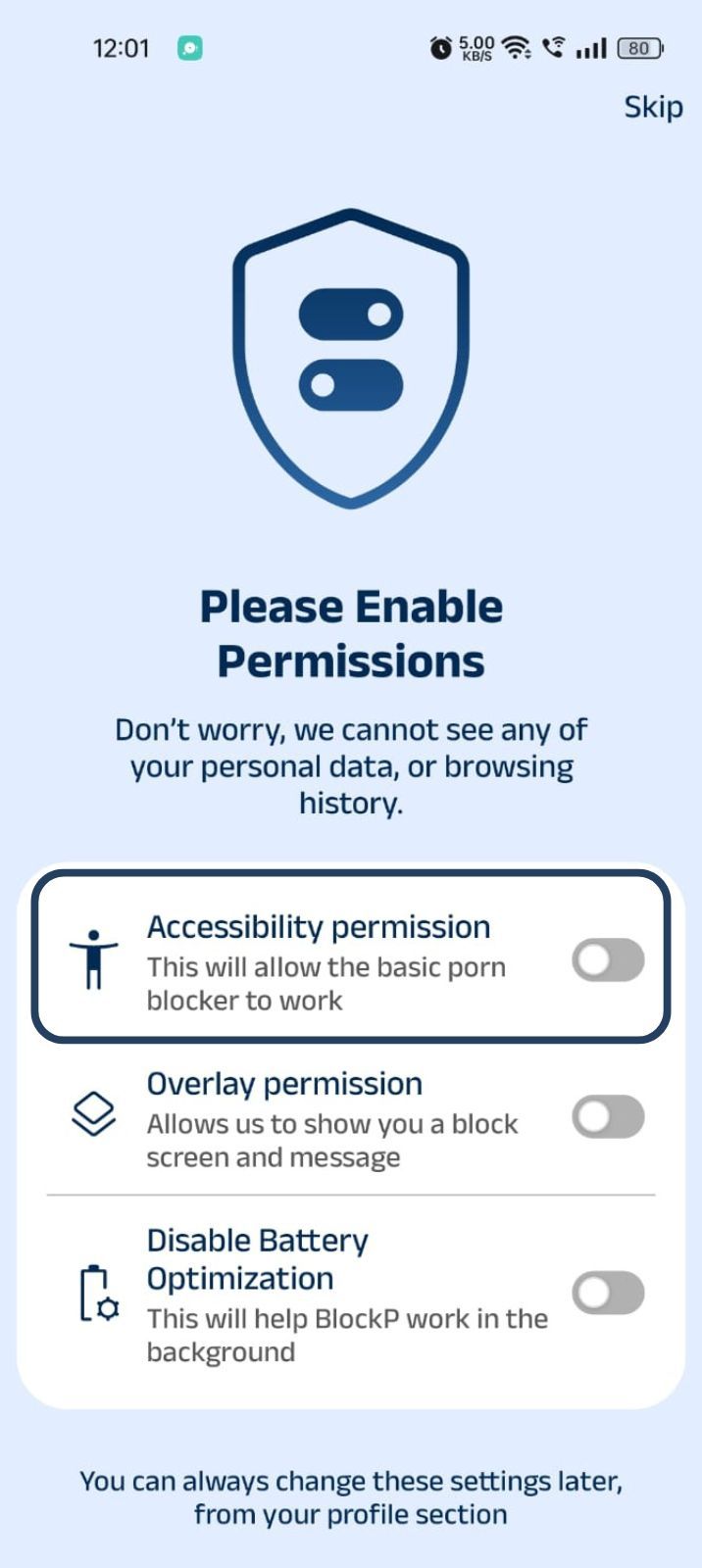
1. Accessibility - Lets the Android adult content blocker see what you are watching on your screen. Here is how to let BlockP use it:
- Click on the Accessibility permission toggle.
- Then click on "Let BlockP Access Accessibility Services"
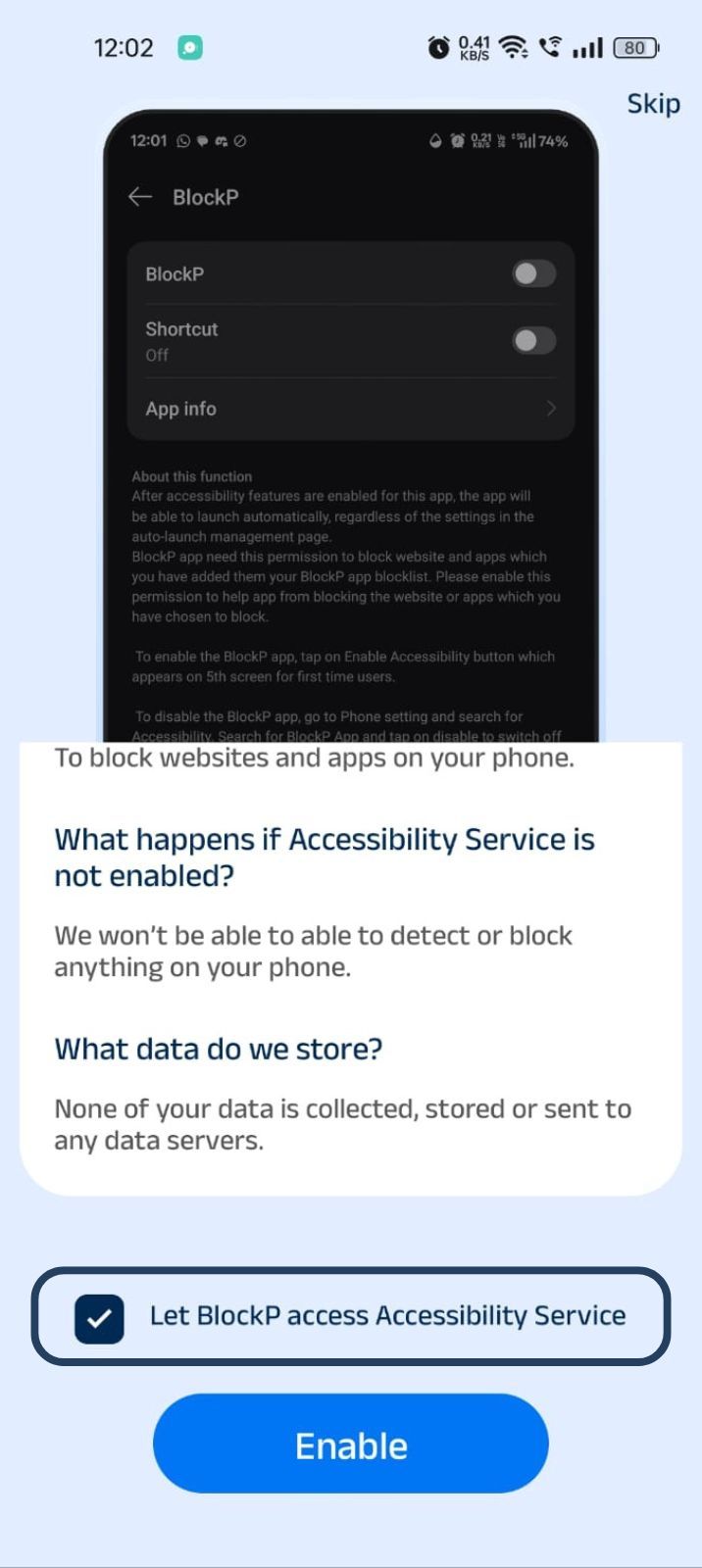
- Next, click on the Enable button
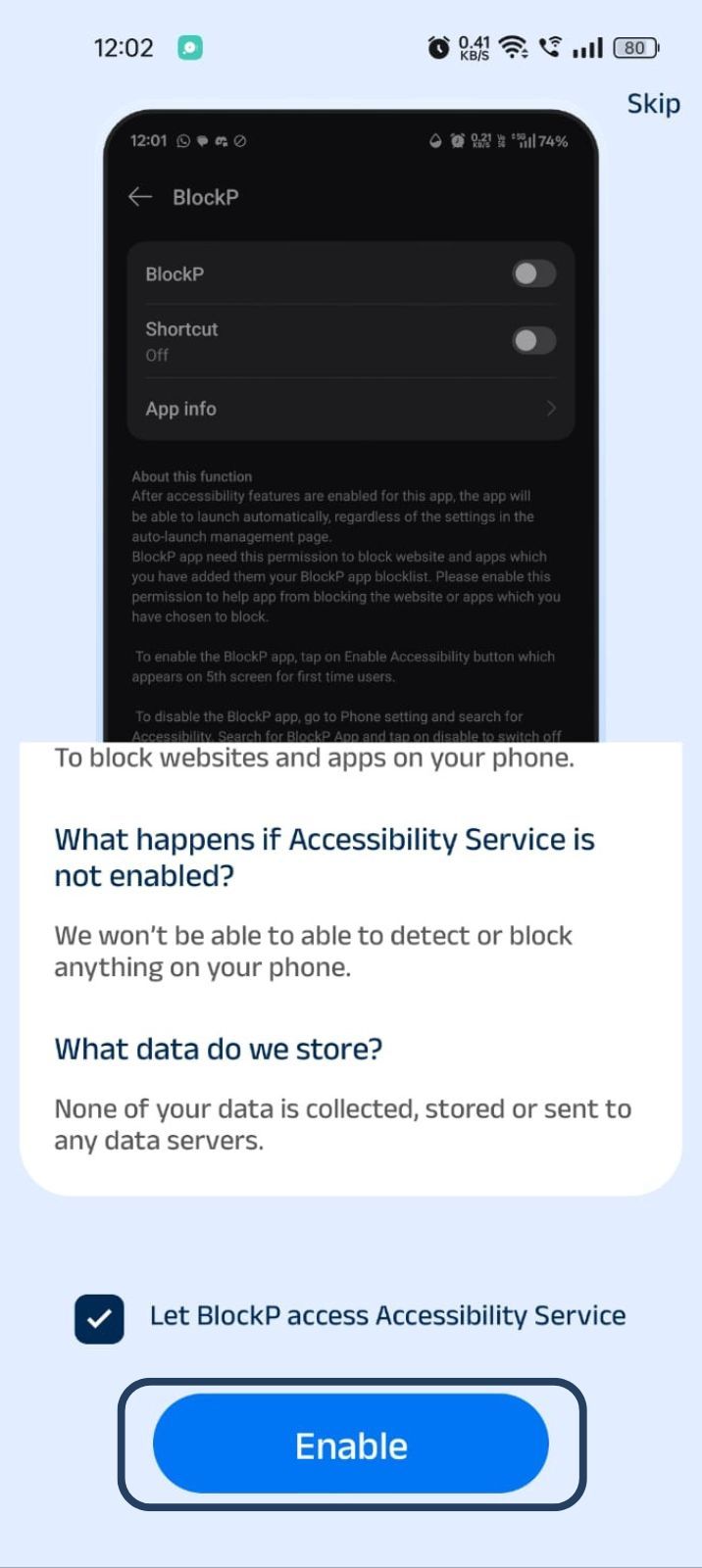
- Next, click on the downloaded apps button.
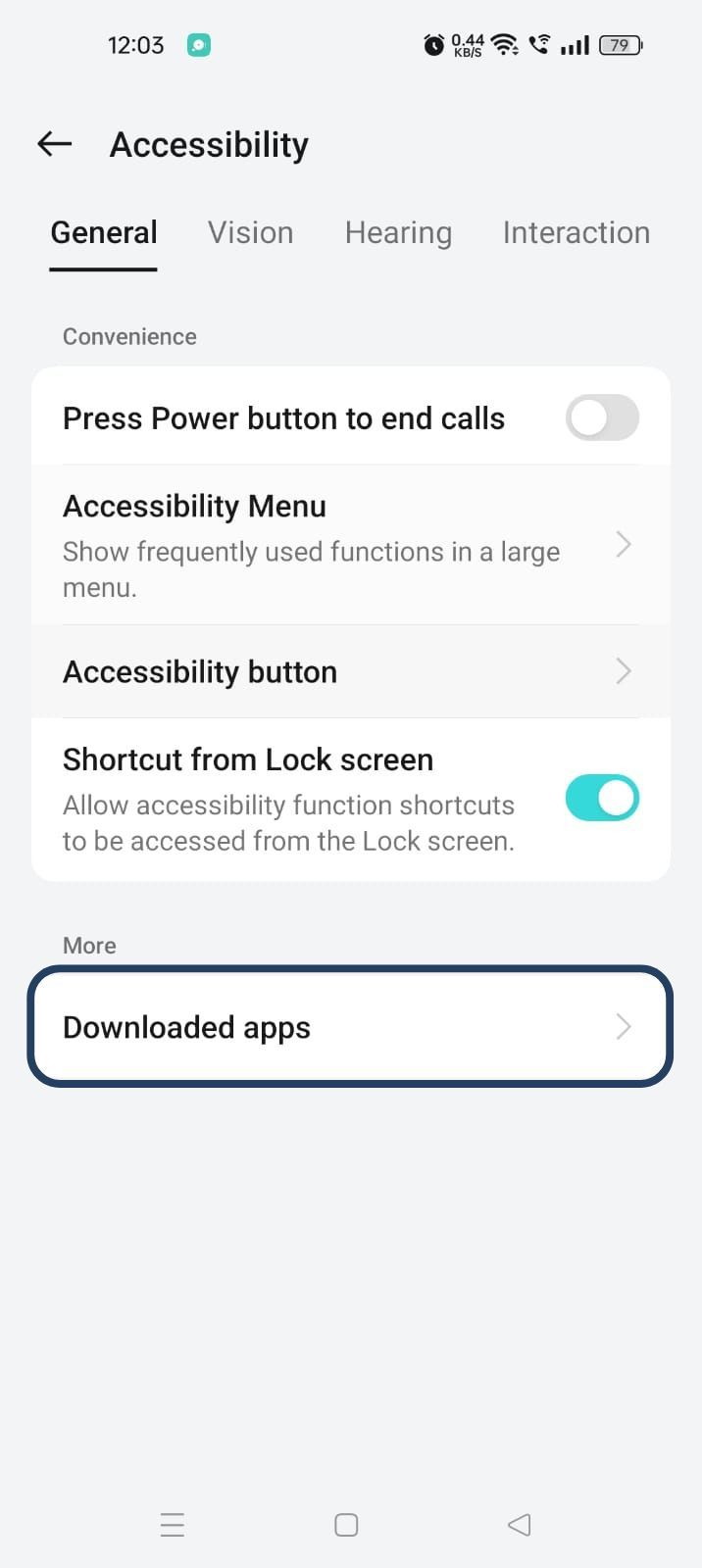
- Now, you will find Blockp - click on BlockP.
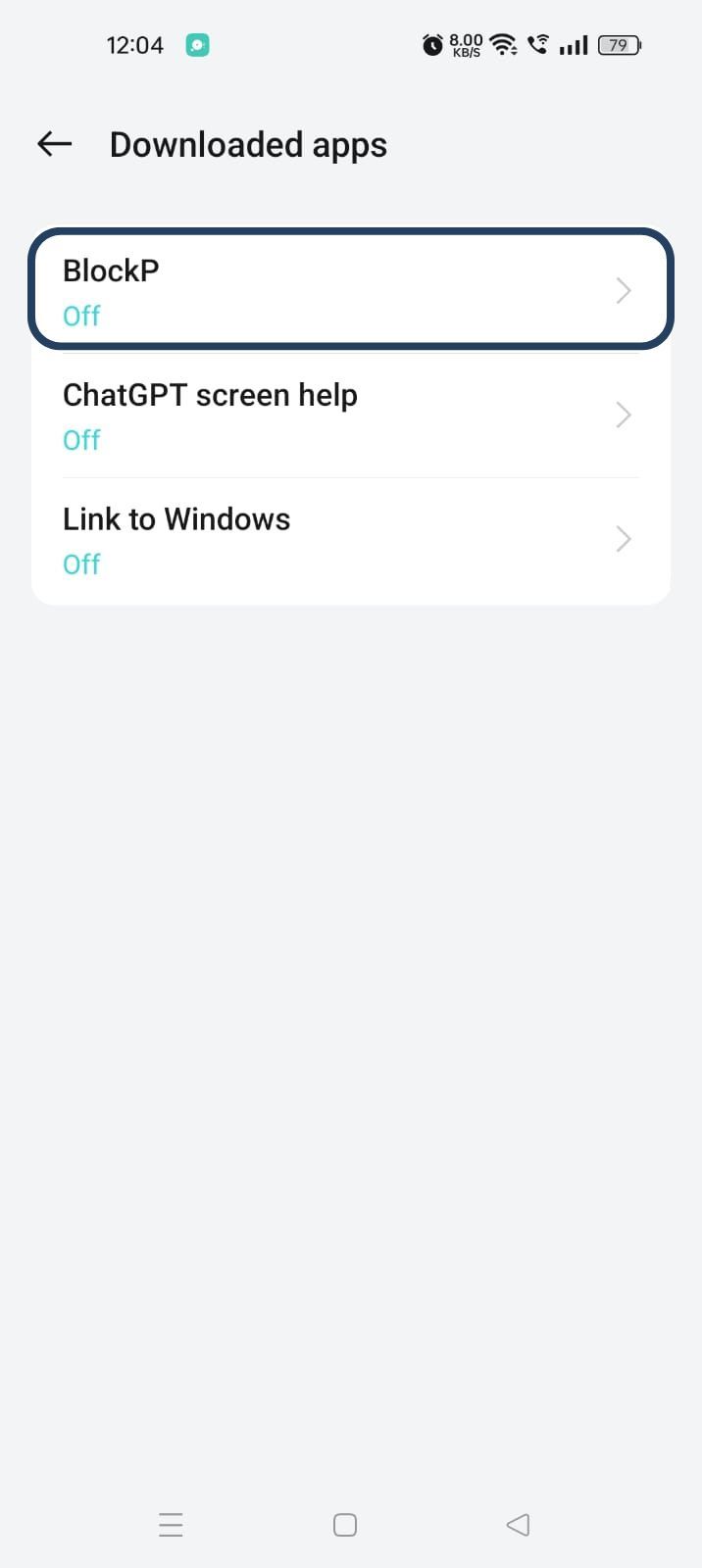
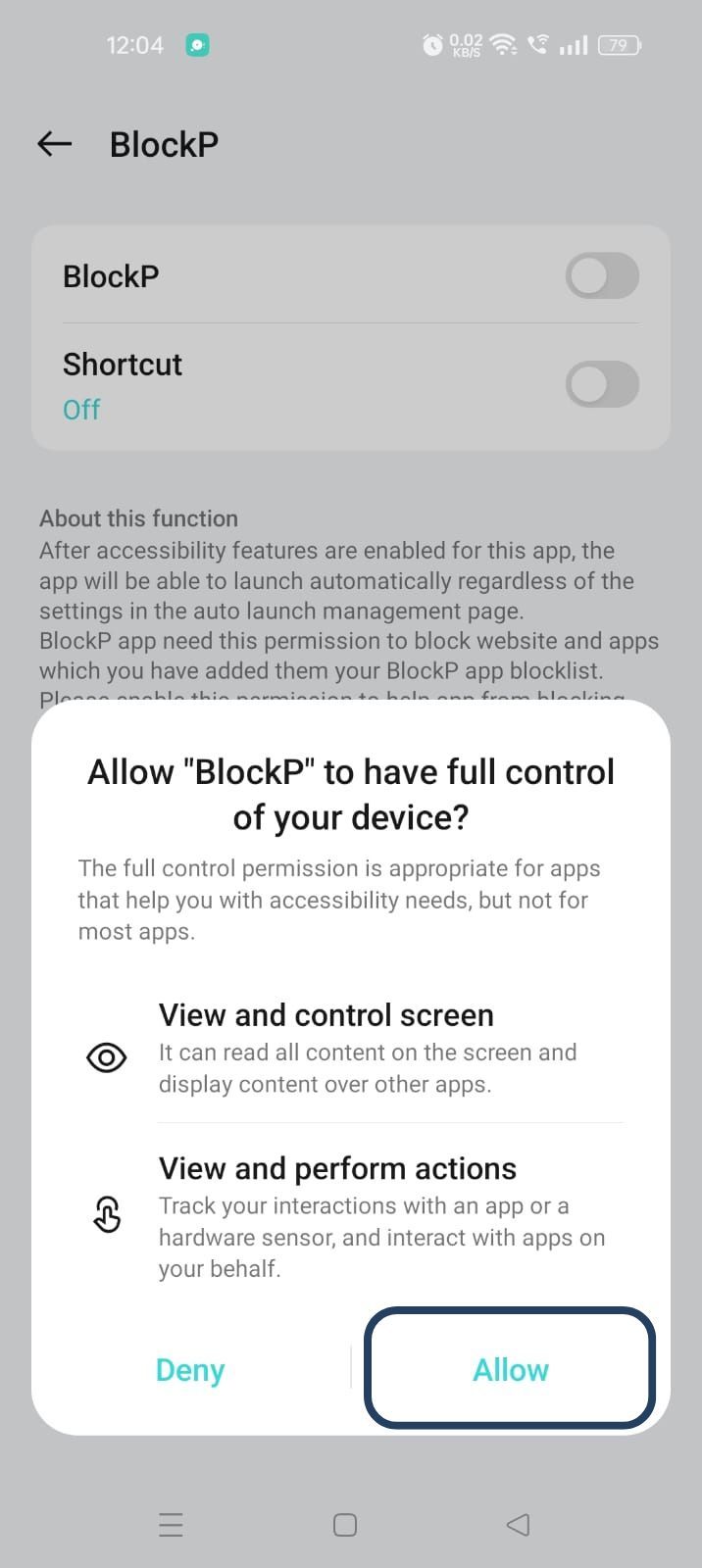
- The new screen will show a toggle in front of BlockP - enable the toggle and then click on the Allow button to complete the accessibility permission.
2. Overlay - lets BlockP show you a blocked screen and message when you try to access adult content.
- Click on Overlay permission toggle.
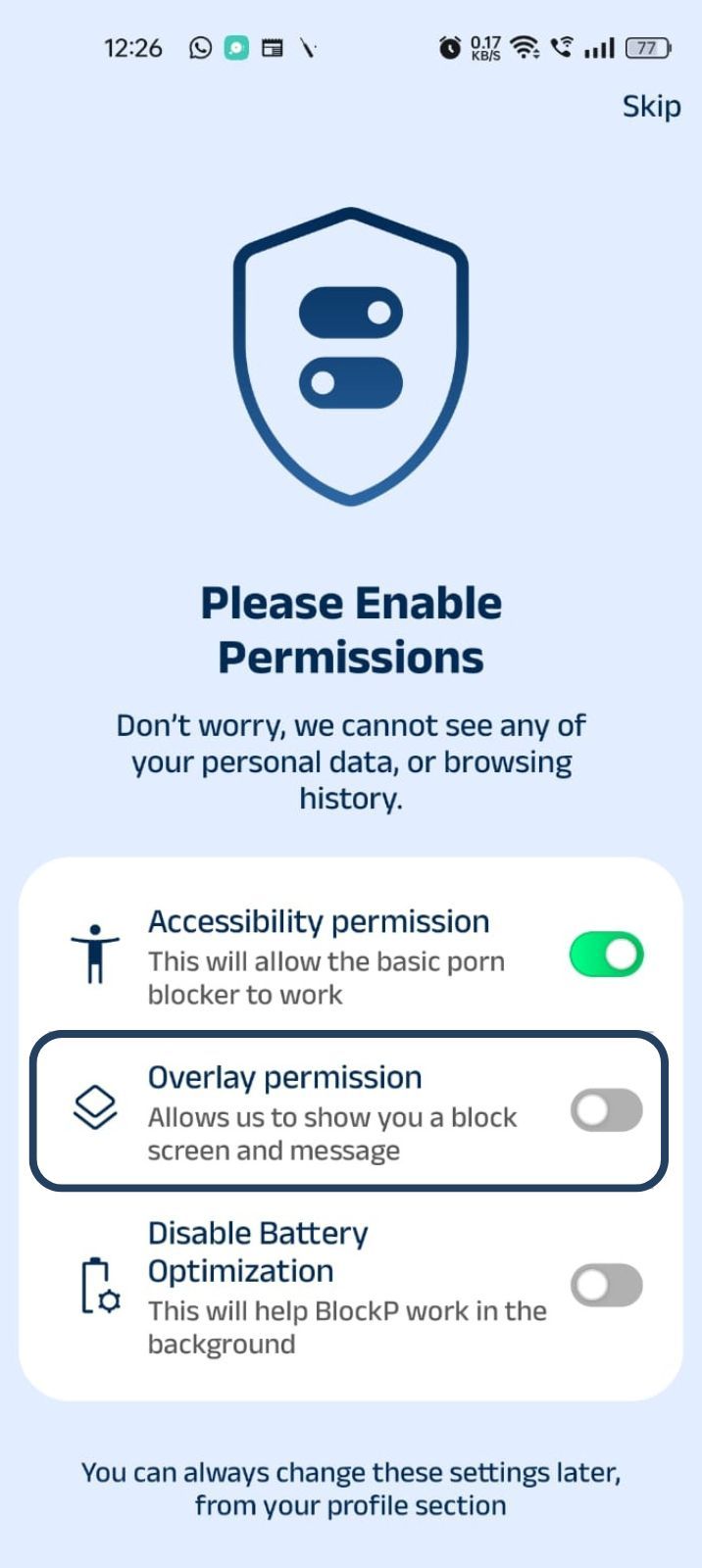
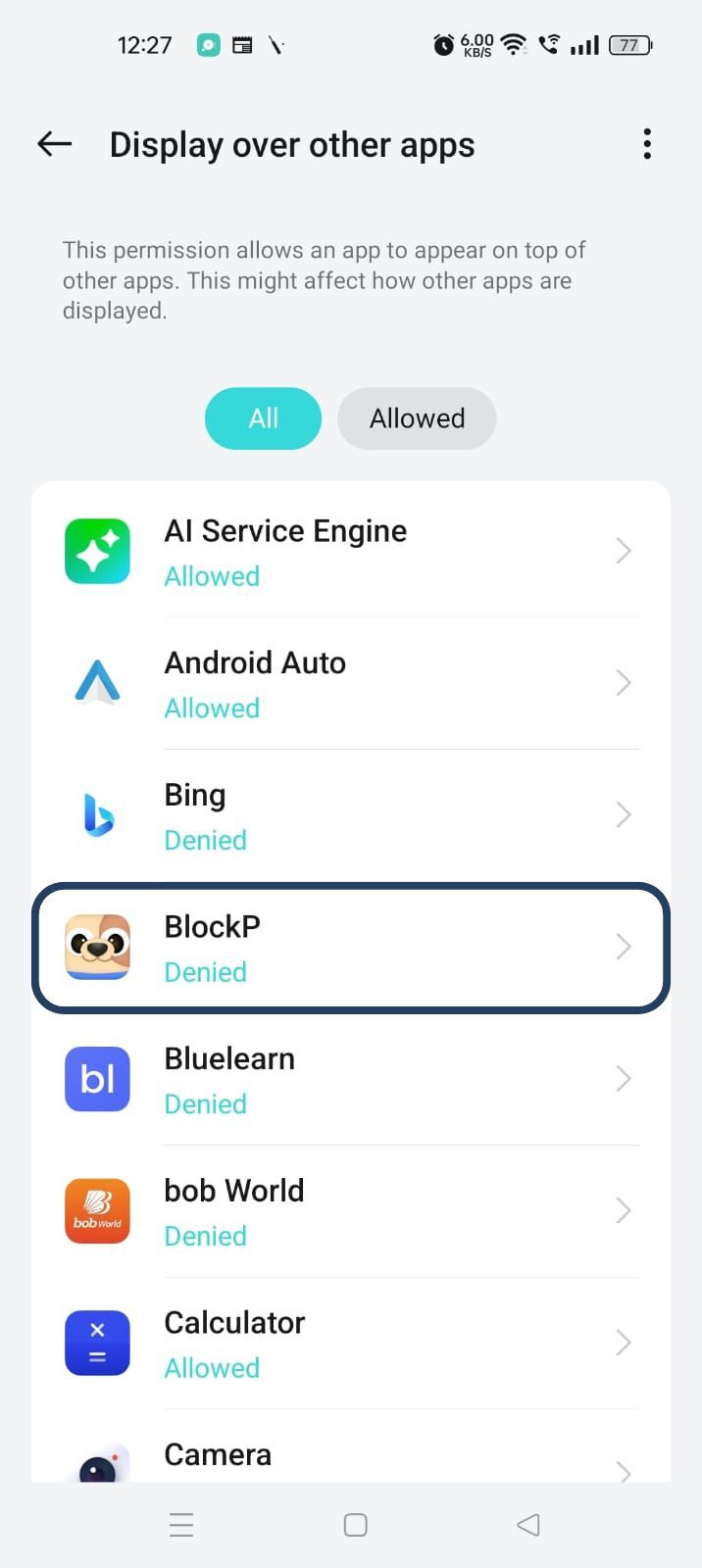
- You will get a menu with a list of apps titled - Display over other apps. Find BlockP in this list and click on it.
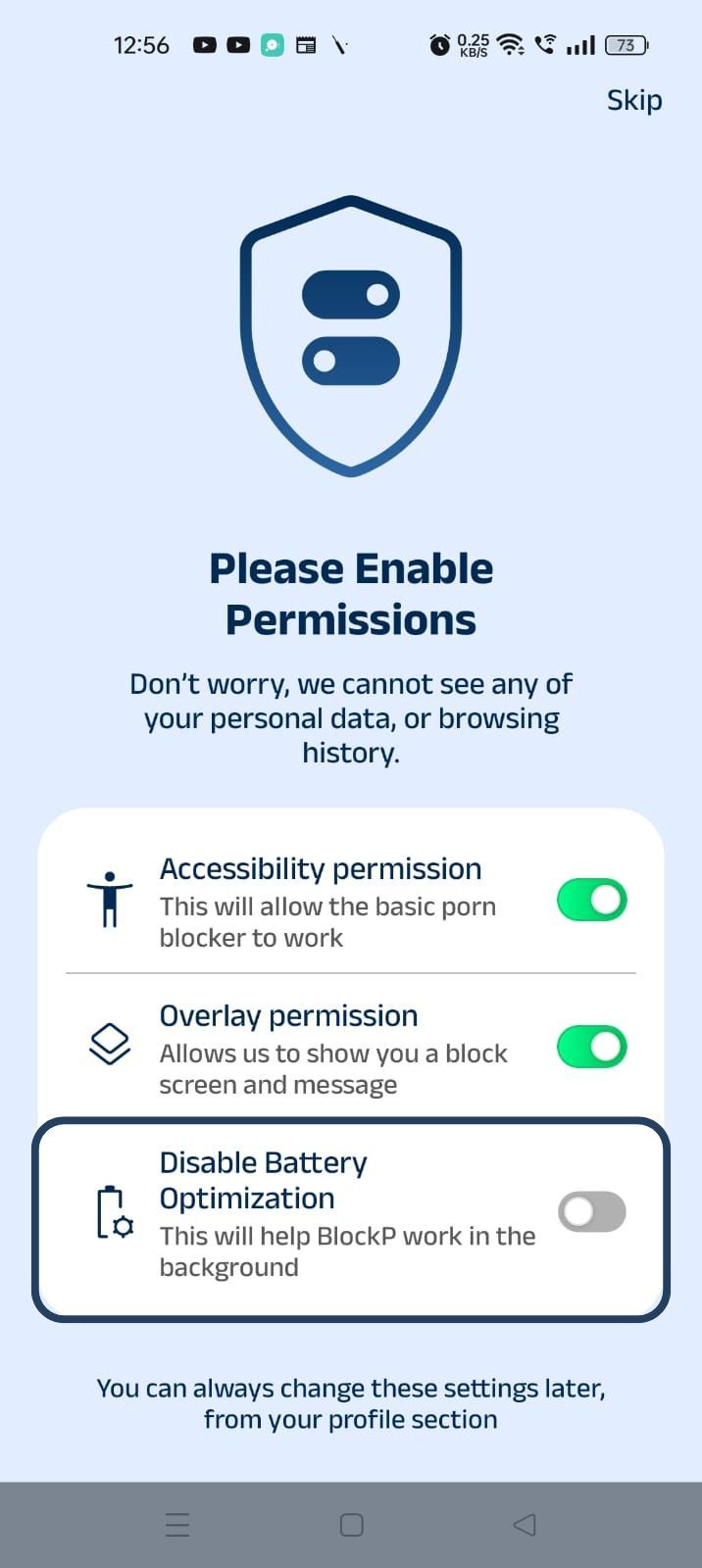
3. Disable battery optimization - so that BlockP can keep working in the background to filter adult content.
- Click on the Disable battery optimization toggle
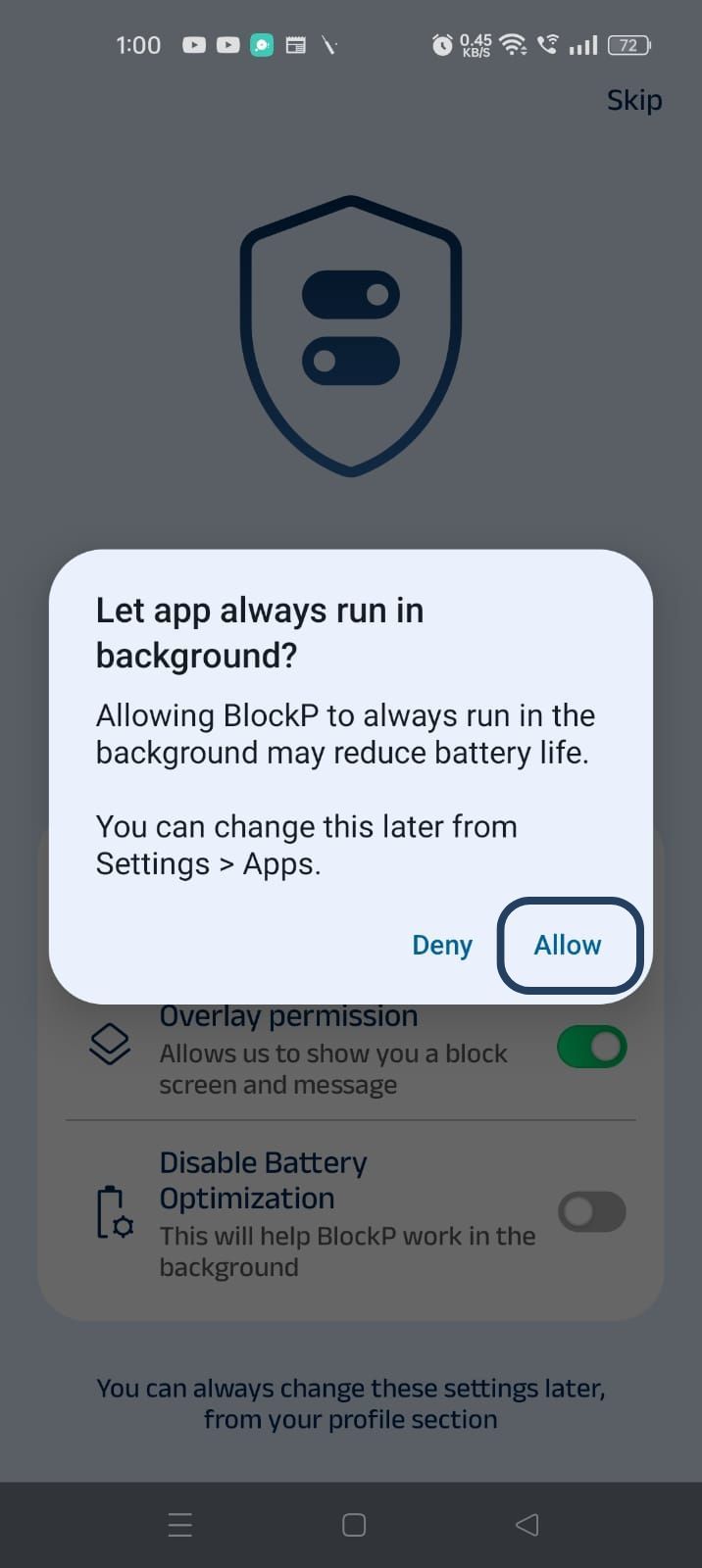
- When prompted, tap Allow to let BlockP run in the background. This helps BlockP stay active and block content without interruption.
Step 4: Go to Advanced Settings
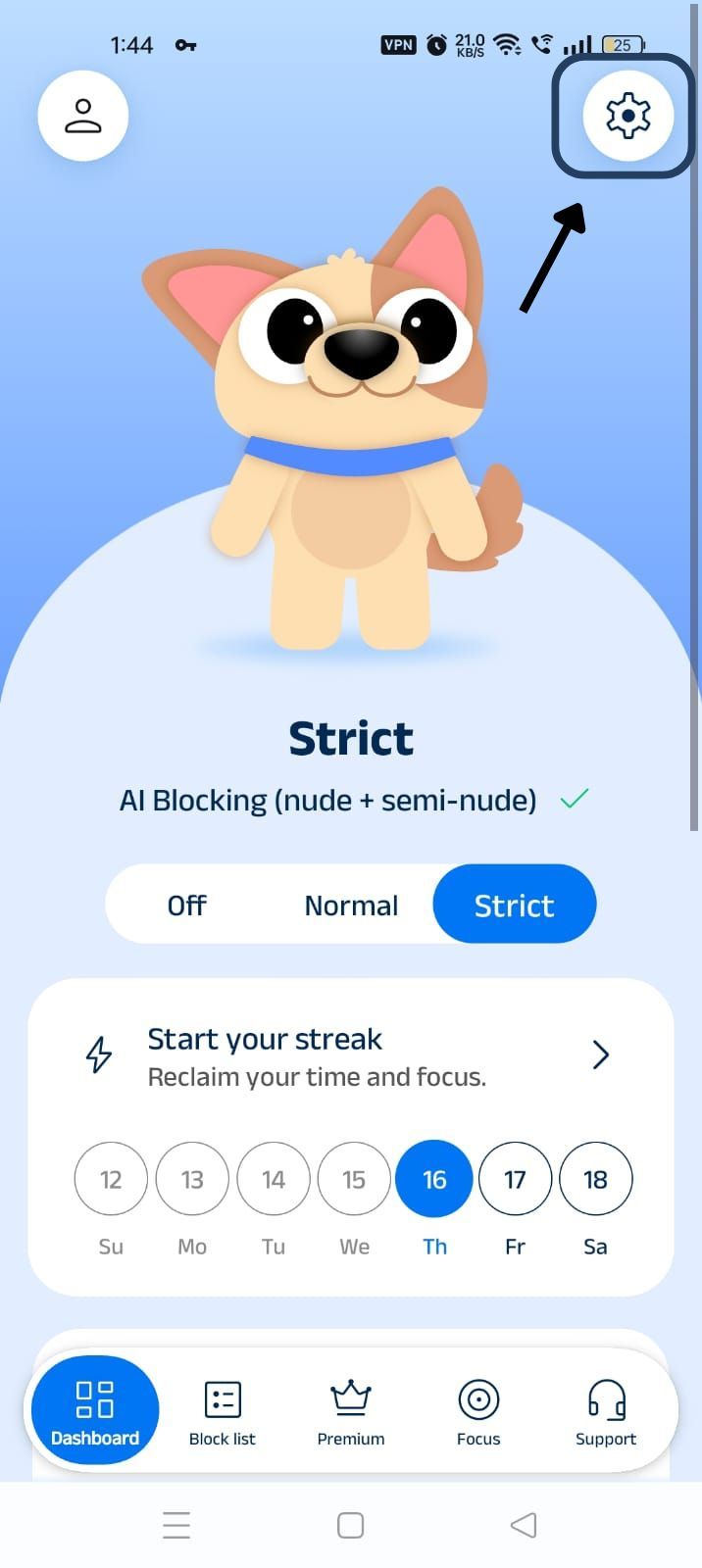
Click on "Advanced settings" (the icon at the top right corner of the BlockP home screen).
Step 5: Find Social Media Blocking Section and Block YouTube Shorts
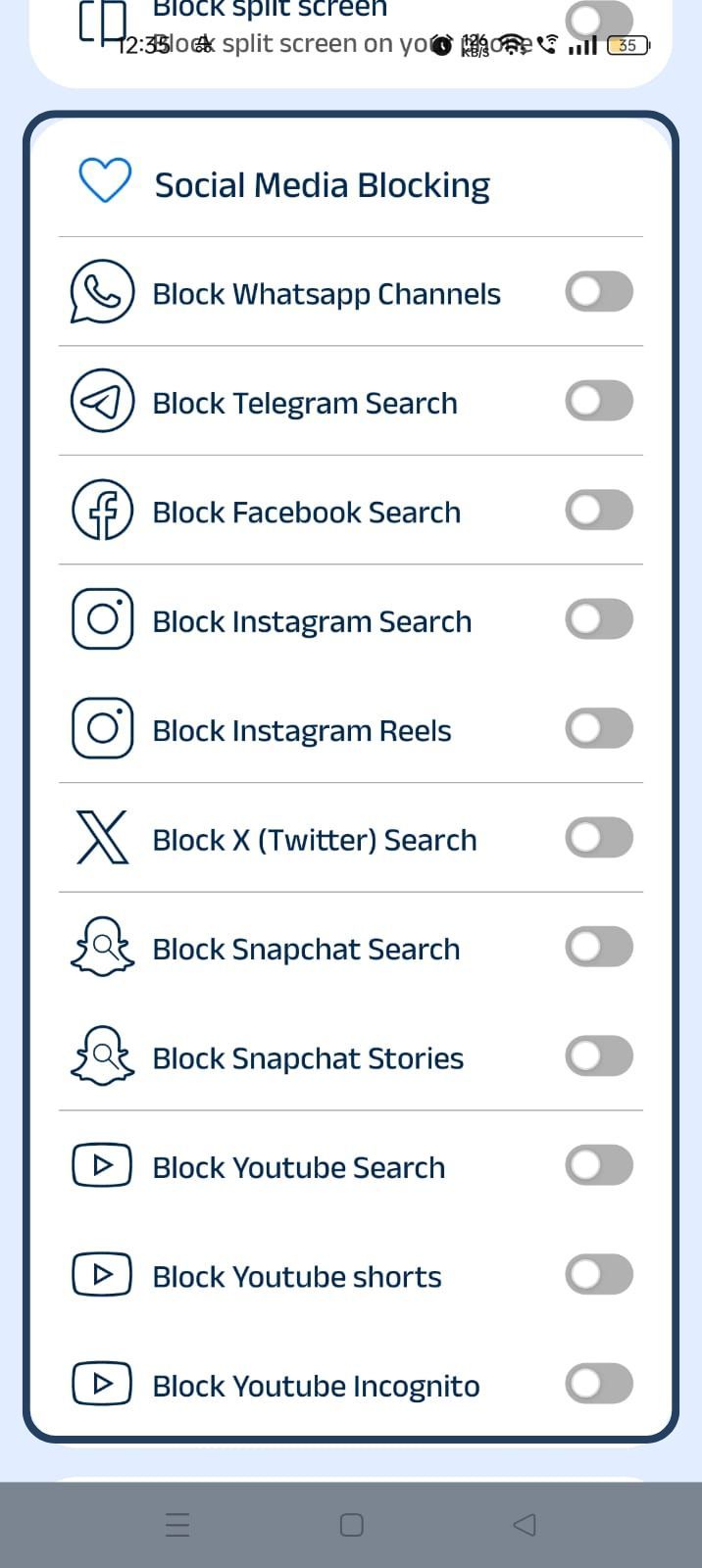
Scroll down the General Settings section and find the Social Media Blocking subsection. This section lists options related to social media apps like Instagram, Facebook, Snapchat, X, and so on.
Step 6: Block Instagram Search
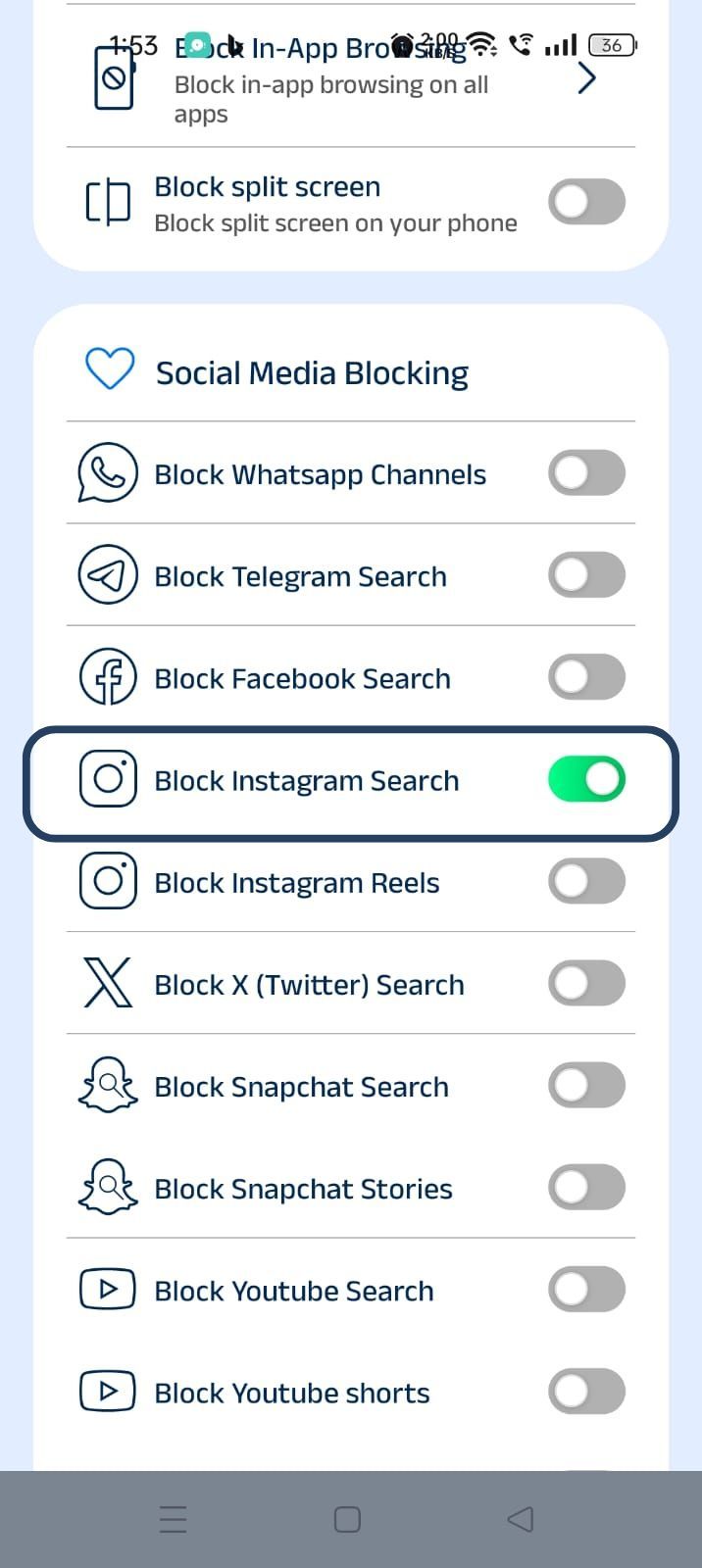
In the social media blocking section, find the Block Instagram Search option and slide the toggle to activate it.
On BlockP, blocking Instagram search is a premium feature - so pick the monthly or annual plan based on your choice to block Instagram search.
How Instagram Search Can Become a Distraction
Instagram search is not a dangerous feature in itself. But it is also not intentional consumption – it's about exploration of the content, and that’s why it can become highly distracting.
The Algorithm
Instagram’s algorithm learns the patterns of your searches and often escalates the content results to the edge of your taste so that you keep discovering something new and keep scrolling.
Dopamine Scrolling
On your Instagram feed you get content from the accounts that you follow. But Instagram search is about discovery - about finding new and exciting content. The pattern of constant novelty and unpredictable dopamine hits from new content in search creates the ‘dopamine-scrolling’ compulsion.
So, you will forget the original reason why you opened the app and keep scrolling through Instagram searches looking for the next dopamine hit.
The Risk of Sexualized Content
The recommendation algorithms of social media platforms are guilty of routinely serving sexualized content even when the user is not actively searching for it. This creates a high risk of accidental exposure to adult content and predators on Instagram searches.
H2: Benefits of Blocking Instagram Search with BlockP
When you block the Instagram search feature with BlockP, you get 4 key benefits.
- When you block Instagram searches, it closes the entry point where you are likely to come across unfamiliar accounts and unmoderated hashtags. So, your intentional content stays fully accessible, but the distracting content stays off your app.
- It removes the compulsive checking habit that causes you to lose focus on what you actually need Instagram for.
- It is a more nuanced and less restrictive option than blocking Instagram altogether. Especially for parents, blocking Instagram search can keep their kids safe without creating a lot of arguments.
- Once you have activated the block search feature, you don’t have to tax your willpower to stay focused and productive. BlockP takes care of the distractions so you can focus on your productivity.
How BlockP Blocks Instagram Search on Android
When you give accessibility permission to BlockP, it can view what you see on your phone. So, if you tap on Instagram search, BlockP can detect the action, and it closes the Instagram screen immediately before any search results can load, and leads you to a new custom screen with a motivational message.
The Block Instagram search settings work at the device level, so even if there is a change in Instagram’s own settings, it does not affect BlockP’s functionality.
Why Choose BlockP?
Most content blockers and productivity apps are blunt tools that lack nuance. They either allow the apps to have a free run or completely block the apps, including useful features.
BlockP takes a more sophisticated approach to social media management because people do need apps like Instagram for work or for leisure. What BlockP aims to do is keep the app still safe for use while blocking the distracting or unsafe features.
When you use the block Instagram search feature of BlockP, you are closing off an entry point. At the same time, Block's other features like AI-powered detectors block Instagram adult content in real-time to keep you safe.
Frequently Asked Questions
How do I block Instagram Search on Android?
- Install BlockP on your Android device.
- Turn on the ‘Block Instagram Search’ option in the social media blocking settings.
Can BlockP block Instagram Search without blocking the entire Instagram app?
BlockP's Instagram search blocking feature prevents you from using only the Instagram searches; the other sections are not restricted.
Can BlockP help reduce exposure to adult content on Instagram?
Yes. BlockP has AI-powered filters that can detect any adult content, nudity, and semi-nude content. It also lets you block Instagram search options, the feature where you are likely to encounter explicit content.
Does Instagram search blocking hide semi-nude and suggestive content?
BlockP Instagram blocker for the search feature prevents any content from loading - so automatically semi-nude and suggestive content will be blocked.
Will blocking Instagram Search affect other Instagram features?
No, when you are using BlockP's Instagram content blocker for the search feature, you can still use the feed, messaging, stories, etc.
Does this feature work alongside BlockP's AI Content Filter?
The Block Instagram search feature works along with BlockP's AI content filter for blocking distracting and explicit content.
Can I enable or disable Instagram search blocking anytime?
You can enable or disable the Instagram search blocking in BlockP settings. You can also lock the settings with the password to prevent changing settings impulsively.
Does Instagram search blocking work on all Android devices?
BlockP's Instagram content blocker for blocking search works on standard Android devices that are using the unmodified version of Instagram.
Can parents use this feature to help reduce exposure to inappropriate content?
Instagram search blocking is a useful feature for parents to ensure that their kids do not go searching and stumble into inappropriate content and risky links.
Is Instagram search blocking included in the free version of BlockP?
Currently Instagram search blocking is available on the premium version of BlockP, but you do have the flexibility of monthly/yearly subscriptions and also a free trial.