How to Block Porn with AI on BlockP Chrome Extension
How to enable AI blocking in BlockP's Chrome Extension to detect and block explicit images, videos, and adult content for a safer browsing experience.
Get Started with BlockPWe all remember the good old days when porn and explicit content were mostly available on exclusive adult websites. But in the last decade, internet content has blurred the lines between mainstream websites and adult websites. That’s why the AI porn blocker Chrome extension has become a necessity rather than an add-on.
Traditional porn blockers depended upon keywords and a database of domain names to identify unsafe content.
But this strategy cannot completely protect you anymore, as platforms like X and Reddit (which are mainstream social media) let the users post explicit content. Creators manage to evade the moderation filters of Instagram and Pinterest also to sneak in suggestive content and external links.
BlockP AI Blocking addresses exactly this major risk by analyzing the actual content on the websites and deciding in real time whether the content is safe or unsafe.
How to Enable AI Blocking in BlockP Chrome Extension (Step by Step)
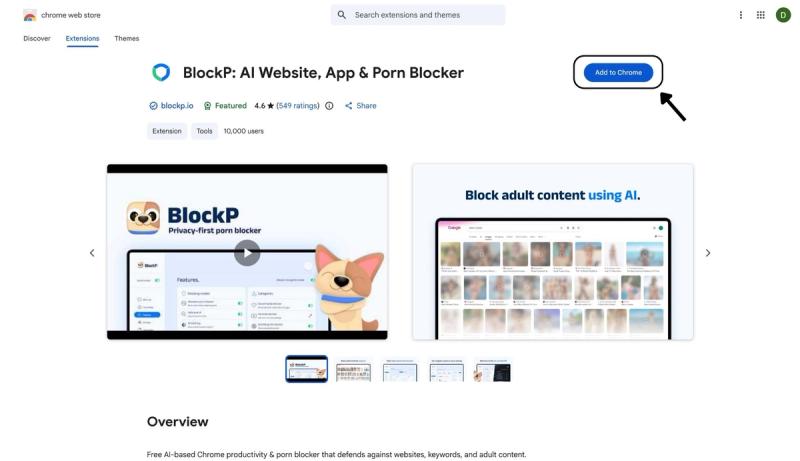
Step 1: Install the BlockP Chrome Extension
- Go to the Chrome Web Store and search for “BlockP,” or visit the BlockP Chrome Extension page directly.
- Select “BlockP: AI Website, App & Porn Blocker”
- Click “Add to Chrome.”
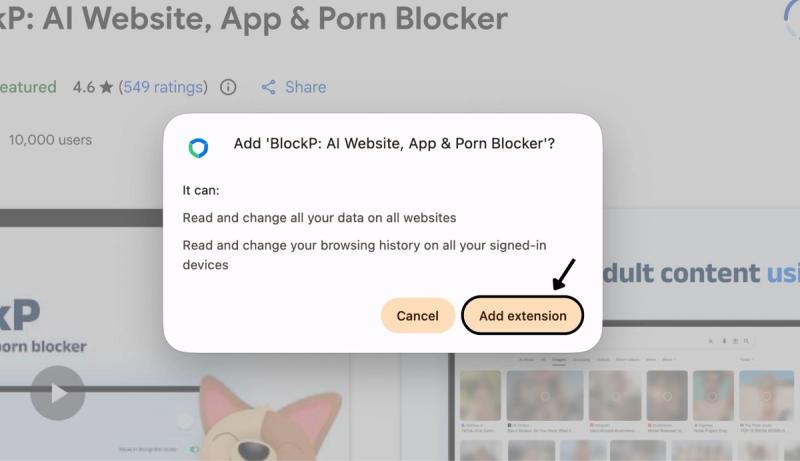
Step 2: Add Extension
Click on ‘Add extension’ in the pop-up.
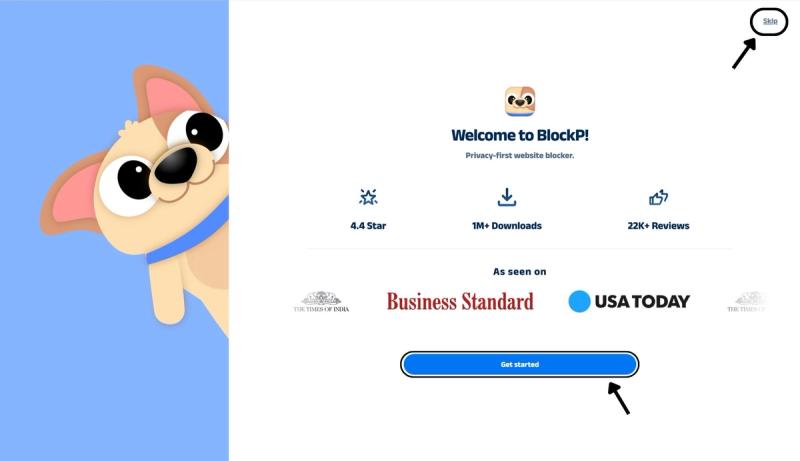
Step 3: Get Started with BlockP
- A new web page will open – click on the “Get started” button at the bottom of the page.
- If you don’t want to answer the questions, click “Skip” in the top-right corner. You’ll then be taken to the login or sign-up screen to continue using the extension.
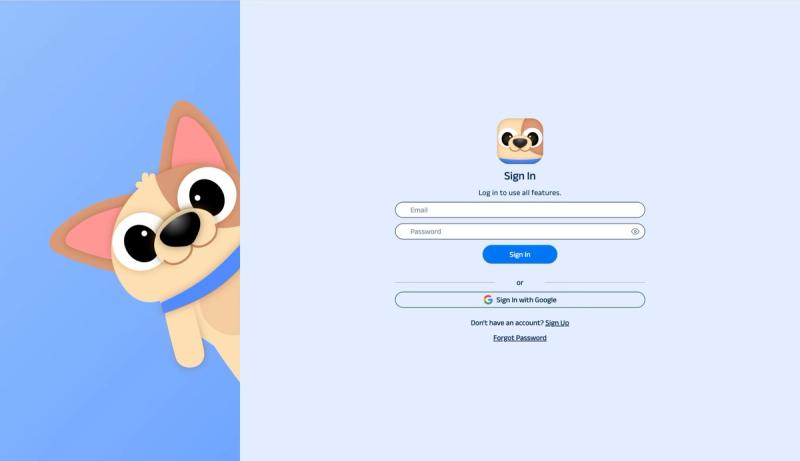
Step 4: Sign In or Sign Up on BlockP Extension
- Enter your email and password, then click “Sign In.” You can also click “Sign In with Google” to use your Google account.
- If you don’t have a BlockP account, click “Sign Up” to create one.
- After signing in, you’ll be automatically redirected to “See How BlockP works” Screen
Step 5: See How BlockP Works
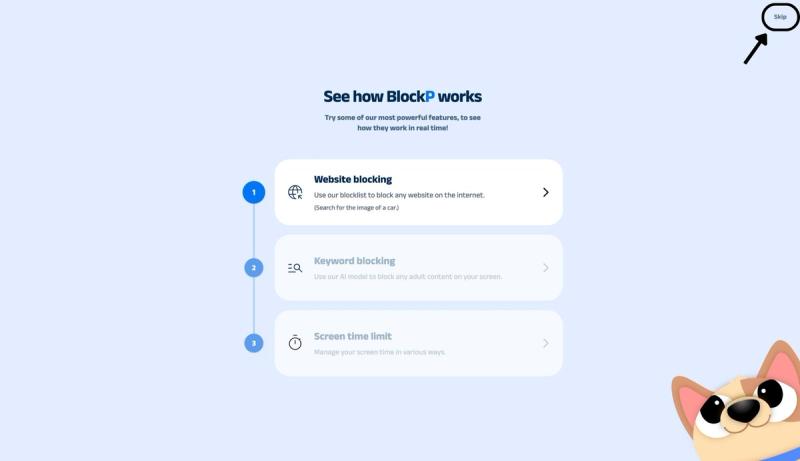
After signing in or creating an account, you’ll see the “See how BlockP works” screen.
- You can explore the interactive guide to learn how features such as Website Blocking, Keyword Blocking, and Screen Time Limits work.
- If you already know how BlockP works or want to skip the guide, click “Skip” in the top-right corner.
After exploring how BlockP works or clicking the “Skip” button, you’ll be redirected to the extension dashboard, where you can access and manage features.
Step 6: Enable AI Blocking Mode
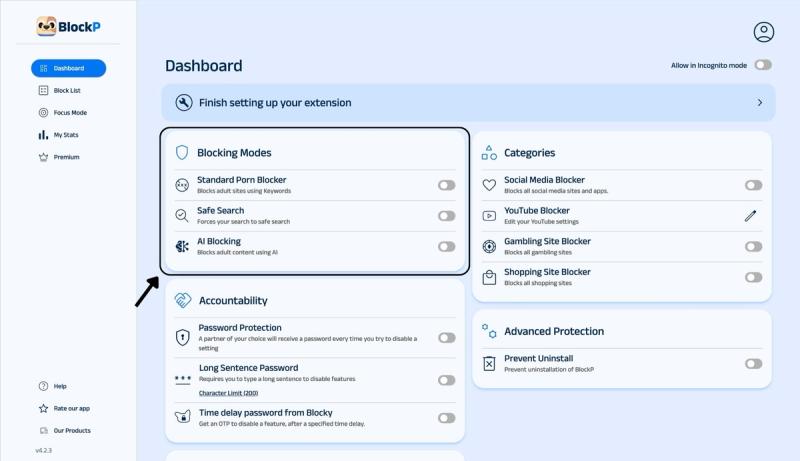
In the main BlockP dashboard, you will see the option for 3 porn-blocking modes –
- Standard Porn Blocker: Blocks adult sites using keywords.
- Safe Search: Enforces Safe Search when you are using Google Search.
- AI Blocking: This is more robust protection to block adult content using AI.
Step 7: Download BlockP Software
After enabling AI blocking in the BlockP Chrome extension, a toggle will appear prompting you to download the BlockP desktop software.
- For Mac users: Download and install the BlockP macOS software.
- For Windows users: Download and install the BlockP Windows software.
Once installed, follow the on-screen instructions to complete the setup and use the AI blocking feature.
What Is AI Porn Blocking on Your PC?
An AI porn blocker Chrome extension checks the actual content on the web page, like images, video frames, and the text along with it. Then, it makes a judgment call not just based on a keyword or the content but on the context of the content.
So, educational content or news will still be allowed to load while explicit content will be blocked. The greatest advantage of Chrome extension AI blocking is that it happens in real-time, so it prevents the risky content from loading.
Benefits of Using AI Porn Blocking
- An AI NSFW blocker on Chrome checks the actual content. So, porn cannot slip through by way of disguised keywords or URLs and a new adult website that may not yet be added to the database by regular blockers.
- It lets parents protect their children from accidental exposure to porn without needing to police their computer use.
- For someone trying to quit porn, the porn blocker extension with AI filters blocks the triggers on social media and mainstream websites.
- Chrome extension AI blocking ensures that no accidental exposure to explicit content happens on work computers (which can violate HR policies). It also keeps sexual content at bay so that work sessions stay productive.
- In the case of a porn blocker extension like BlockP, its AI-powered blockers work with other porn-blocking features and productivity features for maximum effectiveness.
How AI Blocking Works in BlockP
BlockP’s AI-powered filters are intensively trained on the visual patterns of explicit content. So, when a page is loading, BlockP evaluates the content on the page against its trained model.
If the content crosses the threshold for explicit material, then BlockP blurs it in real time. The BlockP porn blocker extension is not concerned about whether the content appears on an adult site or a mainstream site. If it detects explicit content, it will block it no matter the source.
AI Porn Blocking vs Standard Porn Blocking
Standard porn blocking: BlockP has a list of keywords and domain names associated with explicit content. If it detects those keywords and domain name in the URL you have typed, then it blocks the page from loading and redirects you.
BlockP AI Blocking analyzes the content on the web page and blocks any explicit content even if it happens to be on a mainstream website (for example, a shopping site for lingerie) or social media. So, it is much more robust protection for children and people who are trying to quit porn.
Why Choose BlockP Chrome Extension?
| Feature | BlockP (AI Blocking) | BlockSite | Covenant Eyes |
|---|---|---|---|
| How it decides what's unsafe | Scans the actual content of a page in real time with an AI image/text classifier | Matches the URL against a blocklist of known adult domains | Takes periodic screenshots and has a human accountability partner review them later |
| Catches porn on Reddit, X, or Pinterest | Yes, judged by content, not domain | No, these sites aren't on the adult blocklist | Only after the fact, once a partner reviews the screenshot |
| Works instantly, before you see it | Yes, blocks in real time | Yes, for listed domains | No, it's a review-after-the-fact model |
| Chrome extension available | Yes | Yes | Limited , mainly desktop app, browser scanning can be turned off |
| Best suited for | Anyone who wants unsafe content caught wherever it shows up | Blocking a known list of adult sites cheaply | People who want a human accountability partner in the loop |
Frequently Asked Questions
What is AI blocking in BlockP?
BlockP’s Chrome extension AI blocking checks the images and content on web pages to identify and block explicit content.
How do I enable AI blocking in the BlockP Chrome Extension?
In the BlockP dashboard, you have a setting for AI-powered blocking.
What types of content does AI blocking detect?
AI blocking can detect any explicit content (porn, nudity, and semi-nude content.)
Can AI blocking block explicit images on social media?
Yes.
What's the difference between AI blocking and standard porn blocking?
Standard porn blocking blocks any keyword or domain that is listed on its database. AI-blocking checks the content on the website and blocks it if it detects porn or sexual content even if it is a mainstream website.
Does AI Blocking work together with SafeSearch?
Yes.
Will AI blocking slow down Chrome?
No.
Can I turn AI blocking off at any time?
Yes.
Is AI Blocking included in the free version of BlockP?
Yes
Does AI Blocking work on all websites?
Yes.