How to Block Shopping Sites on Chrome Using BlockP Extension
Learn how to block shopping websites on Chrome with the BlockP Extension. Stop impulse buying, cut distractions, and save money with fewer temptations.
Get Started with BlockPThis is a fairly common experience for many of us - we open our computer just to check email, and somehow within fifteen minutes we are paying for ten things we never knew we needed! The idea to block shopping sites on Chrome is needed to protect us from exactly this situation.
When you are online, your browsing behavior across the devices is captured and monetized. It lets the advertisers build your profile and give you targeted ads. So, online shopping becomes harder to resist.
Once online shopping crosses the threshold of convenience and becomes more like a habit, it has consequences. It can fragment your attention by disrupting your work sessions. And in extreme cases, it can have serious financial consequences.
That’s why BlockP gives you a dedicated setting to block shopping sites on Chrome. It is designed to protect you from the temptation of mindless consumption with a single click.
How to Enable Shopping Site Blocking in BlockP Chrome Extension (Step by Step)
Step 1: Install the BlockP Chrome Extension
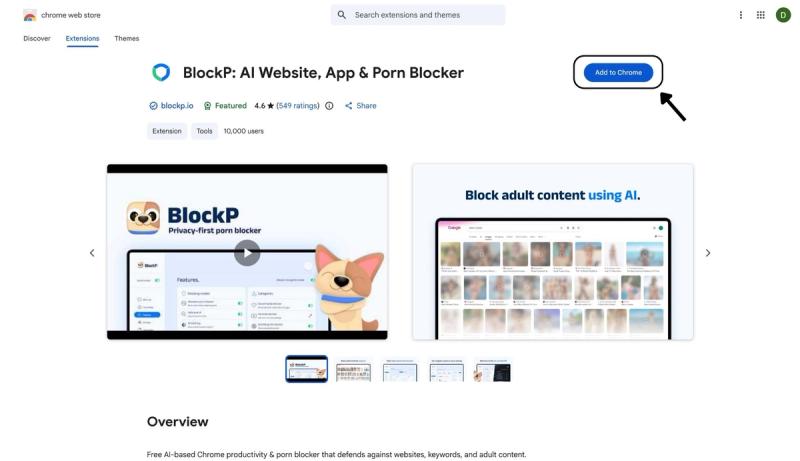
- Go to the Chrome Web Store and search for “BlockP,” or visit the BlockP Chrome Extension page directly.
- Select “BlockP: AI Website, App & Porn Blocker”
- Click “Add to Chrome.”
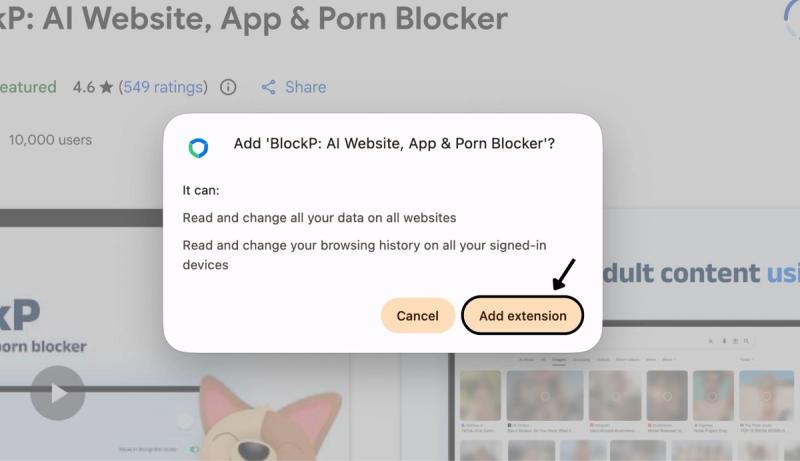
Step 2: Add Extension
Click on ‘Add extension’ in the pop-up.
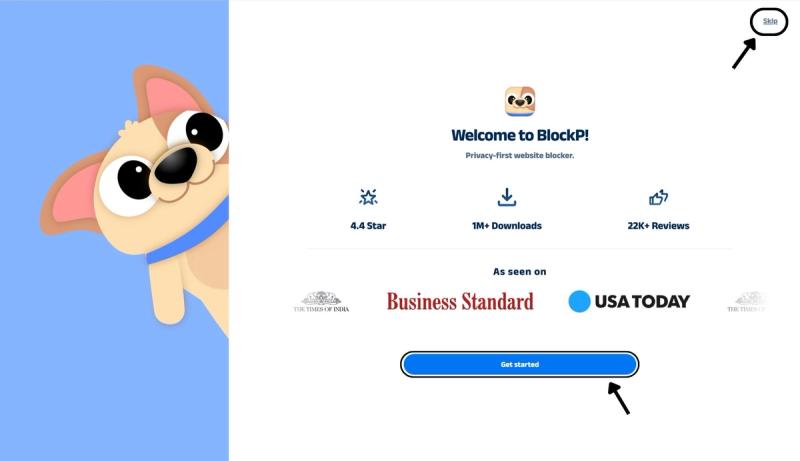
Step 3: Get Started with BlockP
- A new web page will open – click on the “Get started” button at the bottom of the page.
- If you don’t want to answer the questions, click “Skip” in the top-right corner. You’ll then be taken to the login or sign-up screen to continue using the extension.
Step 4: Sign In or Sign Up on BlockP Extension
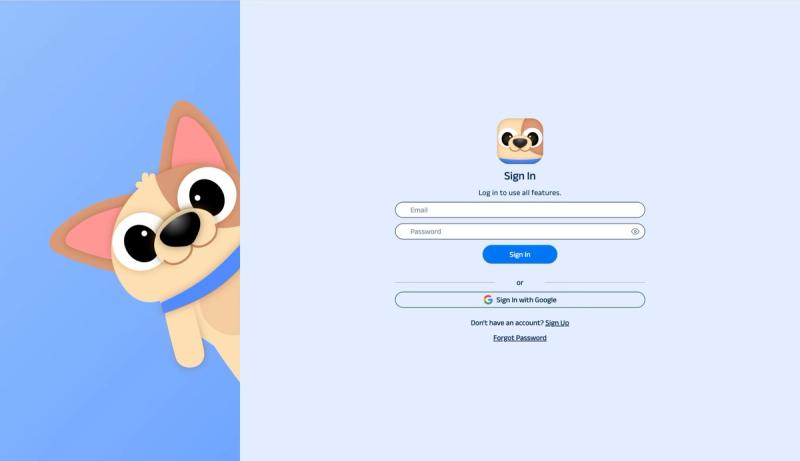
- Enter your email and password, then click “Sign In.” You can also click “Sign In with Google” to use your Google account.
- If you don’t have a BlockP account, click “Sign Up” to create one.
- After signing in, you’ll be automatically redirected to “See How BlockP works” Screen
Step 5: See How BlockP Works
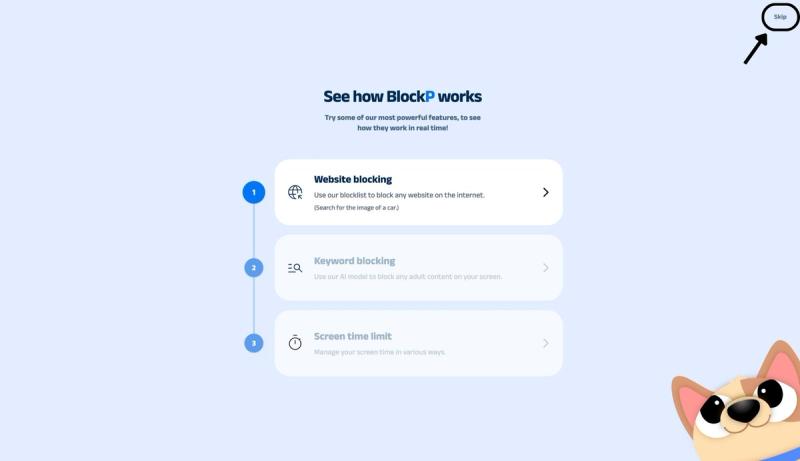
After signing in or creating an account, you’ll see the “See how BlockP works” screen.
- You can explore the interactive guide to learn how features such as Website Blocking, Keyword Blocking, and Screen Time Limits work.
- If you already know how BlockP works or want to skip the guide, click “Skip” in the top-right corner.
After exploring how BlockP works or clicking the “Skip” button, you’ll be redirected to the extension dashboard, where you can access and manage features.
Step 6: Go to the Categories Section
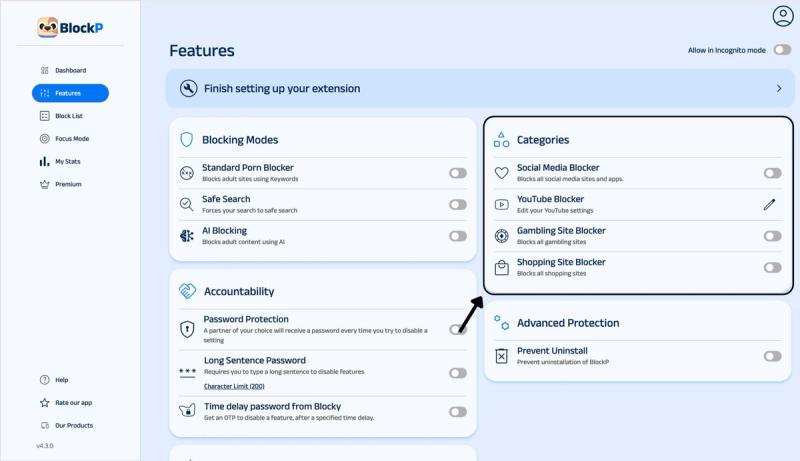
Open the BlockP extension and navigate to the Categories section on the right side of the Features page.
Step 7: Enable the Shopping Site Blocker
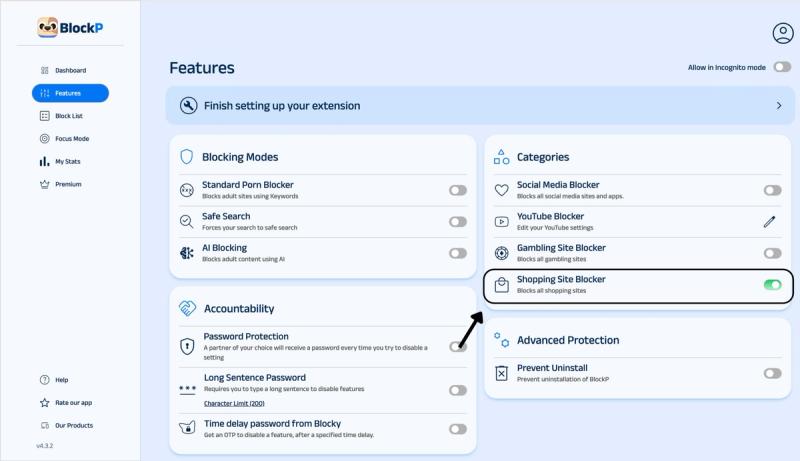
In the BlockP dashboard, navigate to the Categories section. Here you will find options for social media blocking, YouTube blocking, and gambling and shopping site blockers.
Slide the toggle next to the Shopping Site Blocker option to enable the shopping blocker Chrome extension.
Why Block Shopping Sites on Chrome?
The Capital One Shopping Research report of 2026 says that 86% of Americans shop online. Which in itself is not alarming; what is concerning is how online shopping can trigger impulse buying behavior.
- An average consumer spends $254 per month on impulse purchases, which adds up to roughly $3000 per year spent on impulsive buying!
- 37% of shoppers are more likely to make an impulsive purchase when they are shopping online.
- Among online shoppers, 72% have impulsively bought something because there was an advertised discount.
Online shopping sites are designed with similar principles to a slot machine to trigger the impulse to buy. The option to check out with one click, saving all your payment details, etc., makes online buying frictionless.
The shopping sites also give you highly personalized product feeds and algorithm-based recommendations that can make you more likely to buy more impulsively. Flash sales and limited-time banners are also designed to create FOMO
Which Shopping Websites Can You Block Through BlockP Extension?
BlockP shopping blocker Chrome extension blocks the major shopping websites like
- Amazon: Many users want to block Amazon on Chrome because it is the most popular online shopping site and also one of the most convenient ones when it comes to the US.
- eBay: BlockP helps you to stop online shopping on eBay, whose auction countdown model creates urgency and often makes people spend more than what they initially planned.
- Walmart: Because people often visit Walmart for grocery shopping, but the sessions soon deviate to buying home goods and electronics.
- AliExpress: The extremely low prices trigger impulse buys.
- Shein: Constant new stocks and super-low pricing are too tempting.
- Temu: The shopping site uses gamified discounts to hook the visitors to spend more.
- Etsy: Handmade and vintage listings on the Etsy website make the visitors spend hours in endless scrolling.
Benefits of Using BlockP's Shopping Site Blocker
- By removing the frictionless access to shopping sites, BlockP prevents you from reckless spending and impulsive buys. So, it protects your finances.
- You don’t have to struggle with the urge to purchase; BlockP’s option to block shopping sites on Chrome interrupts your habit loop.
- Freedom from the buy now, pay later trap: A lot of impulse purchases are done through buy now, pay later options, which can make you lose track of your spending.
- BlockP supports families to make the shared devices safer for the children. It ensures that they don’t get into the habit of mindless shopping or use saved payment information to run giant bills.
- A single blocker: BlockP is the only Chrome extension you need to cover all online distractions, be it porn, social media, gambling sites, shopping websites, etc.
How Shopping Site Blocking Works in BlockP
The biggest advantage of BlockP is that it intervenes before the shopping site loads and instead shows its custom screen to remind you to stick to your goals.
So, the whole process of putting items into the cart or simply browsing the online shopfront simply does not happen. BlockP moves the friction point right at the beginning instead of at the stage of payment where it is harder to resist.
Why Choose BlockP's Shopping Site Blocker?
Most content blockers require that you manually create a list of shopping websites that you want to block. But BlockP lets you block shopping sites on Chrome with a single click.
| Feature | BlockP | StayFocusd | Freedom | BlockSite |
|---|---|---|---|---|
| Dedicated shopping-site category | Yes, one-toggle to block shopping websites | No, manual URL entry | No, manual URL entry | No, manual URL entry |
| AI-based content detection | Yes | No | No | No |
| Adult-content & social blocking | Yes, same dashboard | No | Apps only, no content filtering | No |
| Available with the free version? | Yes, shopping blocker is fully free | Yes, fully free | Limited free sessions | Free tier caps at 3 sites |
| Cross-device sync (Android + Chrome) | Yes | No, Chrome only | Yes, paid plans | Yes, paid plans |
Frequently Asked Questions
How do I block shopping sites on Chrome?
Install the BlockP shopping blocker Chrome extension.
Enable the ‘shopping sites blocker’ feature in the dashboard.
Can BlockP block Amazon on Chrome?
Yes.
Can I block Shein, Temu, and AliExpress?
You can block Shein, Temu, and AliExpress with BlockP.
Can I add my own shopping websites to the block list?
You can add any shopping website or keyword that you want to avoid to the block list.
Can I choose which shopping sites to block?
The shopping blocker Chrome extension enforces a category-wide block on all shopping sites. So, you can not block only specific sites there. Instead, what you can do is add the specific sites you want to block to BlockP’s blocklist to create a customized blocking experience.
Can I schedule shopping site blocking for certain times?
BlockP Chrome extension currently does not have the option that lets you block online shopping sites during scheduled times. But you can use the focus mode settings to make a blocklist of shopping websites and block them when you enter the focus mode.
Will blocking shopping sites slow down Chrome?
No.
Does shopping site blocking work with AI blocking and social media blocking?
Yes.
Can I temporarily unblock a shopping site?
You can disable the BlockP shopping blocker if you need to.
Is the shopping site blocker included in the free BlockP Chrome extension?
Yes.