How to Enable SafeSearch on BlockP Chrome Extension
Enable SafeSearch on Chrome with BlockP to filter explicit search results on supported search engines and create a safer browsing experience.
Get Started with BlockPAmerican parents are extremely worried about the risks of their teenagers encountering explicit content online. Because it often takes just one wrong click or a misplaced query to encounter nudity or porn, and that’s exactly why parents need to enable Safe Search on Chrome.
As the first basic layer of protection, Safe Search is a great option. It's free, and it's available easily in the settings. But it cannot be fully secure because you can use it only on the Google search engine, and it's too easy to unblock.
To solve this, the BlockP free porn blocker extension gives you a setting to enforce Safe Search. It makes Safe Search harder to turn off and uses its other porn-blocking features for robust protection.
How to Enable Safe Search on BlockP Chrome Extension (Step by Step)
Step 1: Install the BlockP Chrome Extension
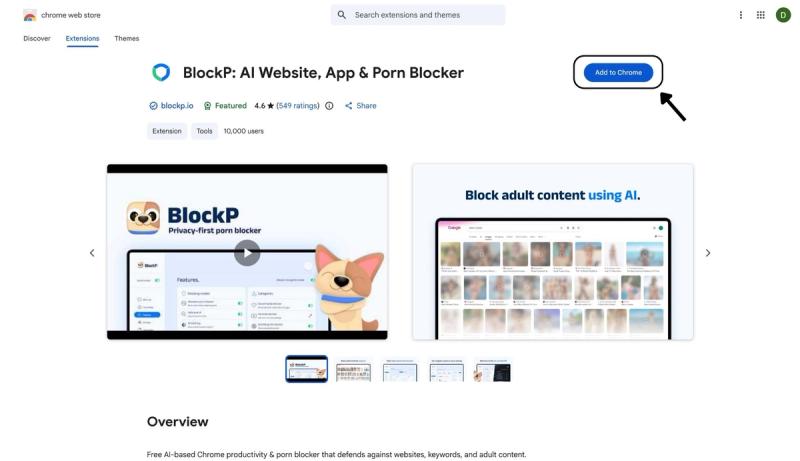
- Go to the Chrome Web Store and search for “BlockP,” or visit the BlockP Chrome Extension page directly.
- Select “BlockP: AI Website, App & Porn Blocker”
- Click “Add to Chrome.”
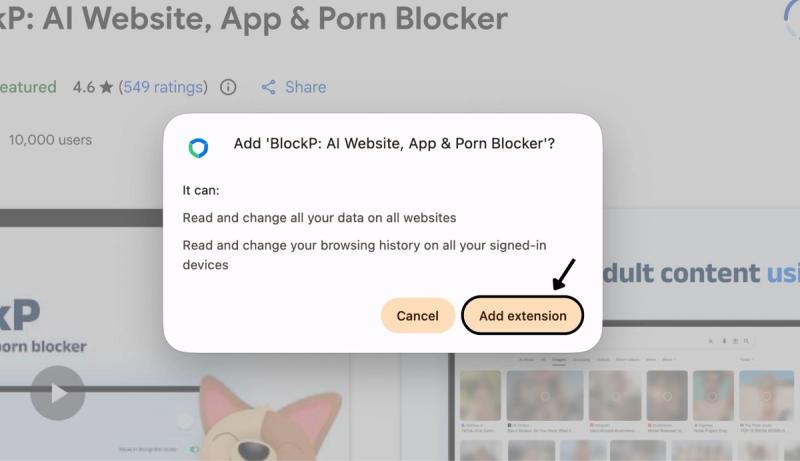
Step 2: Add Extension
Click on ‘Add extension’ in the pop-up.
Step 3: Get Started with BlockP
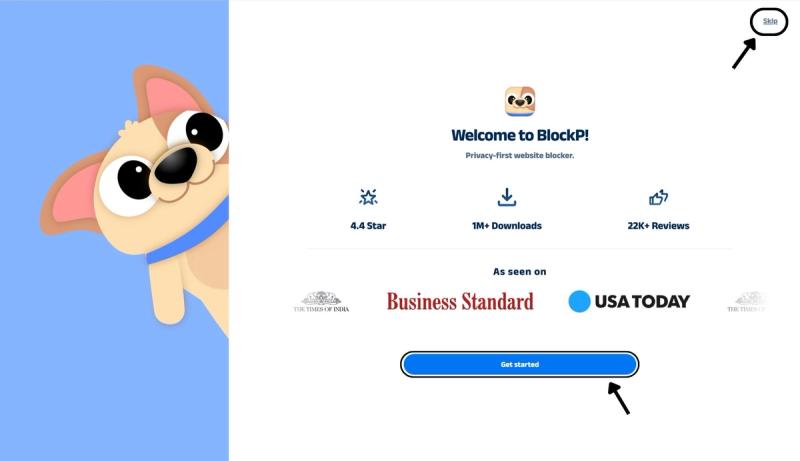
- A new web page will open – click on the “Get started” button at the bottom of the page.
- If you don’t want to answer the questions, click “Skip” in the top-right corner. You’ll then be taken to the login or sign-up screen to continue using the extension.
Step 4: Sign In or Sign Up on BlockP Extension
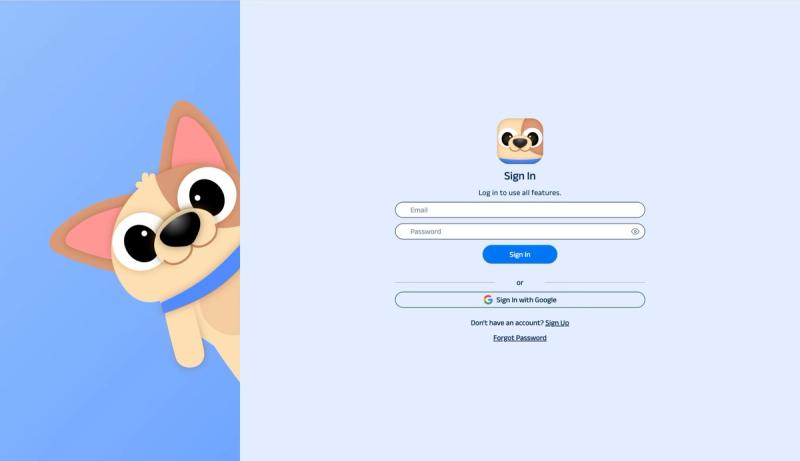
- Enter your email and password, then click “Sign In.” You can also click “Sign In with Google” to use your Google account.
- If you don’t have a BlockP account, click “Sign Up” to create one.
- After signing in, you’ll be automatically redirected to “See How BlockP works” Screen
Step 5: See How BlockP Works
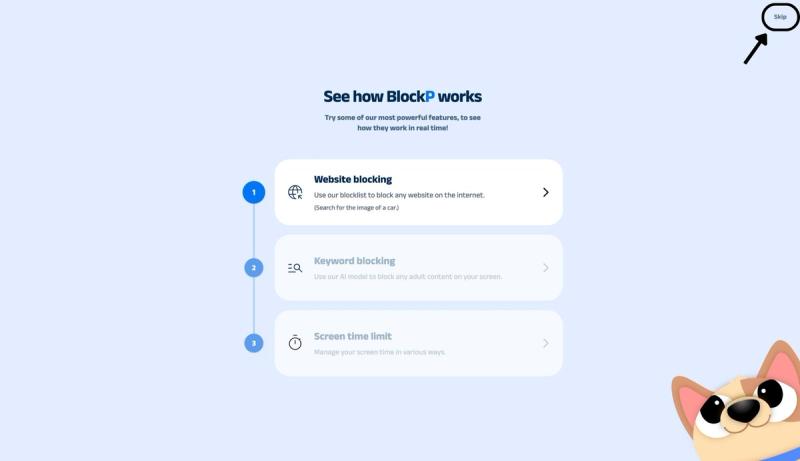
After signing in or creating an account, you’ll see the “See how BlockP works” screen.
- You can explore the interactive guide to learn how features such as Website Blocking, Keyword Blocking, and Screen Time Limits work.
- If you already know how BlockP works or want to skip the guide, click “Skip” in the top-right corner.
After exploring how BlockP works or clicking the “Skip” button, you’ll be redirected to the extension dashboard, where you can access and manage features.
Step 6: Go to the “Blocking Modes” Section
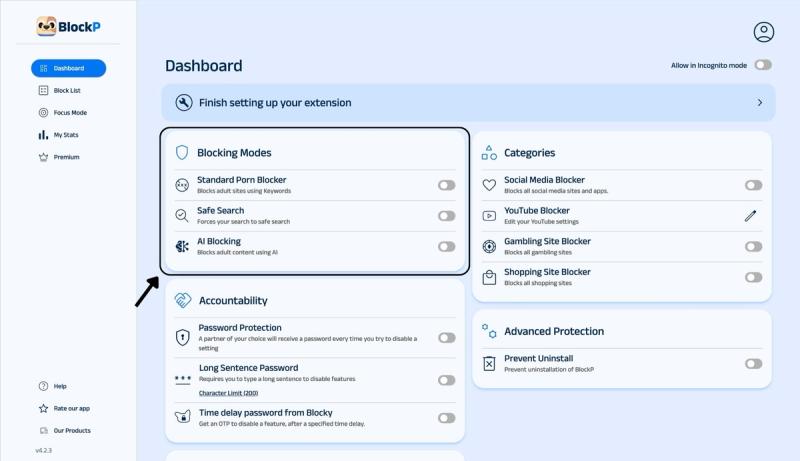
In the main BlockP dashboard, you will see the option for 3 porn-blocking modes:
- Standard Porn Blocker: Blocks adult sites using keywords.
- SafeSearch: Enforces SafeSearch when you use Google Search.
- AI Blocking: This is more robust protection to block adult content using AI.
Step 7: Enable Safe Search
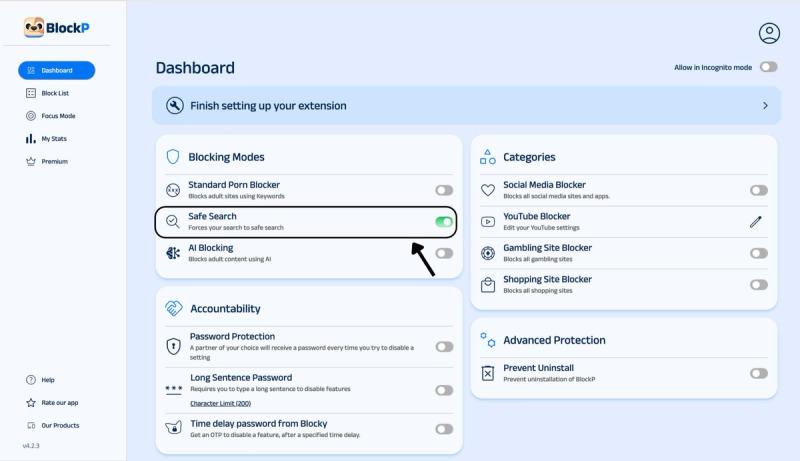
Slide the toggle next to the Safe Search option to enable Safe Search.
What Is SafeSearch?
Google gives its users a built-in filter for restricting explicit content with its SafeSearch feature. It is not a separate extension that you need to install to your browser but an option in the Google account settings themselves.
When you enable Safe Search on Chrome, you get three options.
- Filter: Blocks explicit images, text, and links in search results. Google also applies this setting automatically if it detects that the user is under 18.
- Blur: Puts a blurry overlay over the explicit image results (text and links are still shown.)
- Off option: Displays all content.
Google Search is a good starting point for managing explicit content on your computer because it blocks explicit content but still allows relevant results. So, parents can use it to protect their children.
But Google Search has two big vulnerabilities.
It is designed to work exclusively for Google’s search engine, and it cannot moderate the content on other search engines or social media platforms.
Secondly, the settings are too easy to undo - it takes only a few clicks, and the protection is off.
Why Enable SafeSearch on Chrome?
73% of US teenagers have seen online porn, and the early age of exposure is around 10 to 12.
Among these teens, 58% have encountered porn accidentally, which means they were looking up something for study or just to read up on an interesting topic and came across explicit content.
When you consider that Chrome is the most commonly used browser in US households, securing the shared systems from porn becomes the utmost priority.
Benefits of Using BlockP SafeSearch
BlockP SafeSearch settings give you a few practical advantages.
- Switching off the BlockP porn blocker extension’s safe search setting is harder. It exists on the BlockP dashboard, and parents can secure BlockP settings with a password.
- BlockP SafeSearch is not a standalone feature. It works with other free porn blocker extension features like keyword-based blocking, AI-powered blocking, and social media blocking for maximum effectiveness.
- There are no complicated steps to set up BlockP. And you also do not have to give any credit card details to sign up.
- BlockP is a free porn blocker extension - a very cost-effective option to block adult websites on Chrome.
Why Choose BlockP SafeSearch?
| Feature | BlockP | BlockerX | BlockNSFW |
|---|---|---|---|
| Enforces Google SafeSearch | Yes, with a lockable toggle | Site/keyword blocking focus | Yes, built in |
| AI-based content scanning | Yes, dedicated AI Blocking mode | Not a core feature | On-device AI for text/images |
| Companion mobile app | Yes (Android & iOS) | Yes (Android & iOS) | Chrome only |
| Free tier available | Yes | Limited free tier | Yes |
Frequently Asked Questions
How do I enable SafeSearch on Chrome?
In your Google account settings you can choose to either filter or blur the explicit results. Then you can add another layer of protection with BlockP Safe Search.
What is SafeSearch on Chrome?
SafeSearch is Google’s built-in filter that screens explicit content from its search results.
Does BlockP force SafeSearch on Google?
Yes, not automatically, but it gives you the option to enforce safe search on its dashboard.
Does SafeSearch block explicit images and videos?
The Safe Search blocking feature of Google filters search results that have sexual content or nudity.
Which search engines support SafeSearch?
Safe search is specific only to Google. Each search engine usually has its own setting.
Can I use SafeSearch with Website Blocking?
Yes.
Does SafeSearch slow down Chrome?
When you enable Safe Search on Chrome, it does not affect the speed of your browser.
Can parents use SafeSearch to help protect children online?
BlockP has an accountability partner feature where the partner will receive a password every time a setting has to be changed. So, parents can ensure that the child can not undo Safe Search protection to access explicit content.
Is SafeSearch enough to block all adult content?
Safe Search can block adult content only in Google search results. It cannot block adult websites on Chrome.
Is BlockP SafeSearch free?
Yes.