How to Block Porn on Chrome Using BlockP Extension for Free in 2026
Block adult websites on Chrome for free with BlockP's extension Standard Porn Blocker. Use keyword-based filtering to create a safer, distraction-free browsing experience.
Get Started with BlockPMore than 52% of users in the US use the Chrome web browser on their computers. But, if a parent or someone who is trying to stay productive checks for how to block porn on Chrome using built-in settings, they are going to be disappointed!
Chrome does not offer any native features to block or restrict adult content on its browser.
This gap in protection creates a point of vulnerability where children might accidentally get exposed to porn or someone might get repeatedly distracted by adult content while they are trying to focus on work.
BlockP’s free porn blocker extension addresses this gap by giving you a one-click setting to activate its keyword-based standard porn blocker.
How to Enable the Standard Porn Blocker on BlockP Chrome Extension (Step by Step)
BlockP is the best porn blocker extension that helps prevent access to adult websites and content while you browse Chrome. Follow the steps below to enable the Standard Porn Blocker and start blocking adult content.
Step 1: Install the BlockP Chrome Extension
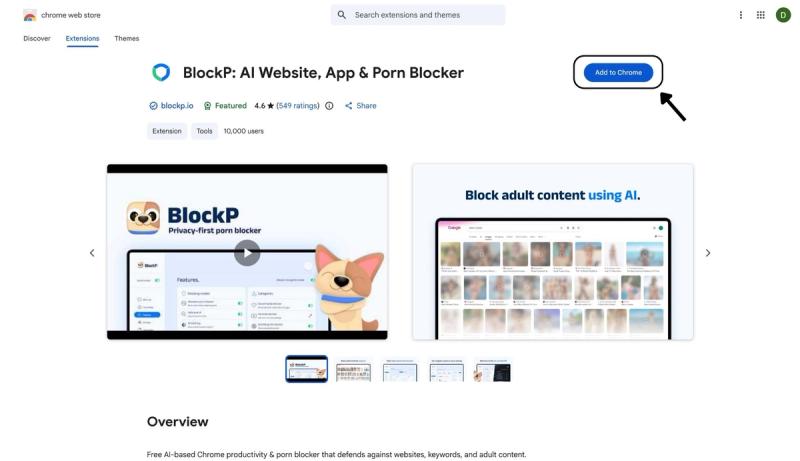
- Go to the Chrome Web Store and search for “BlockP,” or visit the BlockP Chrome Extension page directly.
- Select “BlockP: AI Website, App & Porn Blocker”
- Click “Add to Chrome.”
Step 2: Add Extension
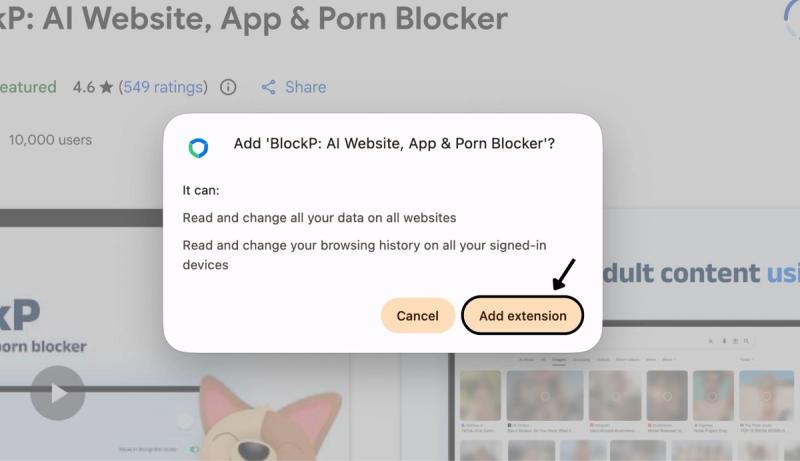
Click on ‘Add extension’ in the pop-up.
Step 3: Get Started with BlockP
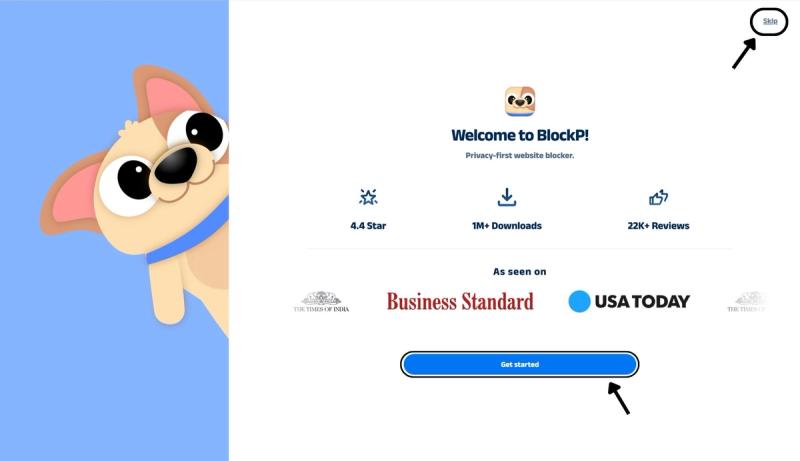
- A new web page will open – click on the “Get started” button at the bottom of the page.
- If you don’t want to answer the questions, click “Skip” in the top-right corner. You’ll then be taken to the login or sign-up screen to continue using the extension.
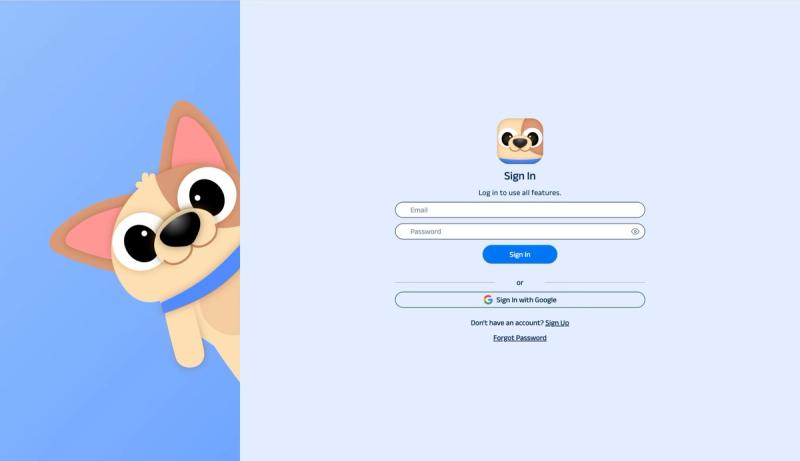
Step 4: Sign In or Sign Up on BlockP Extension
- Enter your email and password, then click “Sign In.” You can also click “Sign In with Google” to use your Google account.
- If you don’t have a BlockP account, click “Sign Up” to create one.
- After signing in, you’ll be automatically redirected to “See How BlockP works” Screen
Step 5: See How BlockP Works
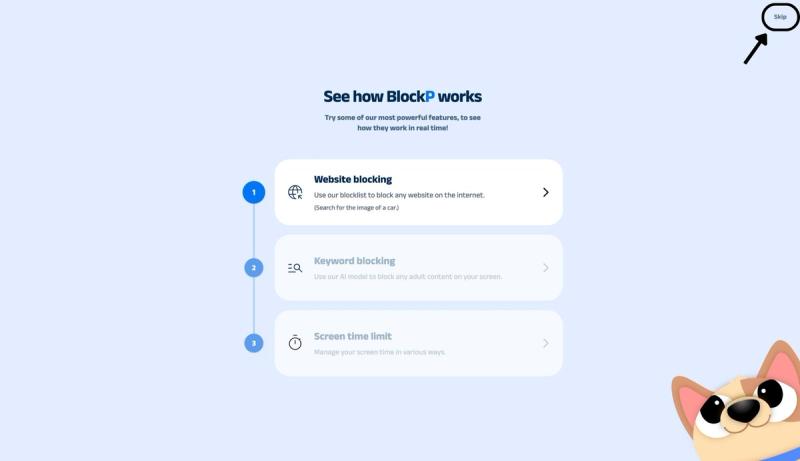
After signing in or creating an account, you’ll see the “See how BlockP works” screen.
- You can explore the interactive guide to learn how features such as Website Blocking, Keyword Blocking, and Screen Time Limits work.
- If you already know how BlockP works or want to skip the guide, click “Skip” in the top-right corner.
After exploring how BlockP works or clicking the “Skip” button, you’ll be redirected to the extension dashboard, where you can access and manage features.
Step 6: Go to the “Blocking Modes” Section
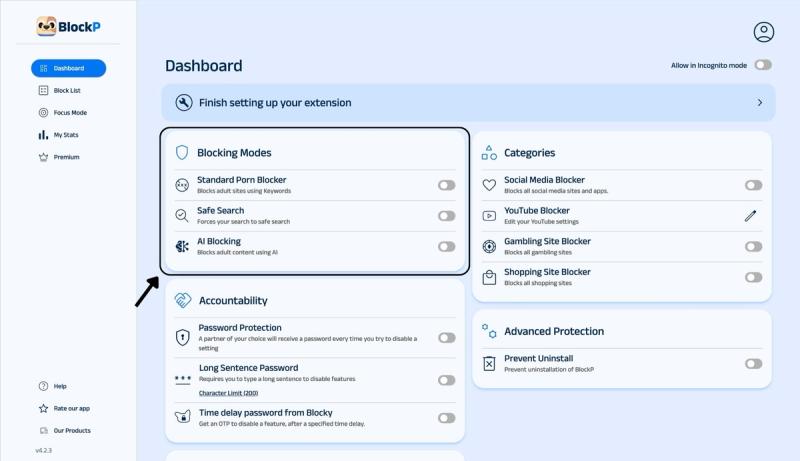
In the main BlockP dashboard, you will see the option for 3 porn-blocking modes:
- Standard Porn Blocker: Blocks adult sites using keywords.
- Safe Search: Enforces Safe Search when you are using Google Search.
- AI Blocking: This is more robust protection to block adult content using AI.
Step 7: Enable Standard Porn Blocker
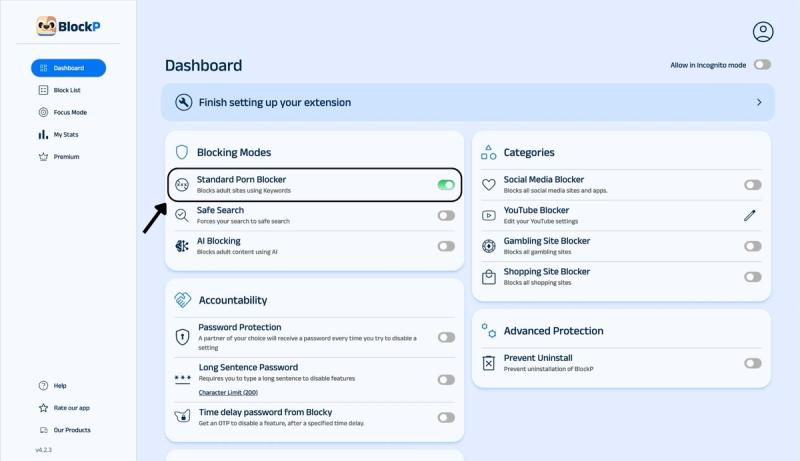
Slide the toggle next to the standard porn blocker option to enable BlockP’s standard porn blocker protection.
What Is the Standard Porn Blocker?
A standard porn blocker for Chrome works as a keyword-and-domain-based filter for your web browser.
The standard porn blocker has a pre-loaded database of explicit keywords. When you type in a website URL in the Chrome address bar, it checks if the URL you have types or any text that it can see from the website.
If it detects a keyword that matches the keyword on its blocklist, then it stops the website from loading.
Why Block Adult Websites on Chrome?
According to Common Sense Media’s Teens and Pornography survey, 54% of teens have seen porn by the time they turn 13. And 15% of teens come across porn by age 10 or younger.
Such exposure to porn is often accidental, and 63% of teens who responded in the survey reported that they had accidentally come across porn in the previous week. Thus, such accidental exposure to porn is not a one-time event but a recurring risk.
When you use BlockP to answer the question of how to block porn on Chrome, it protects the children from such accidental exposure on shared systems.
Parents naturally want to protect their children, but only 29% of the teens reported that they were currently using a content filter. So, 7 in 10 homes still have not taken action on the question of how to block porn websites on Chrome.
BlockP offers a free porn blocker extension that lets you enable keyword-based blocking with a simple toggle setting. So, parents can instantly protect their children without feeling overwhelmed by tech or needing to pay.
For someone who is working on their computer, the easy access to porn creates constant distraction.
BlockP’s standard porn blocking blocks the easy access route to adult websites and protects your focus.
Benefits of Using BlockP's Standard Porn Blocker
For someone looking for how to block porn on Chrome, BlockP’s standard porn blocker gives the foundational protection for free. So, it is a great starting point for students and those who are trying to protect their focus online.
Genuinely Free-Tier
Often the first point of friction when someone tries to block adult websites on Chrome is that most mainstream blockers ask for credit card info because they are built around paid subscription models.
But BlockP gives a free porn blocker extension that removes that moment of hesitation and makes it easier to take that first step.
Customization
Another added advantage of BlockP for someone struggling with the question How to block porn on Chrome is that it gives you the option to customize your keyword blocklist.
Along with BlockP's built-in keyword database, you can add any keyword that you want to block to BlockP’s blocklist.
Why Choose BlockP's Chrome Extension?
| Feature | BlockP (Chrome Extension) | Net Nanny | Covenant Eyes | Canopy |
|---|---|---|---|---|
| Free Chrome extension | Yes - standard blocker included | No free tier | No free tier | No free tier |
| Blocking method | Keyword + AI image/text detection | Content-category filtering | Accountability reports to a partner | Real-time AI image recognition |
| Works without a paid plan | Yes, standard mode | No, subscription required | No, subscription required | No, subscription required |
| Setup time | Under 2 minutes | 10 to15 minutes | 15 to 20 minutes | 10 to 15 minutes |
| Best for | Anyone wanting instant, free Chrome protection | Families managing kids' devices | Adults wanting a human accountability partner | Households wanting always-on AI screening |
Frequently Asked Questions
What is a standard porn blocker?
A standard porn blocker extension runs a keyword check to decide if a website has adult content or not.
How does keyword-based porn blocking work?
A keyword-based porn blocker extension compares the URL of the website against its list of explicit keywords. If it finds a matched keyword, then it blocks the website from loading.
Is BlockP's standard porn blocker free?
Yes.
Can I block adult websites on Chrome without paying?
BlockP has a free porn blocker extension for Chrome, using which you can block adult websites for free.
Does the Chrome extension work automatically?
Yes, it runs in the background.
Can I customize blocked keywords?
You can add any keyword that you want to block to the BlockP porn blocker for Chrome extension’s block list.
Will the standard porn blocker affect normal websites?
No.
Is the standard porn blocker suitable for students and families?
BlockP’s standard porn blocker settings help parents block adult websites on Chrome in real-time. So, it makes shared systems safer for students and families.
What's the difference between standard porn blocking and AI porn blocking?
A standard porn blocker depends upon a list of keywords to check if a website has adult content.
An AI porn blocker analyzes the actual text and images to decide if it is adult content or not.
For example, a standard porn blocker will not block social media content because it may not have obvious adult keywords. But an AI blocker can actually see if there is nudity or semi-nude content and block it even if there are no obvious adult keywords.
Can I upgrade to more advanced protection later?
Yes.