How to Block WhatsApp Channels on Android Using BlockP
Block WhatsApp Channels on Android with BlockP to reduce exposure to adult, inappropriate, and distracting channel content while staying focused online.
Get Started with BlockPOver 1.5 billion WhatsApp users use the updates tab on WhatsApp every day, and the same updates tab also hosts the WhatsApp Channels feature. This quick and easy access combined with the endless scrolling feel of channels is what makes many users feel that they need a way to block WhatsApp channels.
WhatsApp does let you control what shows up on your Channels section, but if you want to avoid something, then you have to mute or unfollow the channels one by one. But the option to find and follow new WhatsApp channels still stays active.
BlockP’s WhatsApp channels blocker addresses exactly this gap. It lets you block WhatsApp channels in one go without affecting how you use other WhatsApp features.
How to Block WhatsApp Channels on Android with BlockP
Here is how to block WhatsApp channels on your Android phone with BlockP:
Step 1: Install BlockP
Download the BlockP app from the Google Play Store and install it on your Android phone.
Step 2: Sign Up on BlockP
- Open the BlockP app.
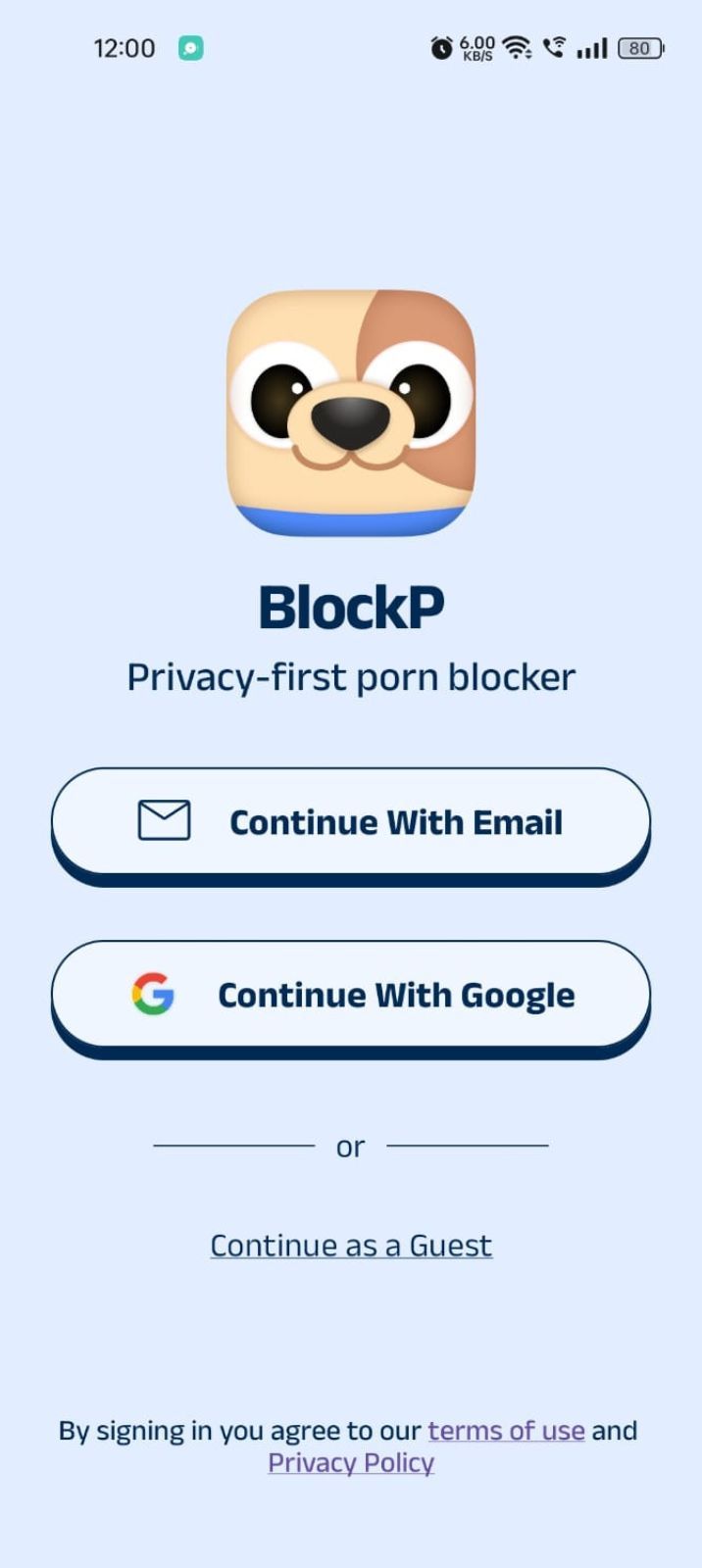
- Sign up using Email or Google.
- Or tap Continue as a Guest to get started without creating an account.
Step 3: Give Necessary Permissions
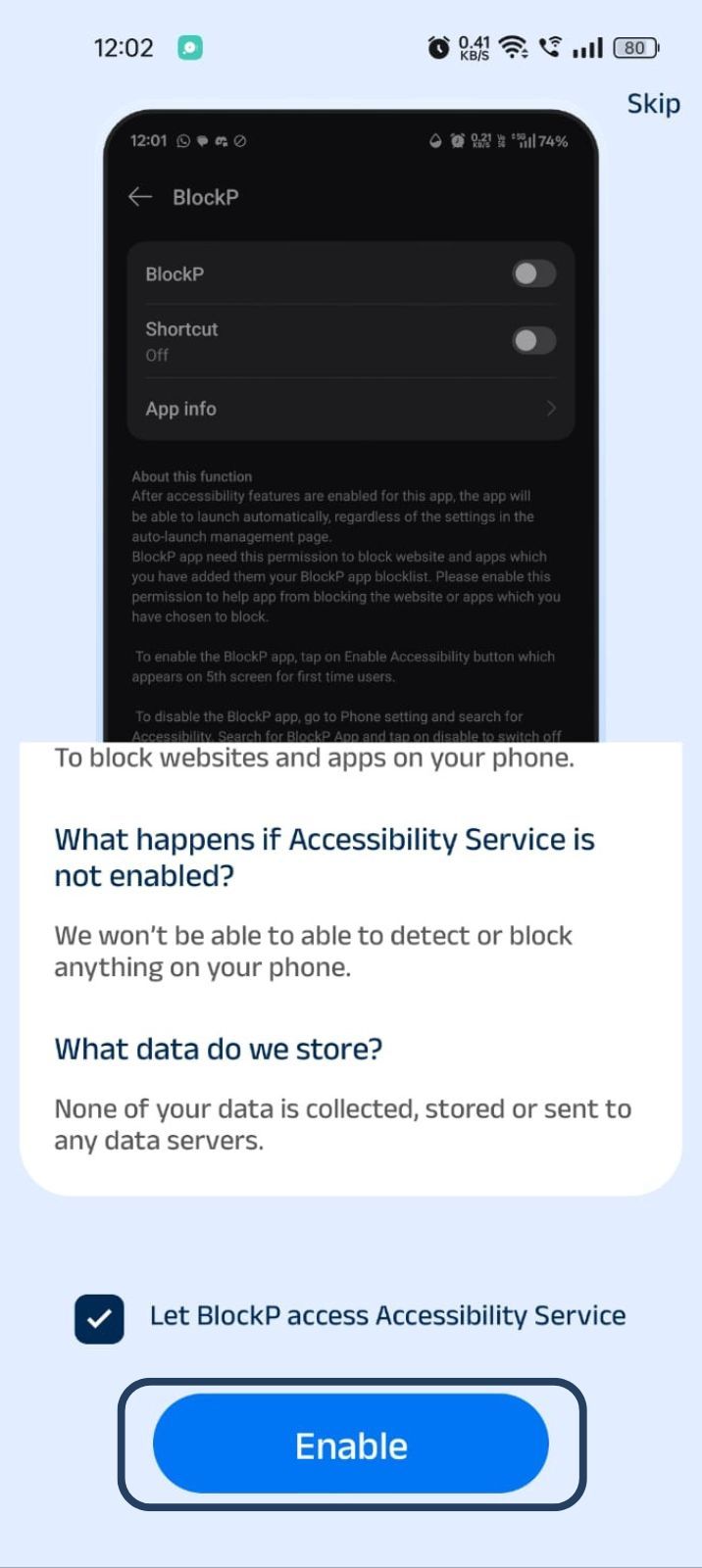
1. Accessibility - Lets the Android adult content blocker see what you are watching on your screen. Here is how to let BlockP use it:
- Click on the Accessibility permission toggle.
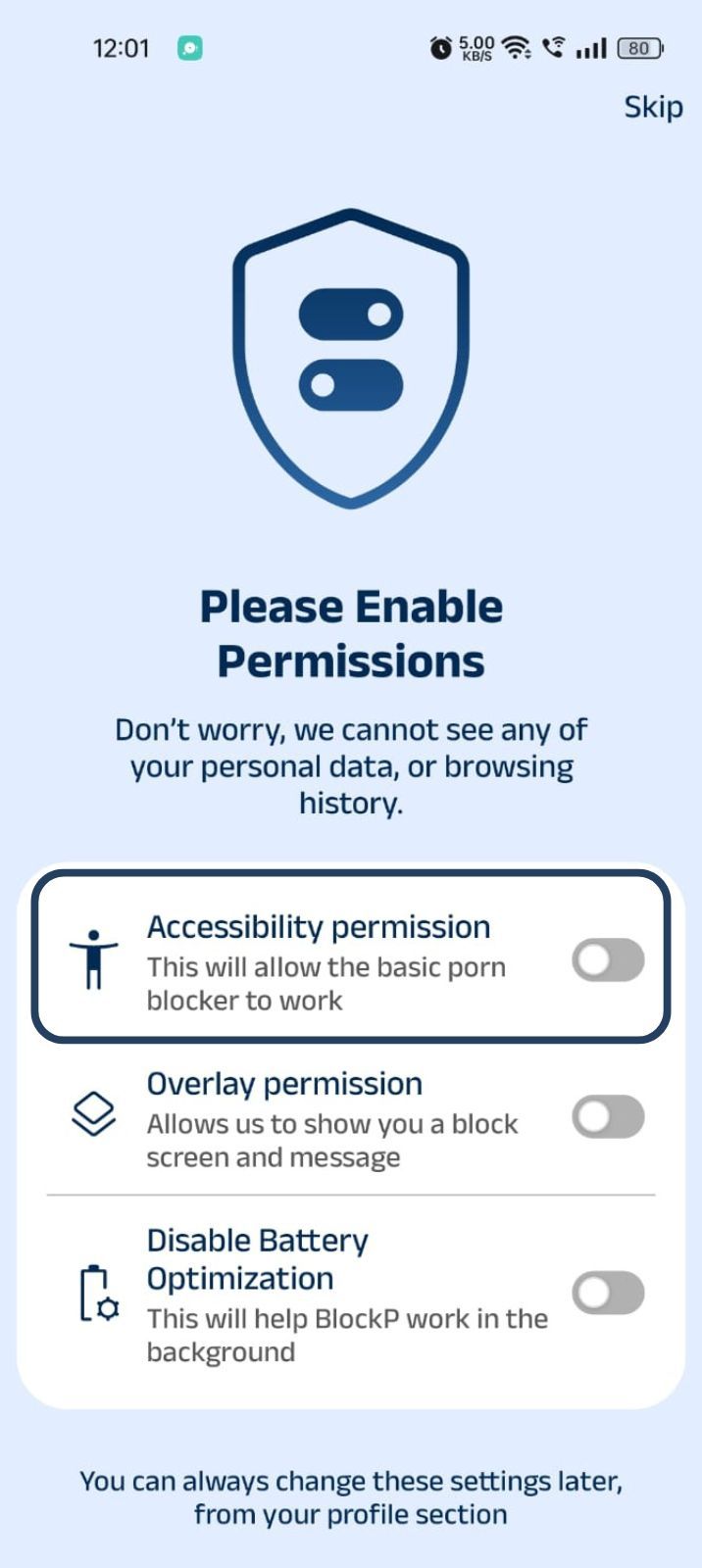
- Then click on "Let BlockP Access Accessibility Services"
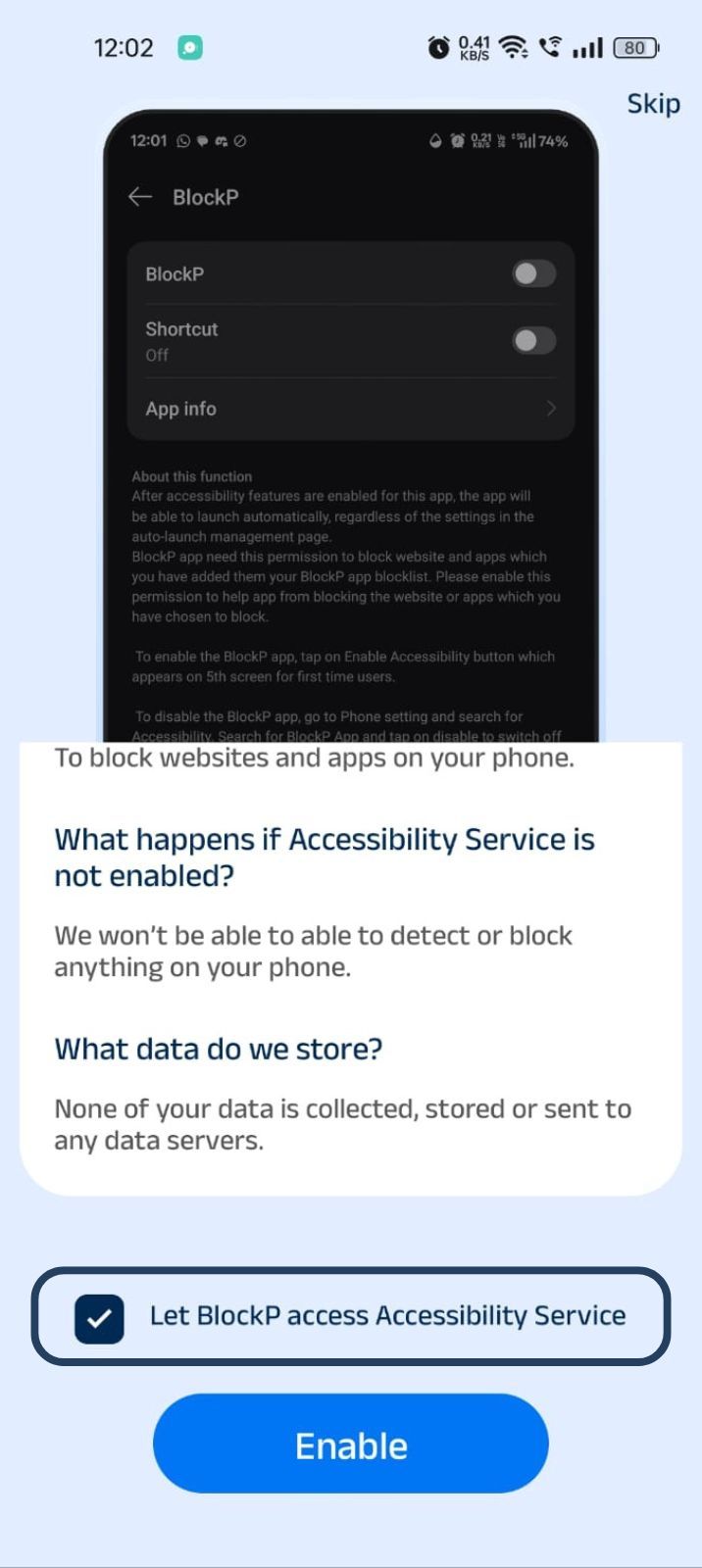
- Next, click on the Enable button
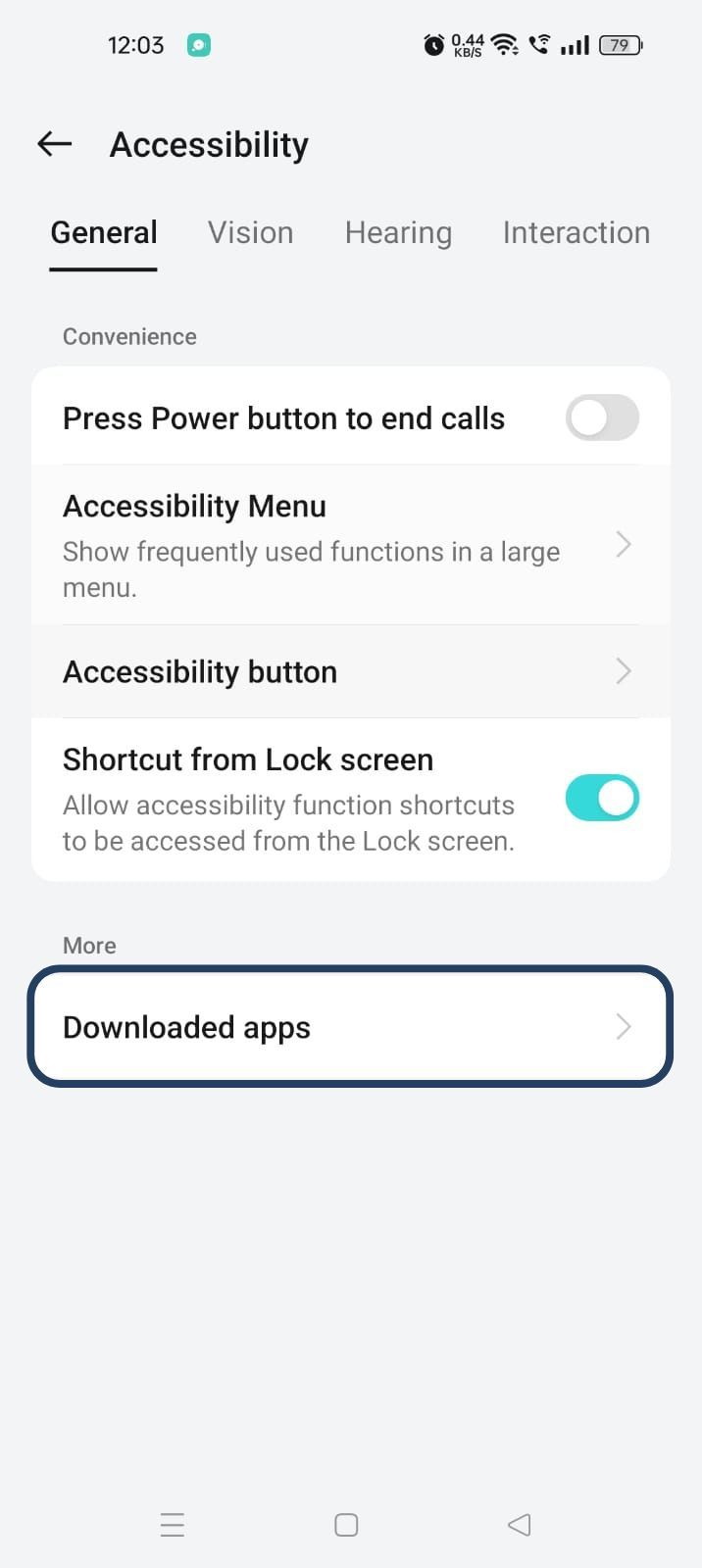
- Next, click on the downloaded apps button.
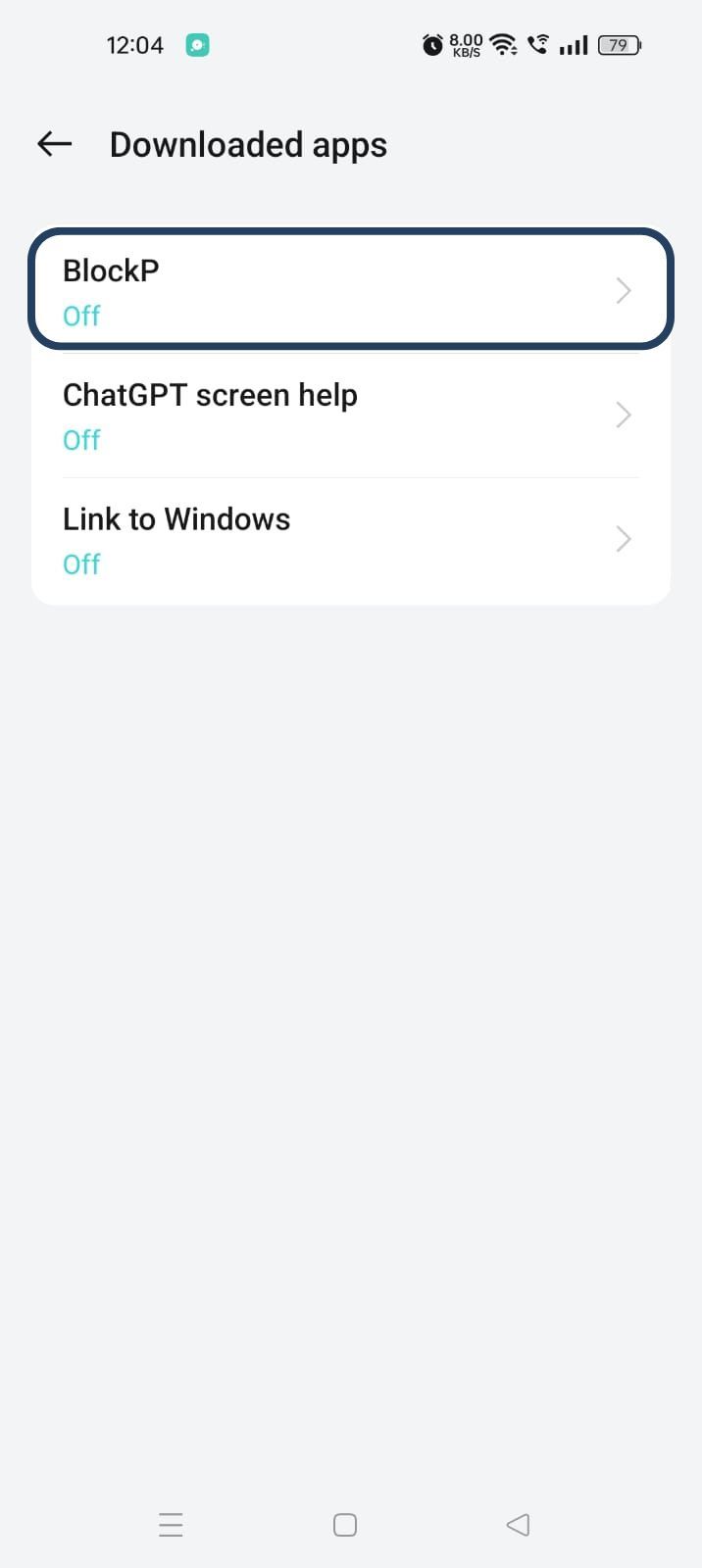
- Now, you will find Blockp - click on BlockP.
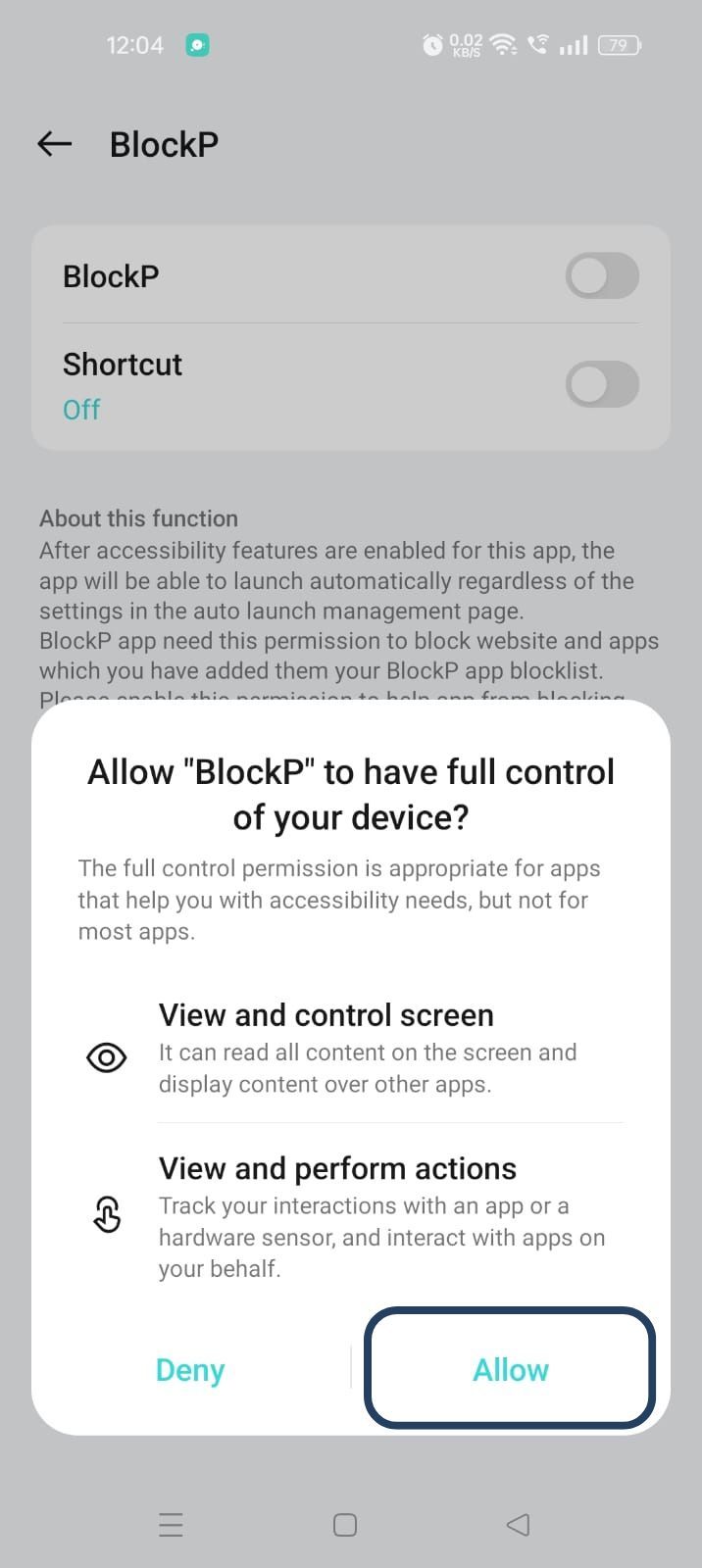
- The new screen will show a toggle in front of BlockP - enable the toggle and then click on the Allow button to complete the accessibility permission.
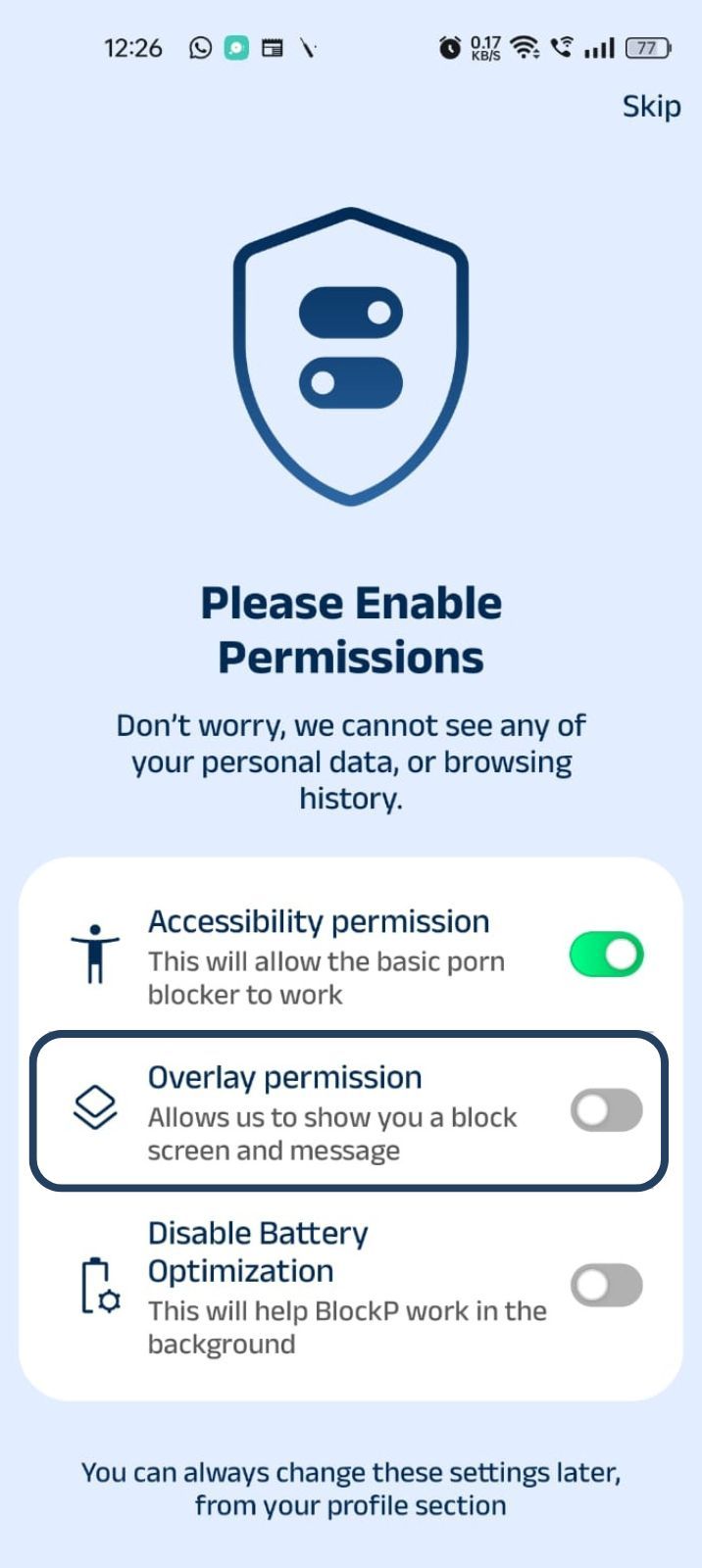
2. Overlay - lets BlockP show you a blocked screen and message when you try to access adult content.
- Click on Overlay permission toggle.
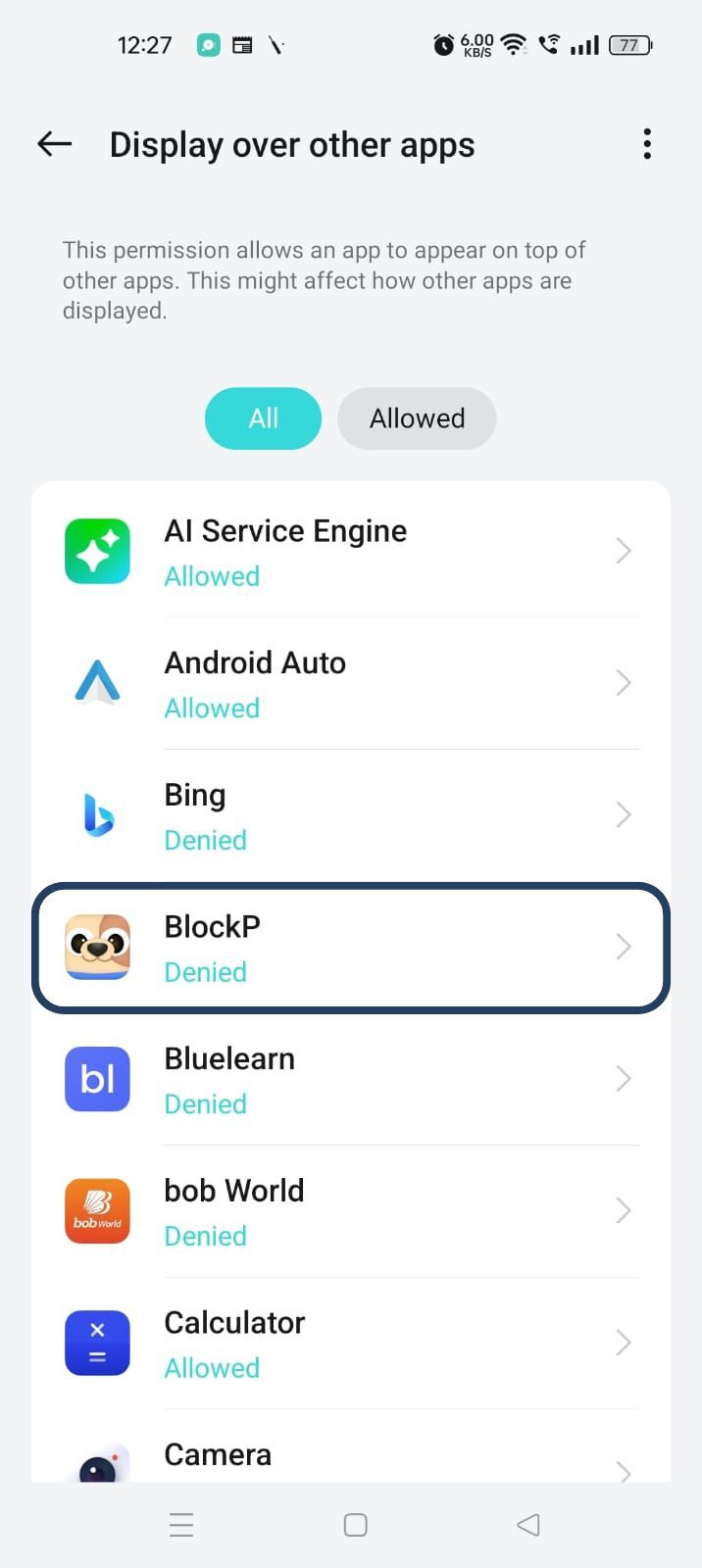
- You will get a menu with a list of apps titled - Display over other apps. Find BlockP in this list and click on it.
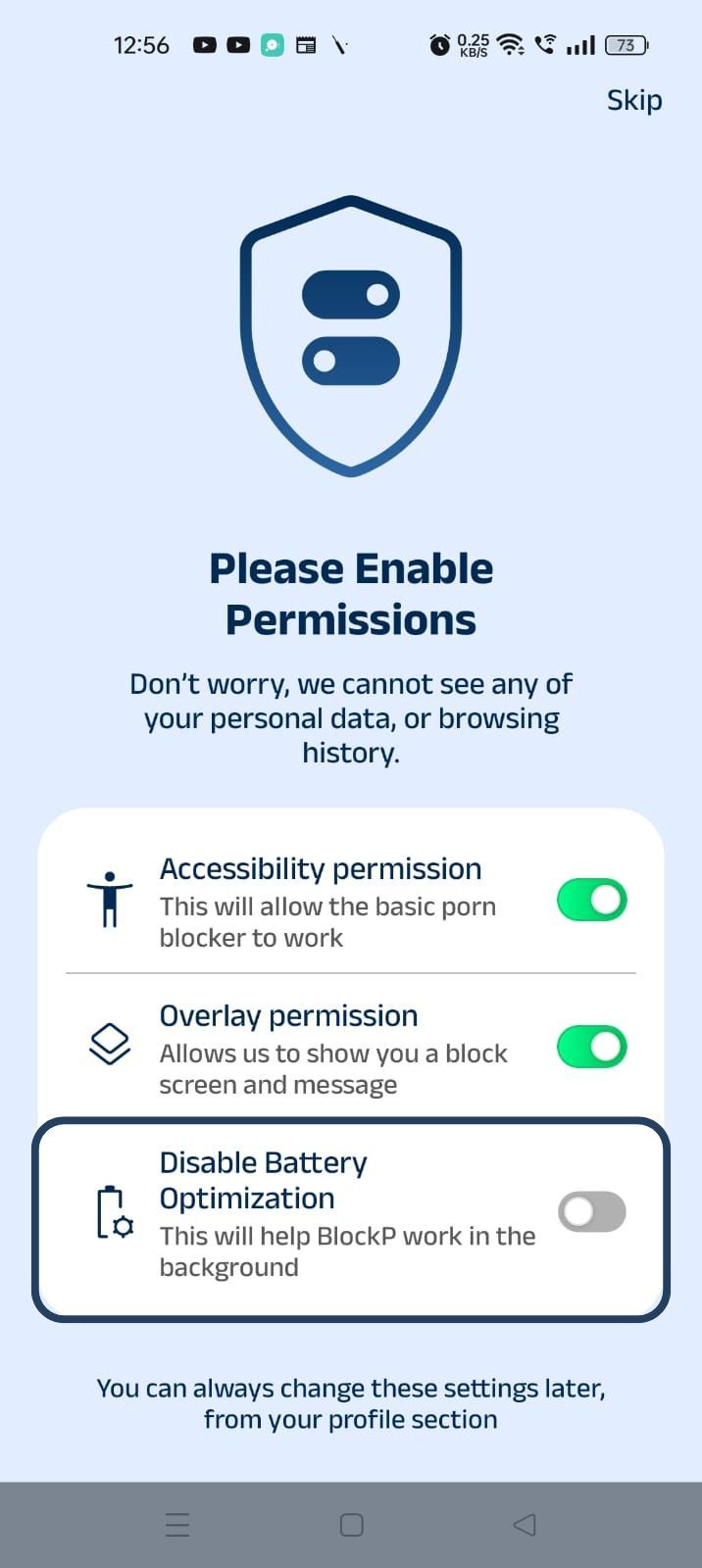
3. Disable battery optimization - so that BlockP can keep working in the background to filter adult content.
- Click on the Disable battery optimization toggle
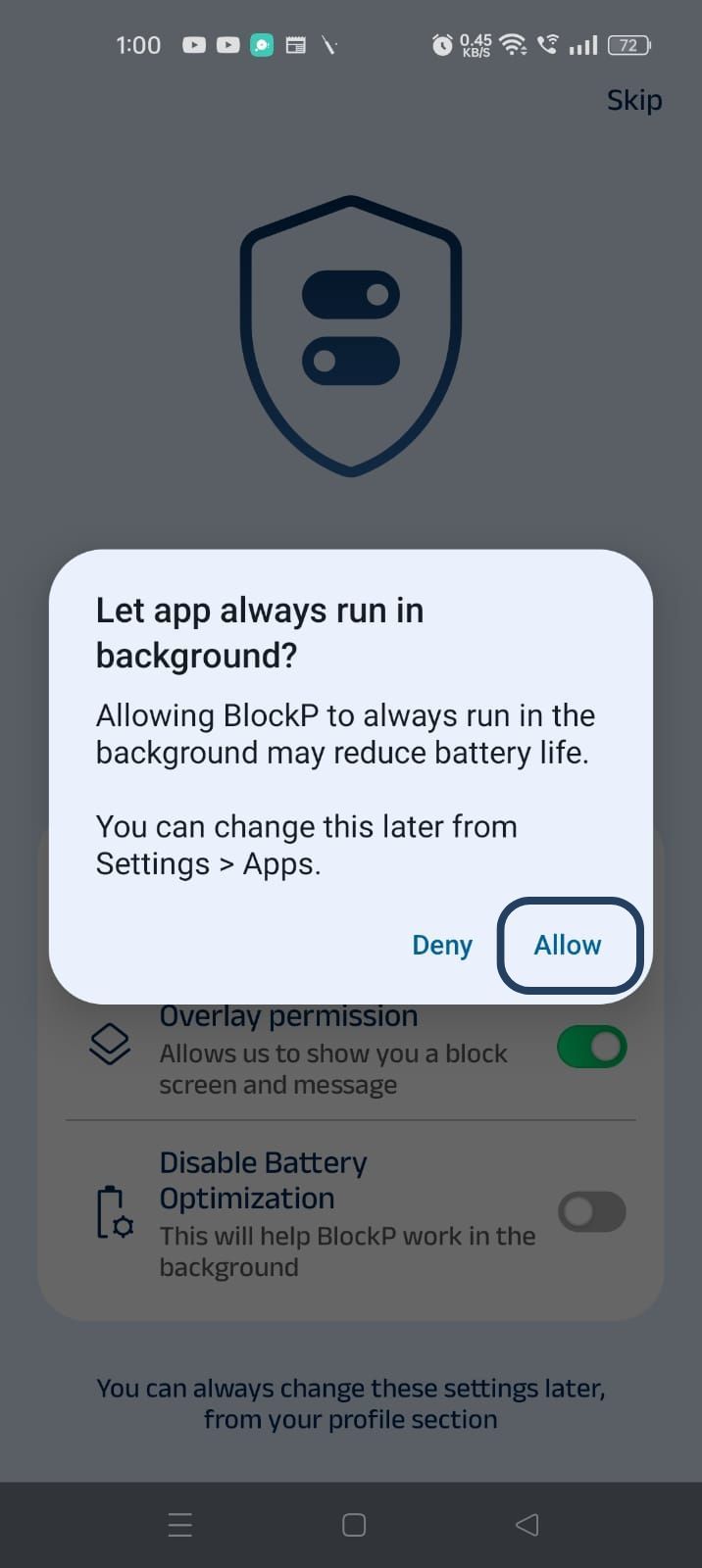
- When prompted, tap Allow to let BlockP run in the background. This helps BlockP stay active and block content without interruption.
Step 4: Go to Advanced Settings
Click on "Advanced settings" (the icon at the top right corner of the BlockP home screen).
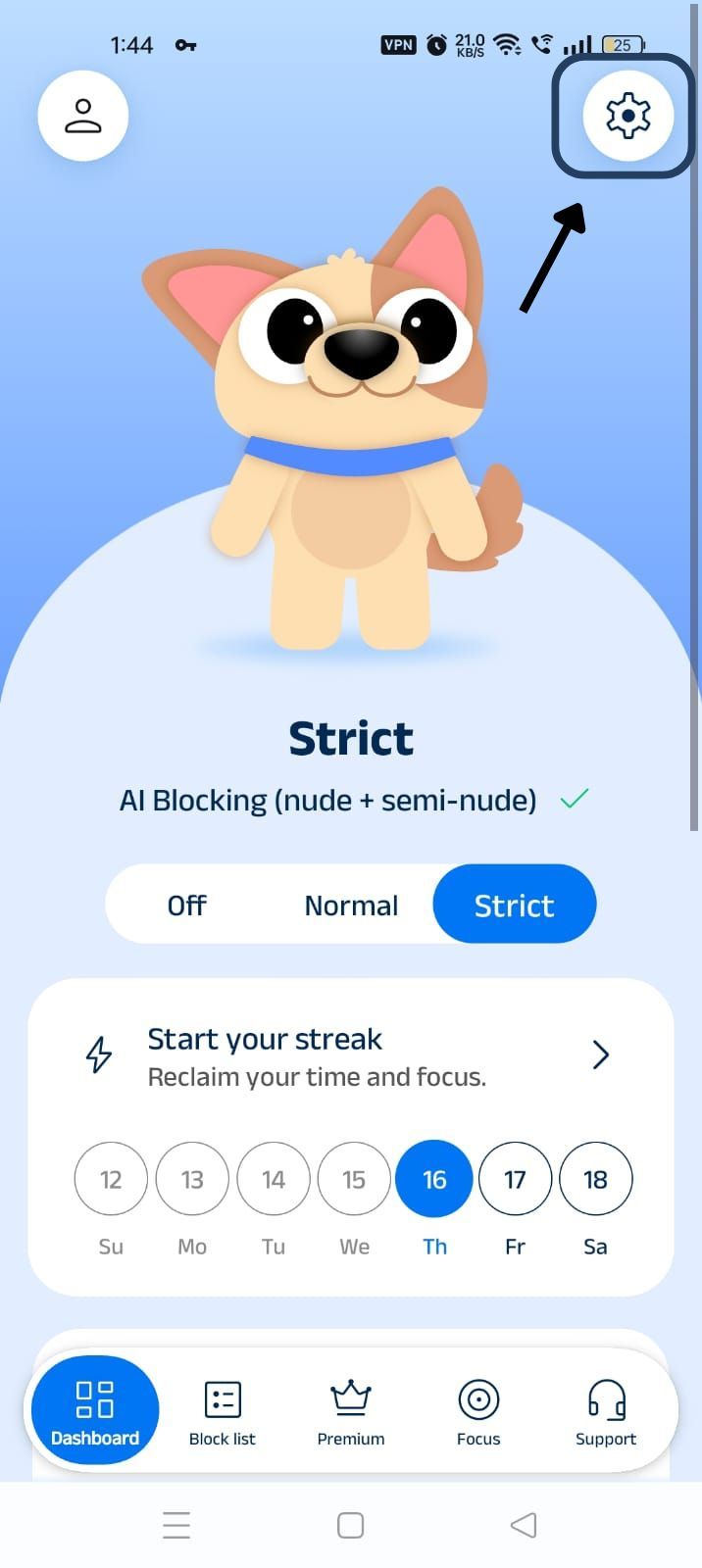
Step 5: Scroll Down to Social Media Blocking Section
Scroll down the General Settings section and find the Social Media Blocking subsection. This section lists options related to social media apps like Instagram, Facebook, Snapchat, X, and so on.
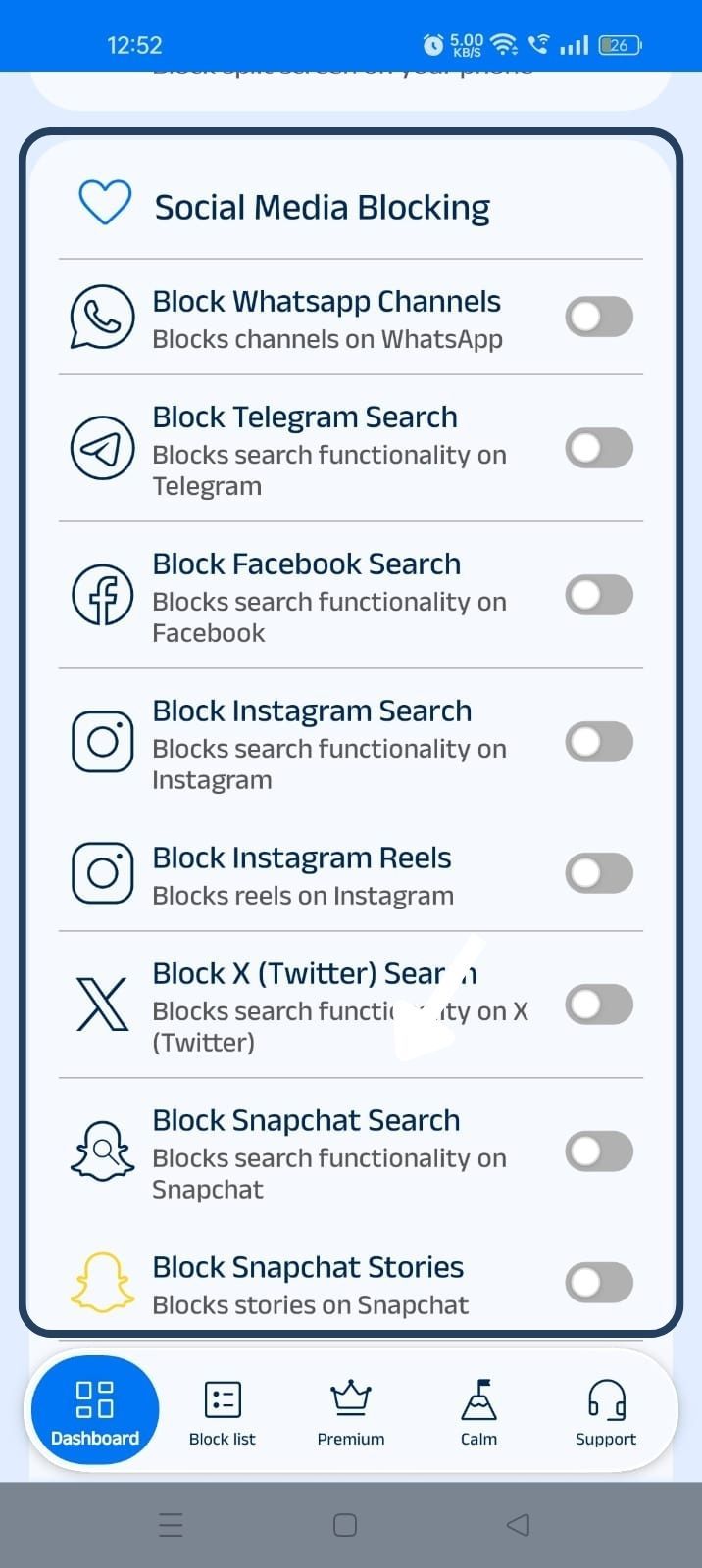
Step 6: Block WhatsApp Channels
In the social media blocking section, find the Block WhatsApp Channels option and slide the toggle to activate it.
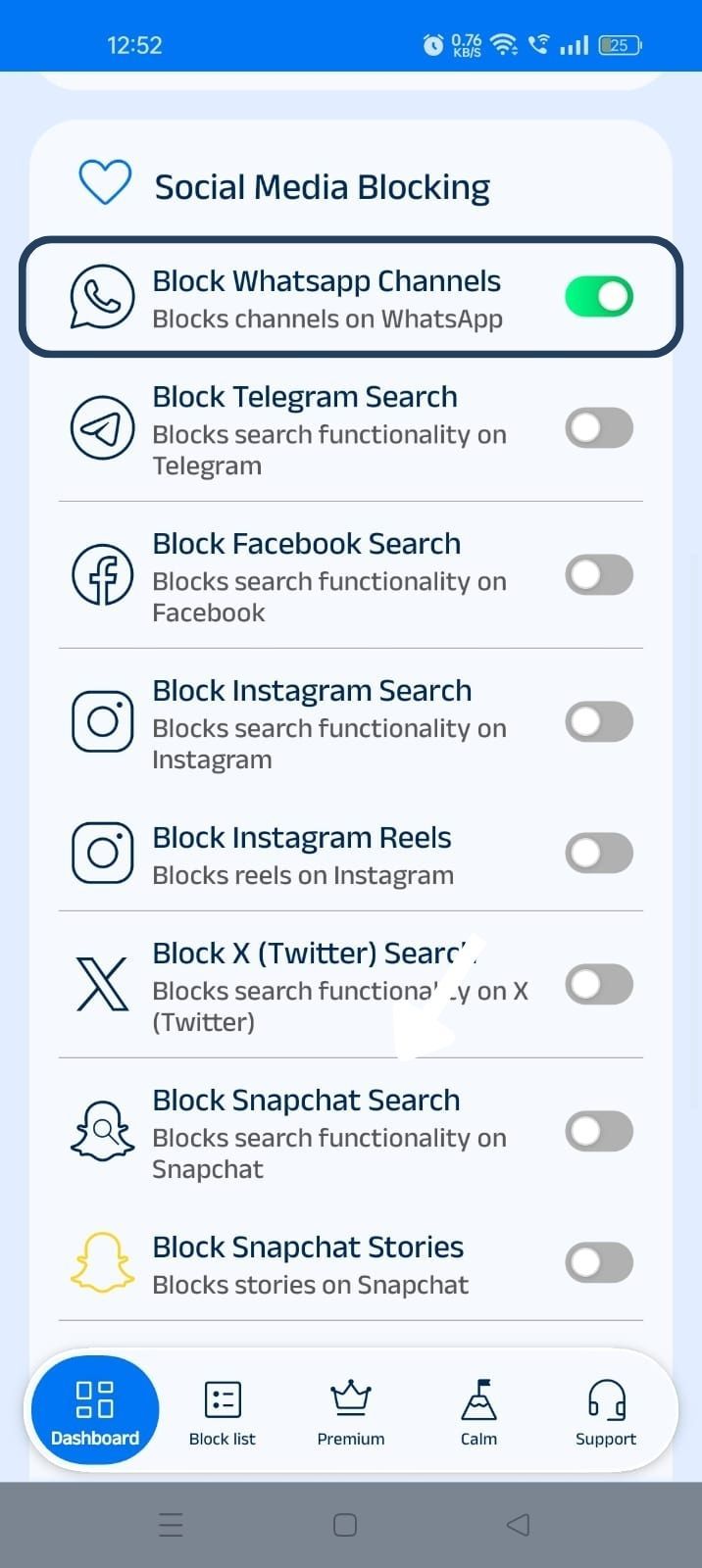
What Are WhatsApp Channels and Why Block Them?
WhatsApp channels let celebrities and brands create one-way broadcast channels to connect with their followers. Anyone who follows the channel can scroll through the content posted on the channel, but they cannot reply.
In essence, a WhatsApp channel behaves more like Instagram’s Explorer, where you can find a personalized content feed, than a private conversation.
The question of a WhatsApp channels blocker arises because, by nature, WhatsApp is a messaging app, but channels give it the flavor of an entertainment app or a social media platform where you can discover new content and quickly develop the habit of scrolling beyond your control.
How WhatsApp Channels Can Become a Distraction
WhatsApp channels follow the same design philosophy as Instagram or TikTok, where the algorithm keeps driving new and exciting content that makes the app sticky.
People do need to check WhatsApp multiple times in a day, either for connecting with their colleagues or communicating with their friends. A feature like Channels can easily turn these quick check-ins into hours of scrolling.
Benefits of Blocking WhatsApp Channels with BlockP
WhatsApp Channels pose a distraction, but most of us cannot afford to block the full app because we do need it for legitimate reasons. We need to message, call, and get notifications.
When you block WhatsApp channels with BlockP, you can keep all these necessary features functioning as usual and only lose the channel feed that promotes mindless scrolling. You no longer have to rely on willpower or feel frustrated when you keep bypassing the screen-time control to access WhatsApp channels.
WhatsApp Channels can also contain content from unmoderated sources, which may be unsafe for the young children. So, parents can use the BlockP WhatsApp blocker to limit accidental exposure to such content.
How BlockP Blocks WhatsApp Channels on Android
When you give accessibility permission to BlockP, it can see exactly what you are seeing or what app you are using on your phone. (This is perfectly safe because BlockP does the filtering on your phone itself, and your data is not shared).
So, when you click on a WhatsApp channel, BlockP can know that you are trying to use a blocked feature.
The overlay permissions allow BlockP to display a custom screen over any other app on your phone. So, when it detects an attempt to open a WhatsApp channel, before WhatsApp can load the channel, BlockP redirects you to its custom screen with a motivational message.
Then you can use the ‘Back’ button option on the BlockP custom screen to take you back to your phone’s home screen.
How BlockP Compares to WhatsApp's Built-In Channel Controls
BlockP’s built-in controls have one key limitation. They only let the users unfollow or turn off notifications from individual channels. So, if you have already subscribed to the feeds, then you have to mute the channels or unfollow them one by one.
Whereas with BlockP, with a simple one-step setting, you can instantly block WhatsApp channels, all of them at once!
Moreover, even if you use WhatsApp settings to block the channels you are following, there is nothing to really stop you from following new channels or unmuting an older channel in the future.
With BlockP, the whole feature itself becomes non-existent. So, even during your weakest moments, there is no need to hard-knuckle through an urge.
Why Choose BlockP?
Most content restriction apps work by blocking entire apps or restricting entire apps for a certain time period with screen time regulation tools. This all-or-nothing approach frustrates people who are using WhatsApp for work or connecting with their friends/family.
What BlockP does is block only one specific feature, WhatsApp Channels, and keeps all others (messaging, updates, calls, etc.) fully accessible. So you can use necessary features more intentionally without distraction.
Frequently Asked Questions
How do I block WhatsApp Channels on Android?
Install BlockP, give the necessary permissions, and go to advanced settings. - Find social media settings - Slide the toggle next to the option “Block WhatsApp Channels." That’s it - easy and simple.
Can BlockP block WhatsApp Channels without blocking the entire WhatsApp app?
Yes. That is exactly how it is designed.
Can BlockP help reduce exposure to adult content in WhatsApp Channels?
When you block WhatsApp channels with BlockP, it automatically lets you also block WhatsApp adult content, as the Channels will not load.
Does WhatsApp Channels blocking hide recommended and suggested channels?
You can use BlockP to hide WhatsApp recommended channels and suggested channels.
Will blocking WhatsApp Channels affect my personal chats and calls?
No.
Does this feature work alongside BlockP's AI Content Filter?
Yes.
Can I enable or disable WhatsApp Channels Blocking anytime?
Usually yes, but if there is password protection (a parent may have set up a password to prevent the child from impulsively changing BlockP settings), then you need the parent or accountability partner’s support.
Does WhatsApp Channels Blocking work on all Android devices?
Yes.
Can parents use this feature to help reduce exposure to inappropriate content?
When you block WhatsApp channels, it blocks access to unmoderated content that may show up. So, your child stays safe from inappropriate content.
Is WhatsApp Channels Blocking included in the free version of BlockP?
Yes.