Social Media Blocker App to Block Distractions & Stay Focused
Block distracting apps like Instagram, Facebook, YouTube Shorts, and X to improve focus, productivity, and screen-time control.
Get Started with BlockPAccording to researcher Gloria Mark, you need 23 minutes to fully regain concentration after every interruption. In our social media-heavy lifestyles, such a fracturing can easily add up to many hours lost and have a serious effect on our ability to focus on tasks. That’s exactly where a social media blocker app can help you.
A social media blocker app like BlockP is built to give you more sophisticated control over your social media apps.
Unlike an app that blocks social media completely, BlockP lets you restrict only the distracting features within the app but still continue to use the sections of the social media app that you need for work or to communicate with your loved ones.
Step-by-Step: How to Use Social Media Blocker in BlockP
The option to block in-app browser is often overlooked or totally missed by many of us. And in moments of vulnerability it can make most of us vulnerable to distraction and relapse.
Most Android apps offer in-app browsing as a convenience and also use it as a strategy to make the user stay on their app for longer periods. But for someone who is trying to stay focused or a child who is trying to bypass the adult content restrictions, in-app browsing can become a convenient loophole.
That’s why BlockP has designed a ‘block in-app browser’ feature that blocks adult content inside apps and keeps you safe.
How to Enable In-App Browsing Protection in BlockP Android
Here is how to block In-App Browsing on your Android device with BlockP:
Step 1: Install BlockP.
Download the BlockP app from the Google Play Store and install it on your Android phone.
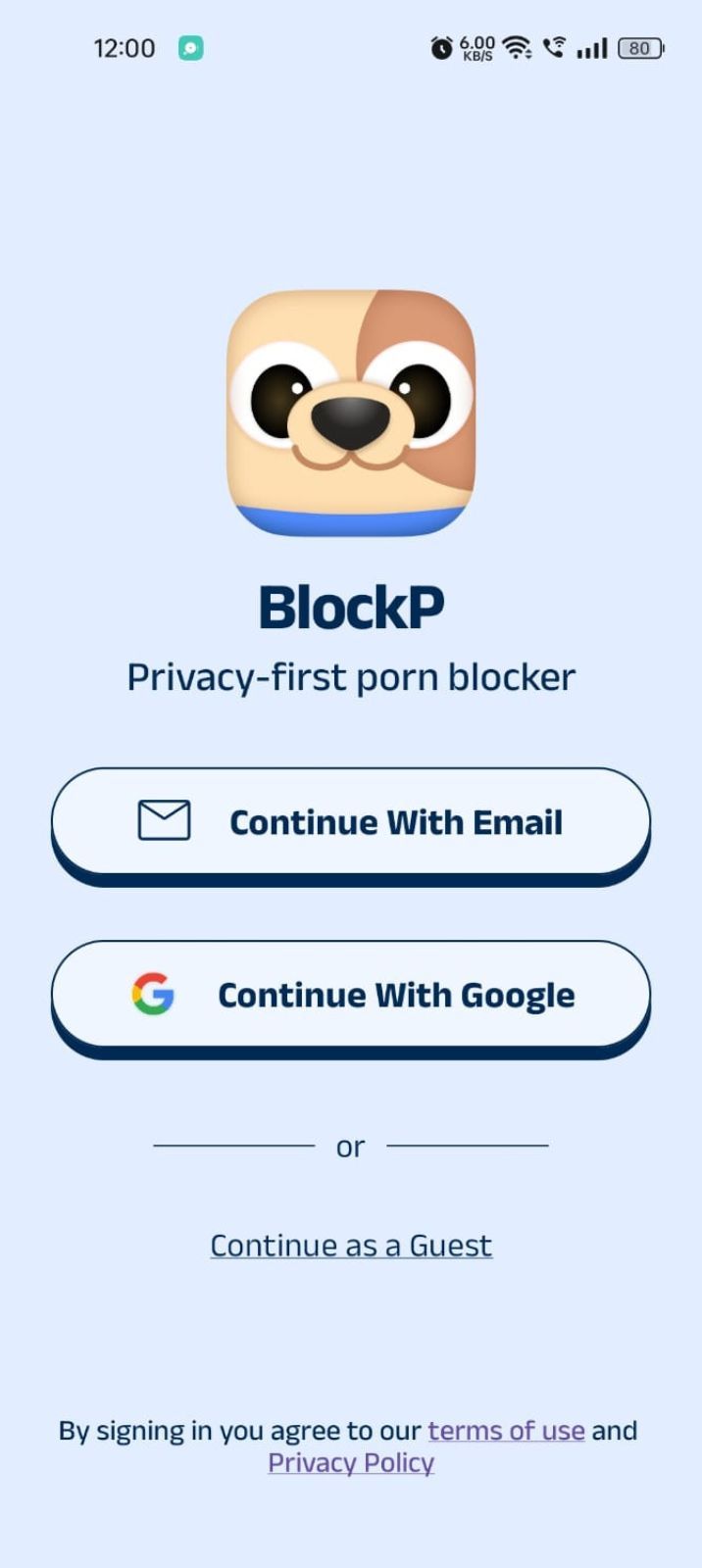
Step 2: Sign Up on BlockP
- Open the BlockP app.
- Sign up using Email or Google.
- Or tap Continue as a Guest to get started without creating an account.
Step 3: Give Necessary Permissions
1. Accessibility - Lets the Android adult content blocker see what you are watching on your screen. Here is how to let BlockP use it:
- Click on the Accessibility permission toggle.
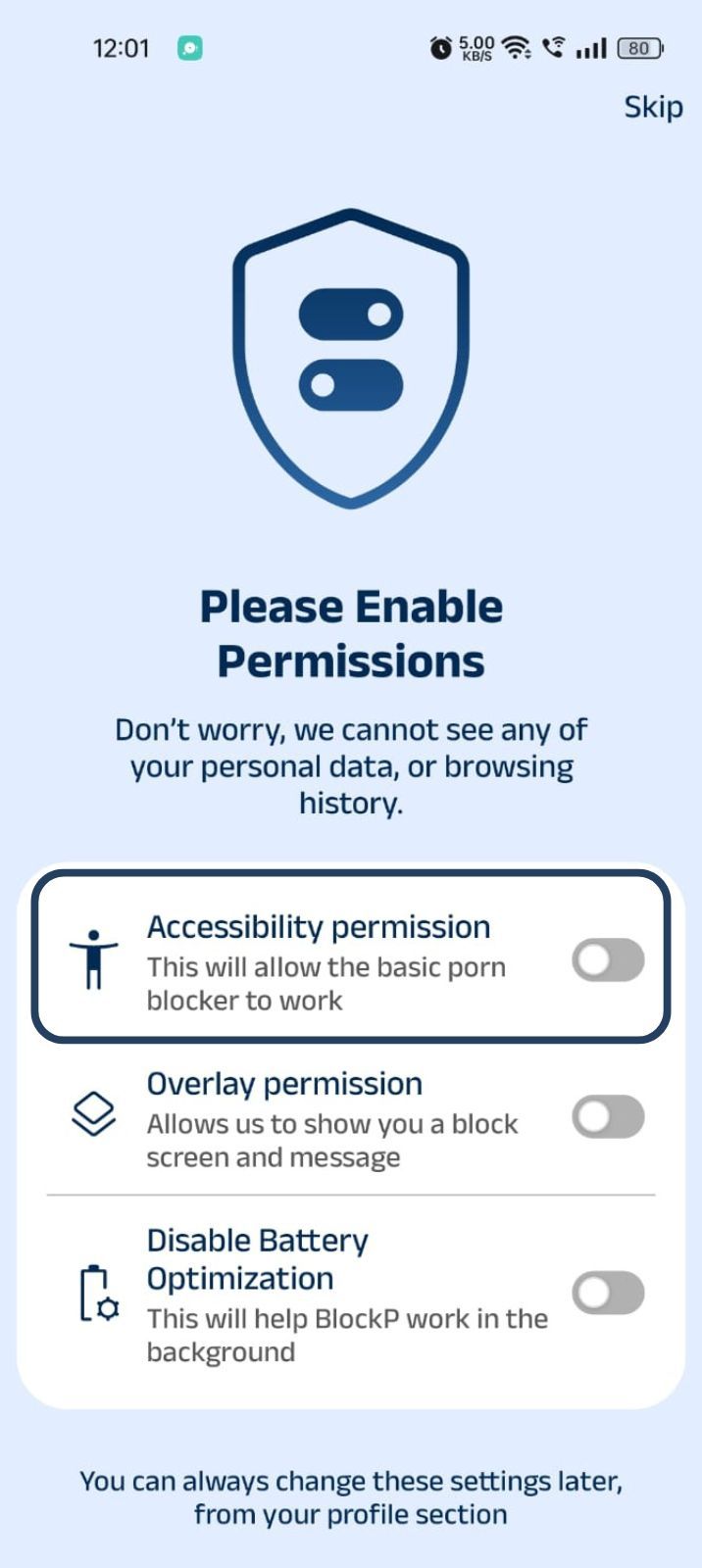
- Then click on "Let BlockP Access Accessibility Services"
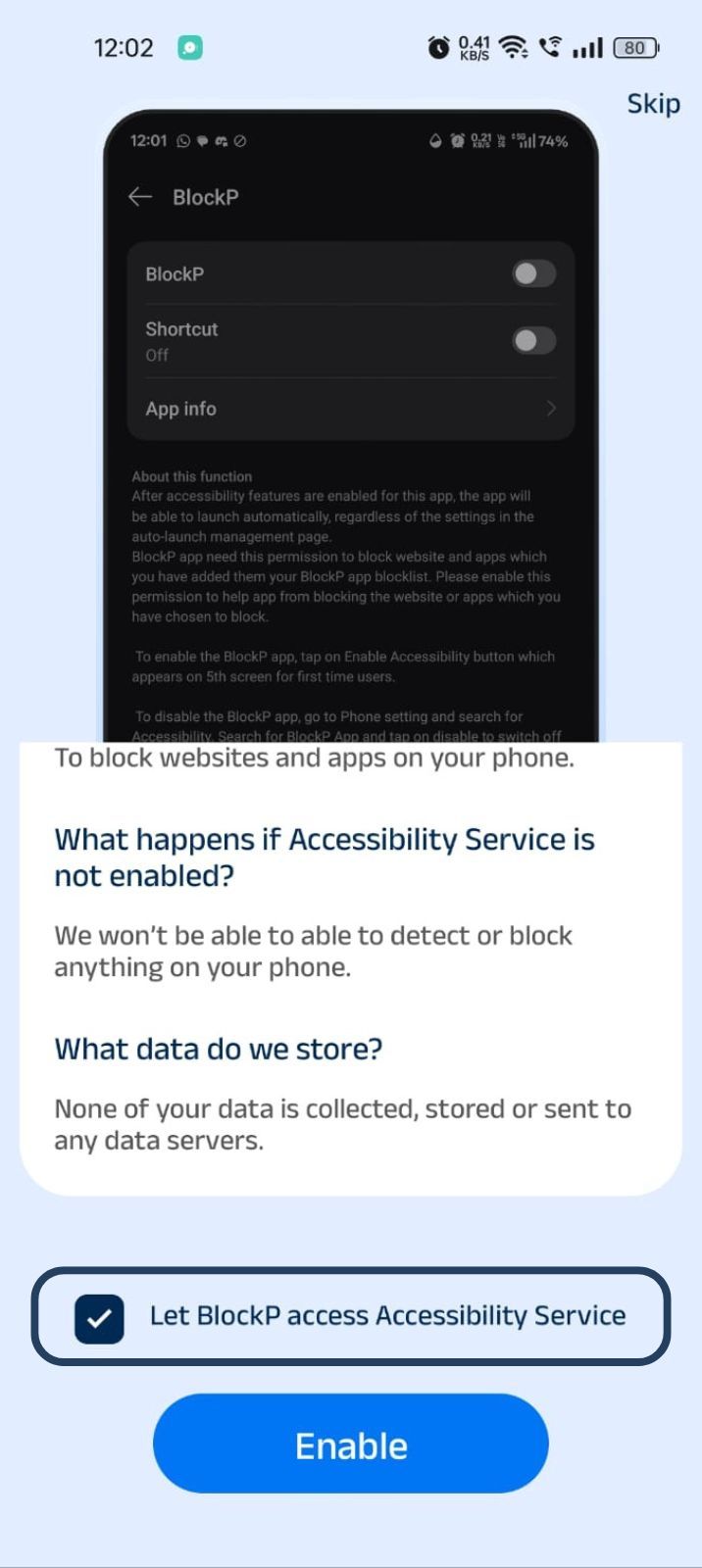
- Next, click on the Enable button
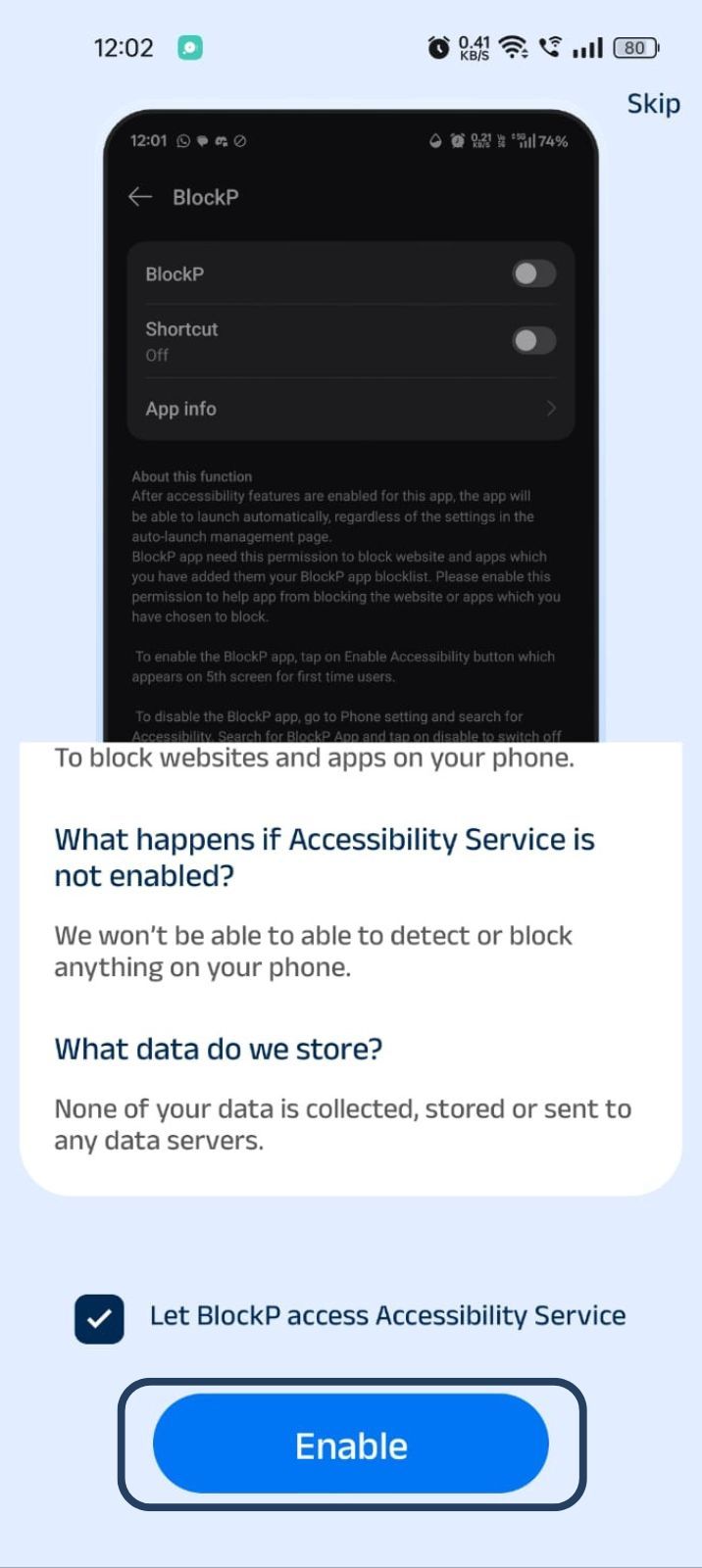
- Next, click on the downloaded apps button.
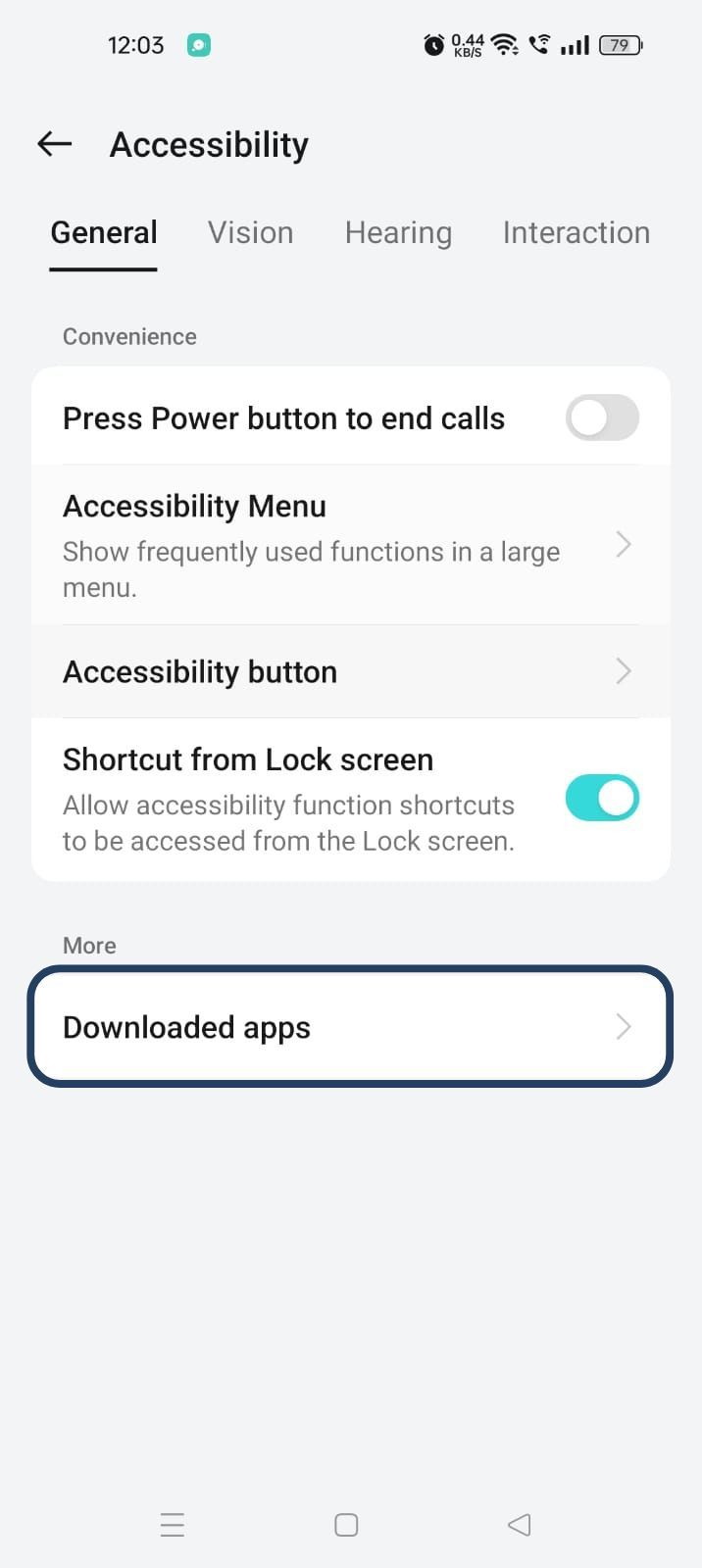
- Now, you will find Blockp - click on BlockP.
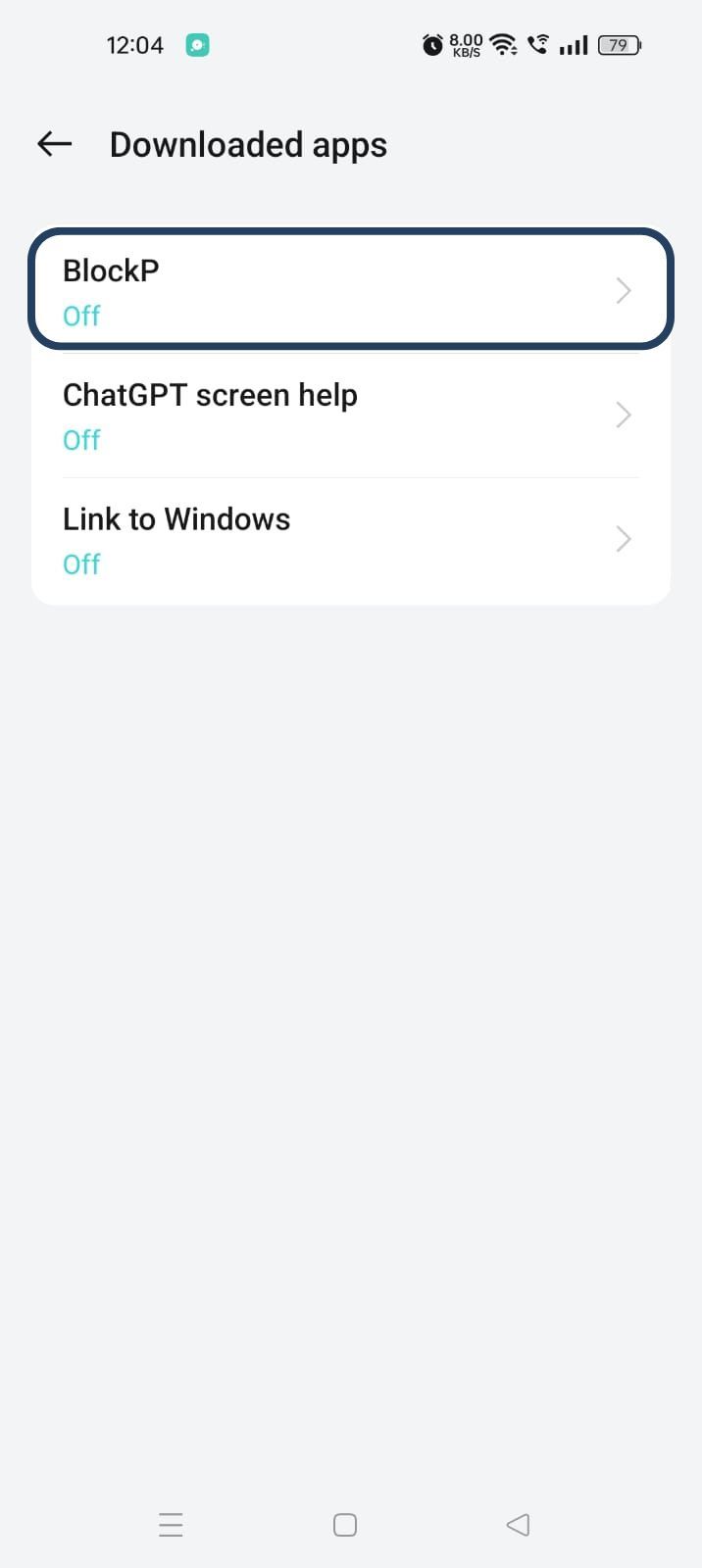
- The new screen will show a toggle in front of BlockP - enable the toggle and then click on the Allow button to complete the accessibility permission.
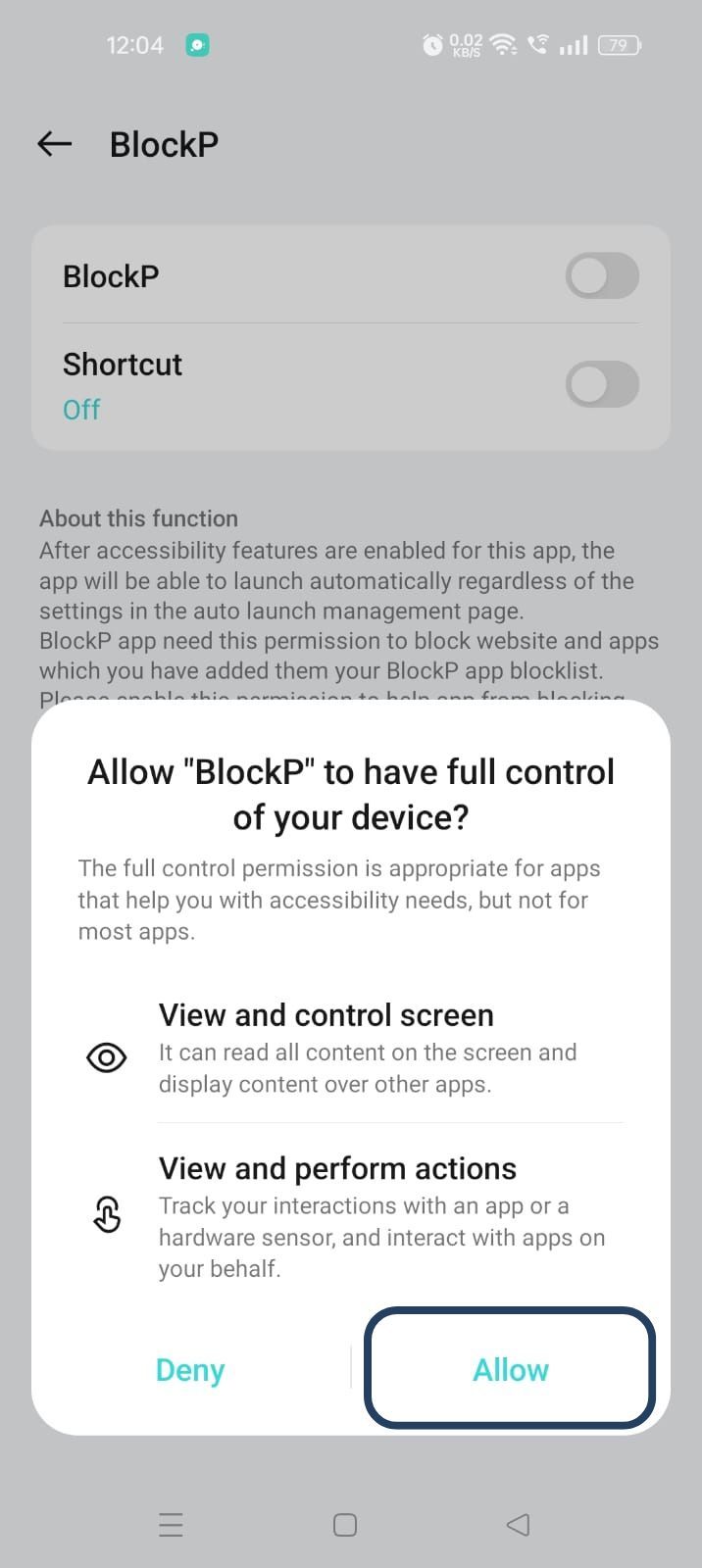
2. Overlay - lets BlockP show you a blocked screen and message when you try to access adult content.
- Click on Overlay permission toggle.
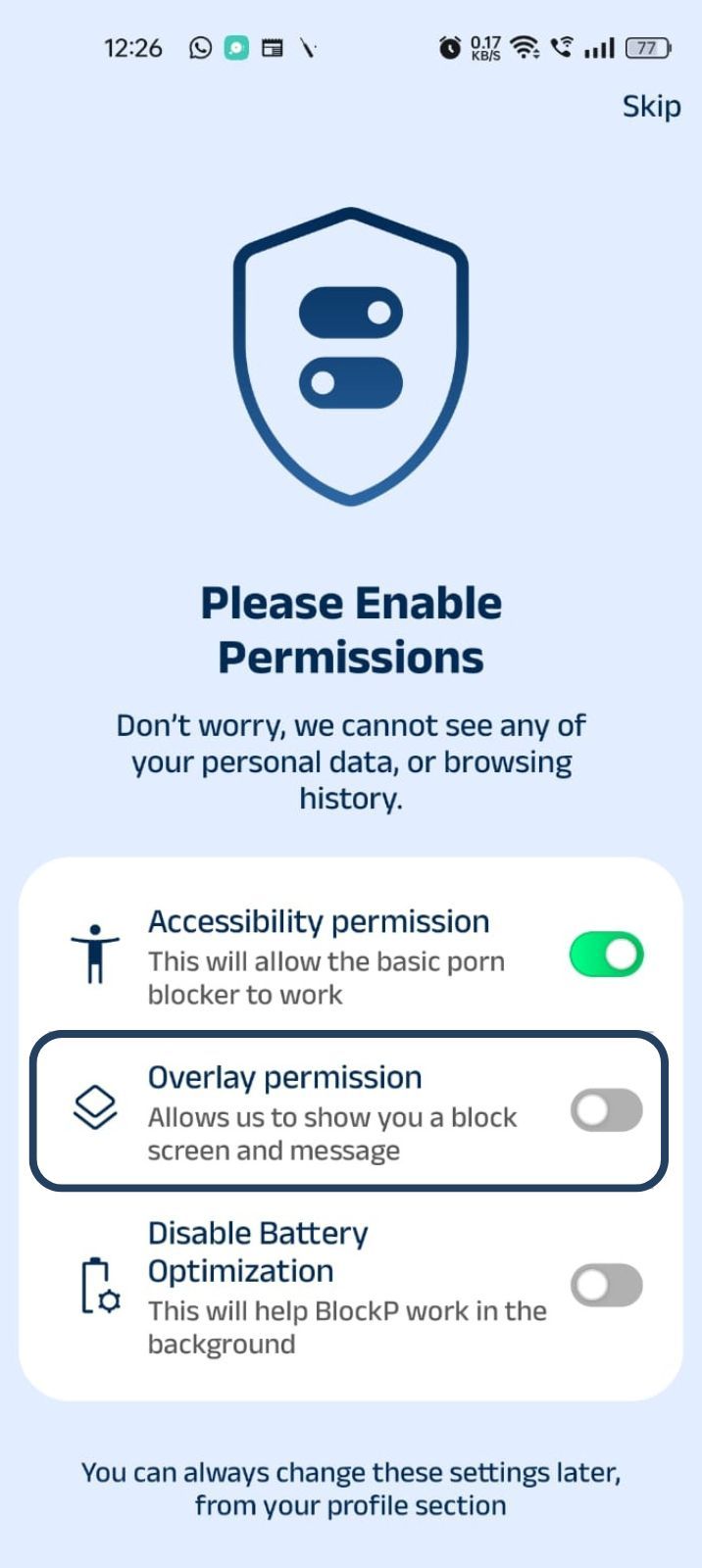
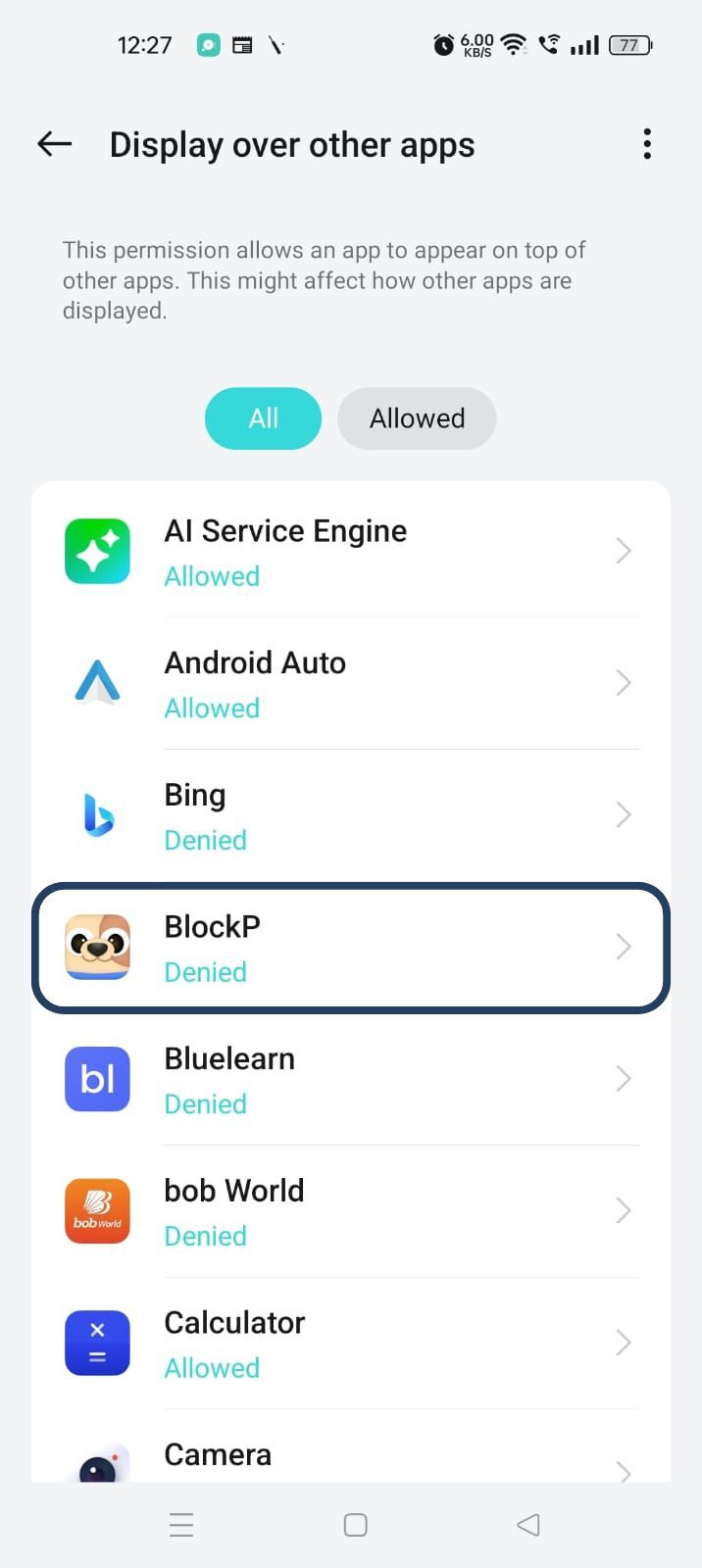
- You will get a menu with a list of apps titled - Display over other apps. Find BlockP in this list and click on it.
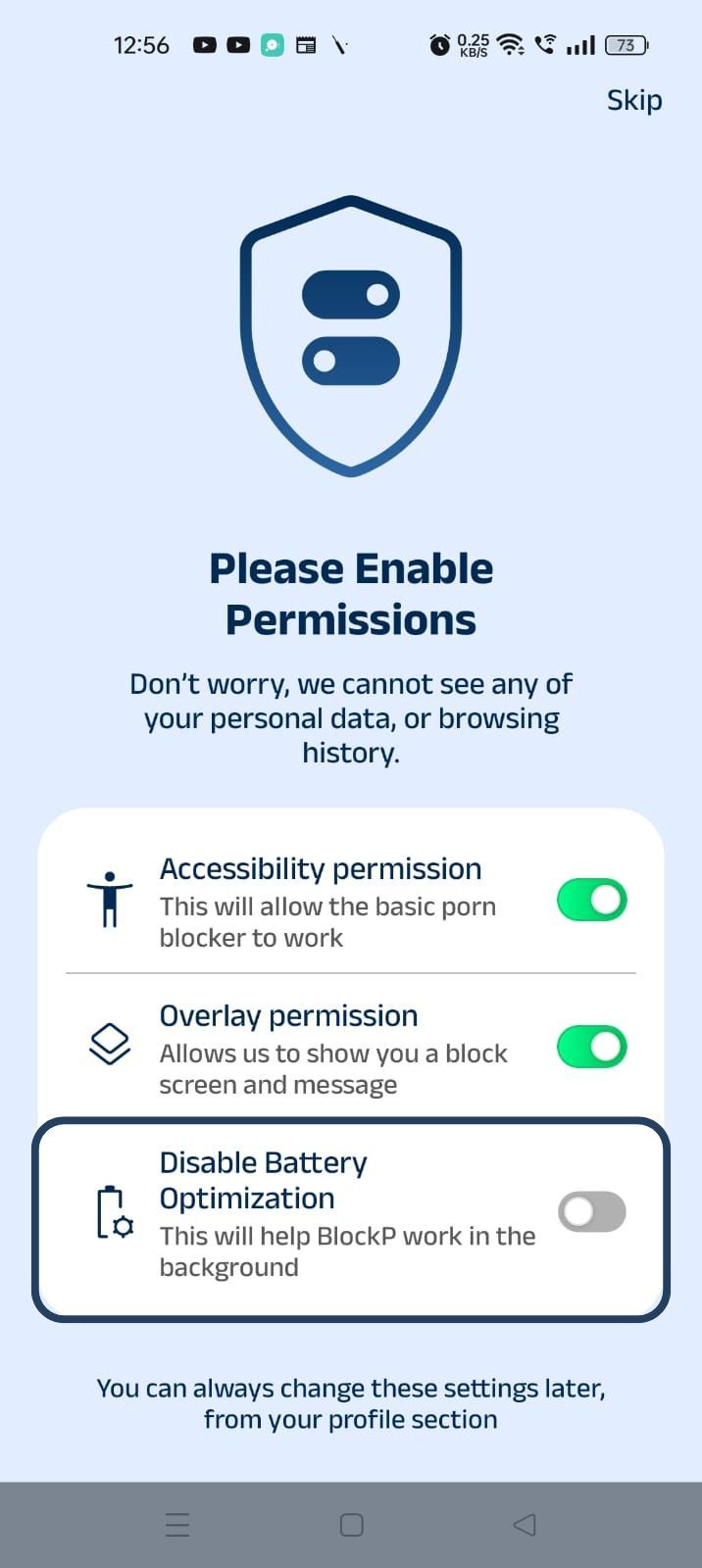
3. Disable battery optimization - so that BlockP can keep working in the background to filter adult content.
- Click on the Disable battery optimization toggle
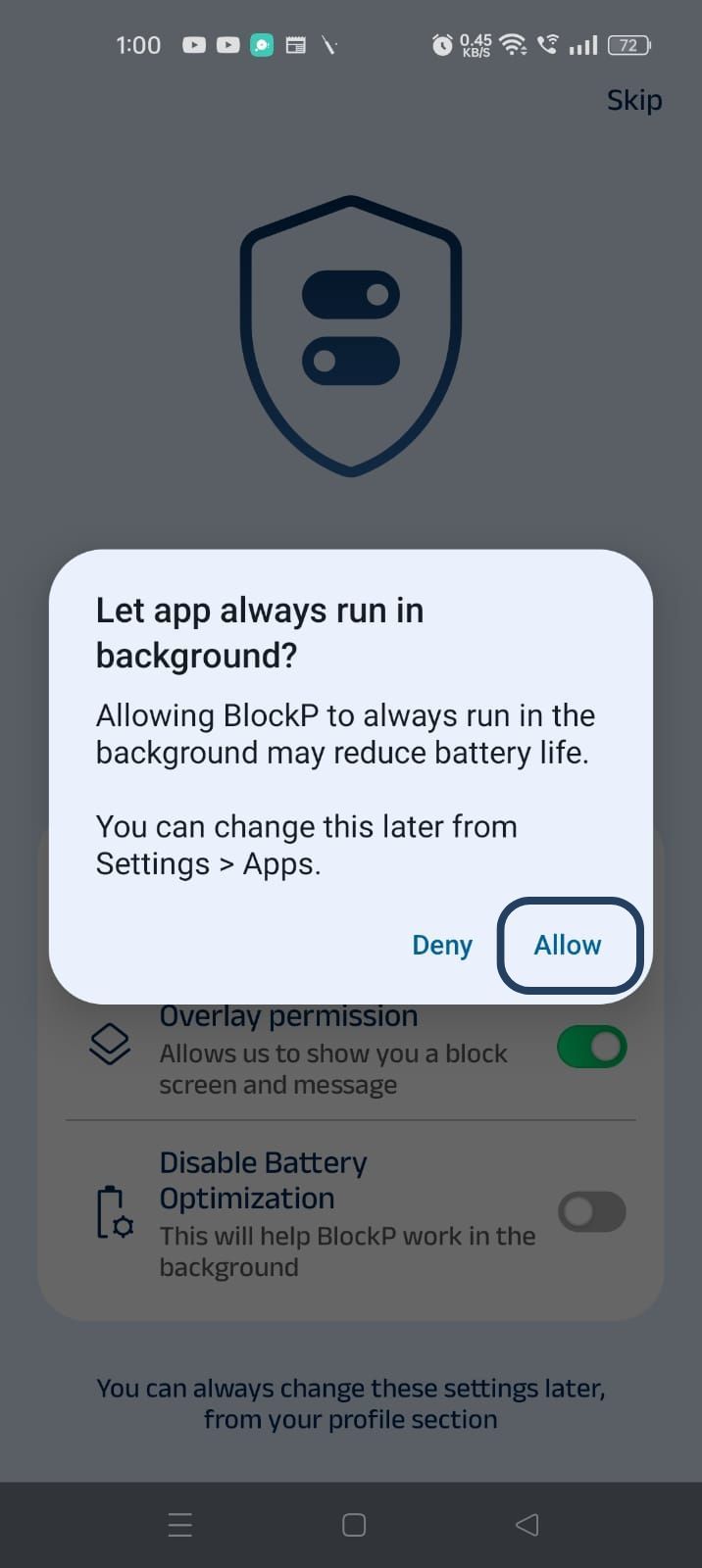
- When prompted, tap Allow to let BlockP run in the background. This helps BlockP stay active and block content without interruption.
Step 4: Go to Advanced Settings
Locate the advanced settings icon in the top right corner of BlockP’s home screen and click on it.
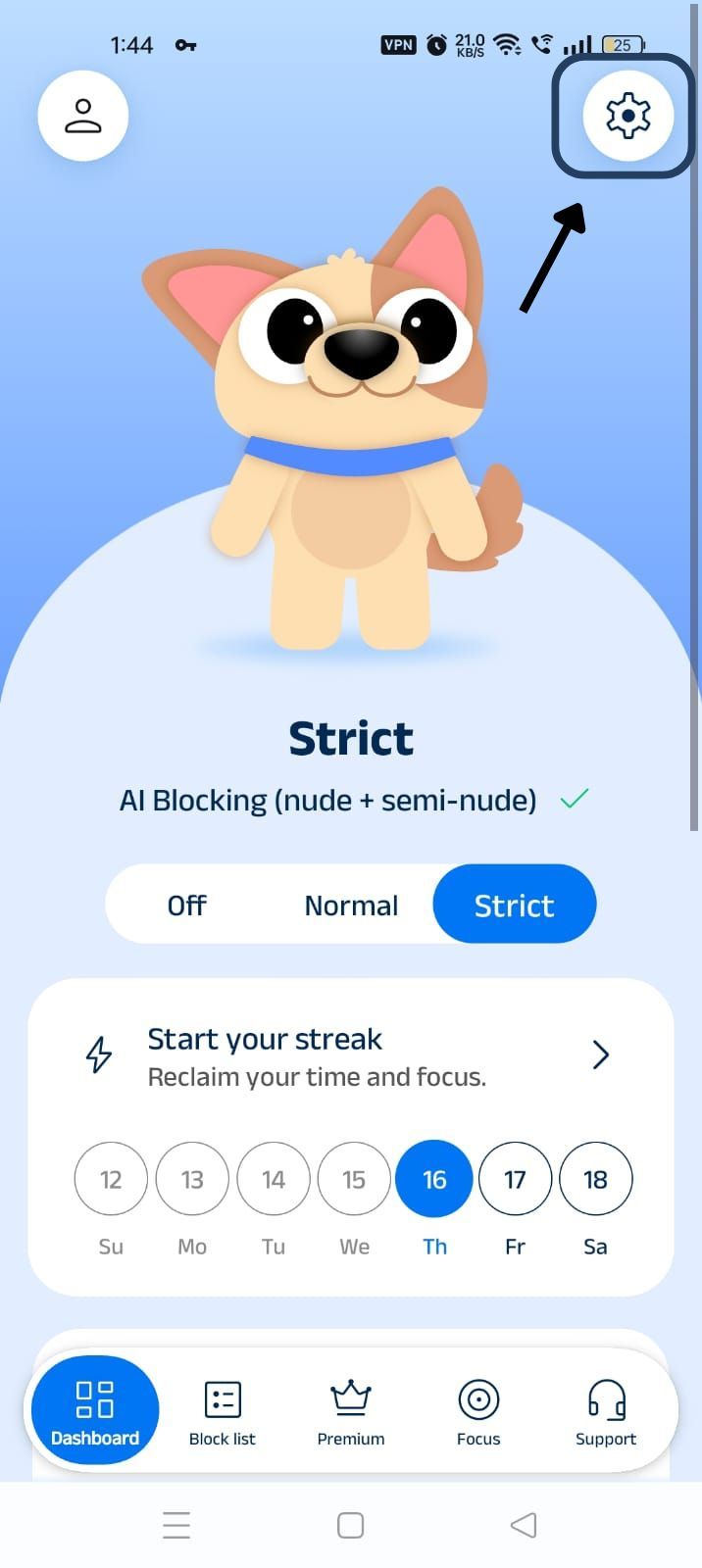
Step 5: Scroll Down to Social Media Blocking Section
Scroll down the General Settings section and find the Social Media Blocking subsection.
This section lists options related to social media apps like Instagram, Facebook, Snapchat, X, and so on.
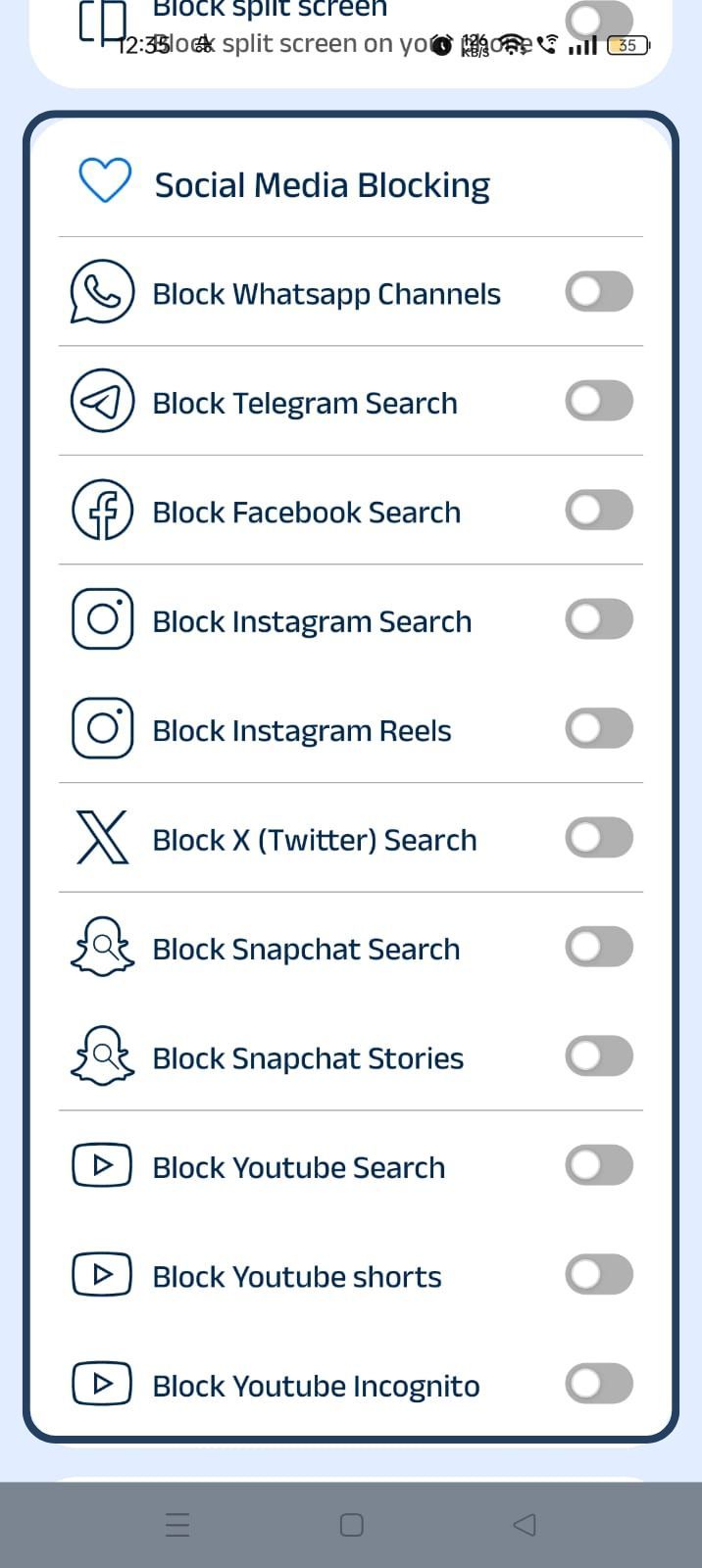
Step 6: Set Up Social Media Controls
Go through the list of social media features and slide the toggle next to any feature that you want to block.
Block Social Media Apps Instantly With BlockP
Many of us are aware that we are being distracted by our social media apps and that we are losing too much time online in mindless scrolling.
Many of us do try to cut back on our social media use. The screen-time regulations and app that blocks social media completely can feel like a good option at this point.
But, when the moment of temptation hits, screen-time controls are too easy to undo.
In most cases social media apps are not just for entertainment. They are where messages and updates from your family come. Work-related communication also happens on these apps. So, if you use a blunt social media blocker app, it will restrict legitimate use also.
Instead, what an app to block social media like BlockP can do for you is help you restrict certain features but keep the ones you truly need active.
BlockP’s social media blocking settings are quickly accessible through its dashboard, and you can set up the controls and begin blocking social media instantly.
Features of BlockP Social Media Blocker
Instead of completely blocking a social media app, the BlockP social media blocker app
gives you the nuanced option to block only the specific features that you feel distracting. So you can choose to just block Instagram Reels or Instagram Search instead of completely blocking the app.
BlockP supports specific social media controls, like
- Block WhatsApp Channels (messaging, calls, updates, etc. stay open).
- Block search - Block only the ‘search’ feature on Telegram, Facebook, and Twitter.
- Block Instagram Search & Reels (Here also DMs, stories, posts, etc. stay open).
- Block Snapchat Search and Stories - useful for parents to keep their teens safe from unmoderated content on the platform.
- Block YouTube Search and Shorts (two features that trigger instant scrolling habits) and block YouTube incognito (a common technique used to bypass controls).
PS: If you do want to fully block any social media app itself, instead of a specific feature, you can add it to BlockP’s block list.
Benefits of Using Social Media Blocker
If you are using a blanket social media blocker app, every time a real need comes, unblocking the app becomes effortless, leading to a familiar distraction. to fully unblock the app and get lost in the familiar distractions. But, with a nuanced social media blocking app like BlockP, there is no pressure to deny yourself social media.
With BlockP, you won’t feel like you are depriving yourself because the social media features that add real value to you still stay active. At the same time passive-scrolling and video-watching features that hijack you are blocked.
- A social media blocker app helps you reclaim a significant chunk of time. When you can not access features like reels or search that encourage infinite scrolling, a check-in can remain just a check-in.
- By using an app to block social media, parents can protect their children from the sections that carry a high risk of exposing the children to explicit content, like Telegram search and Instagram search.
- A social media blocker app can boost your productivity by minimizing interruptions to a focused work or study session.
Frequently Asked Questions
What is a social media blocker app?
A social media blocker app helps you either completely block or restrict specific features of your phone’s social media apps.
Can BlockP block Instagram, Facebook, and YouTube?
A social media blocker app like BlockP does have setting options that can block Instagram, Facebook, and YouTube.
How do I block social media apps on my phone?
Use a social media blocking app like BlockP which helps you restrict social media.
Does blocking social media improve productivity?
A social media blocker app like BlockP lets you use social media for work without getting into the trap of passive scrolling.
Is BlockP hard to bypass?
BlockP has settings like password protection and accountability partner that prevent you from bypassing the restrictions.