How to Block YouTube on Chrome Using BlockP Extension
Learn how to block YouTube on Chrome with the BlockP Extension. Hide Shorts, home feed, comments, and more to cut distractions and stay focused.
Get Started with BlockPMany of us have the habit of disrupting our work or studies to quickly watch a YouTube short or play a podcast in the background as we work on other tabs on our browser. It feels so harmless that an option to block YouTube on Chrome feels a bit extreme.
In reality, every such YouTube break adds up into hours of distraction that not only hijacks your time but also fragments your attention. So, over time your productivity goes down.
For many of us, completely blocking YouTube is not an option - we do have a genuine need for YouTube content in our everyday tasks, whether it is working or cooking or a DIY project.
BlockP YouTube blocker Chrome extension helps you solve this dilemma by giving you options to restrict the distracting features of YouTube on your Chrome browser but letting you keep the essential features fully active.
How to Enable YouTube Blocking in BlockP Chrome Extension (Step by Step)
Step 1: Install the BlockP Chrome Extension
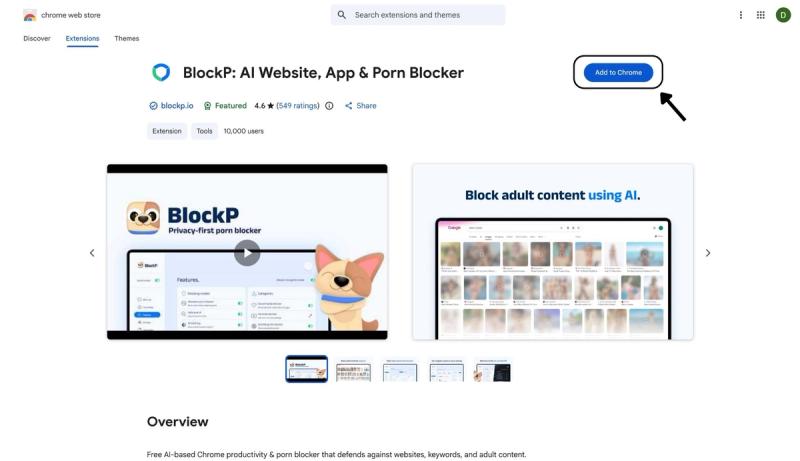
- Go to the Chrome Web Store and search for “BlockP,” or visit the BlockP Chrome Extension page directly.
- Select “BlockP: AI Website, App & Porn Blocker”
- Click “Add to Chrome.”
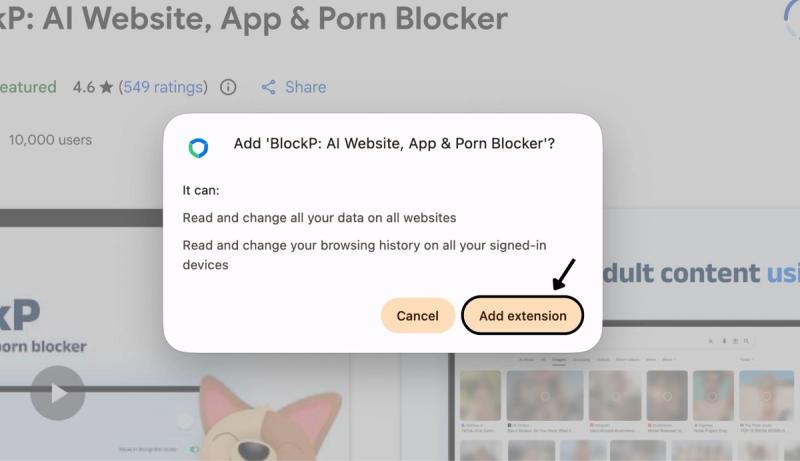
Step 2: Add Extension
Click on ‘Add extension’ in the pop-up.
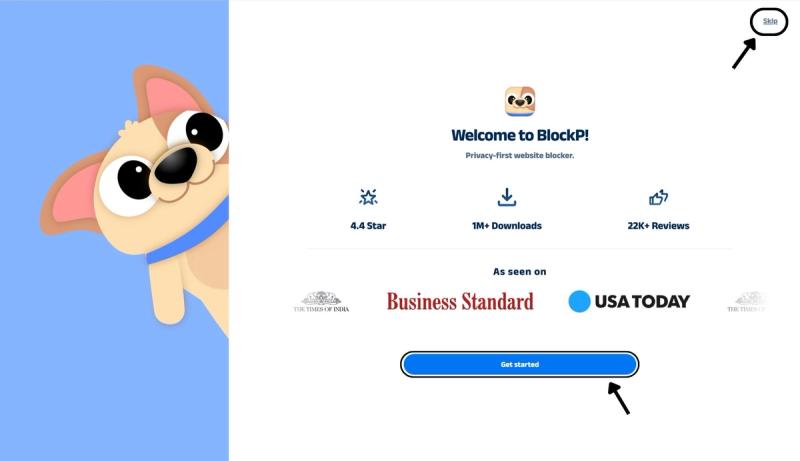
Step 3: Get Started with BlockP
- A new web page will open – click on the “Get started” button at the bottom of the page.
- If you don’t want to answer the questions, click “Skip” in the top-right corner. You’ll then be taken to the login or sign-up screen to continue using the extension.
Step 4: Sign In or Sign Up on BlockP Extension
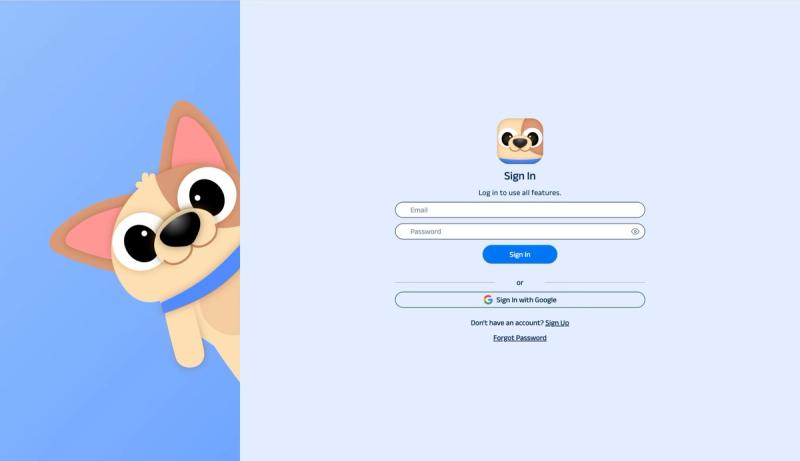
- Enter your email and password, then click “Sign In.” You can also click “Sign In with Google” to use your Google account.
- If you don’t have a BlockP account, click “Sign Up” to create one.
- After signing in, you’ll be automatically redirected to “See How BlockP works” Screen
Step 5: See How BlockP Works
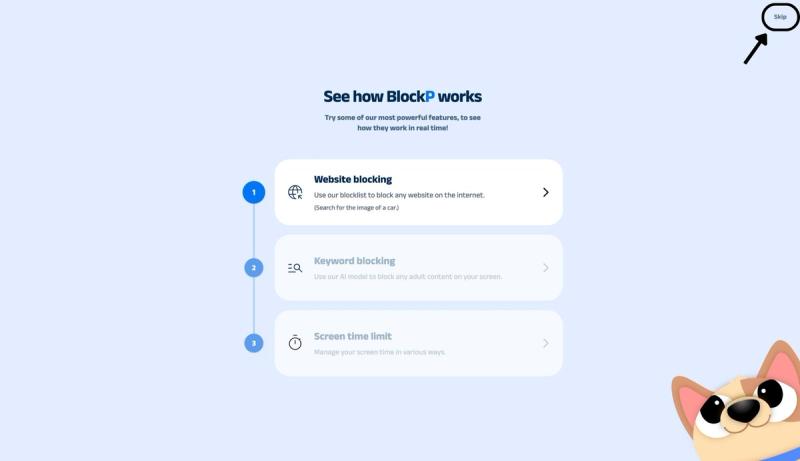
After signing in or creating an account, you’ll see the “See how BlockP works” screen.
- You can explore the interactive guide to learn how features such as Website Blocking, Keyword Blocking, and Screen Time Limits work.
- If you already know how BlockP works or want to skip the guide, click “Skip” in the top-right corner.
After exploring how BlockP works or clicking the “Skip” button, you’ll be redirected to the extension dashboard, where you can access and manage features.
Step 6: Go to Categories Section
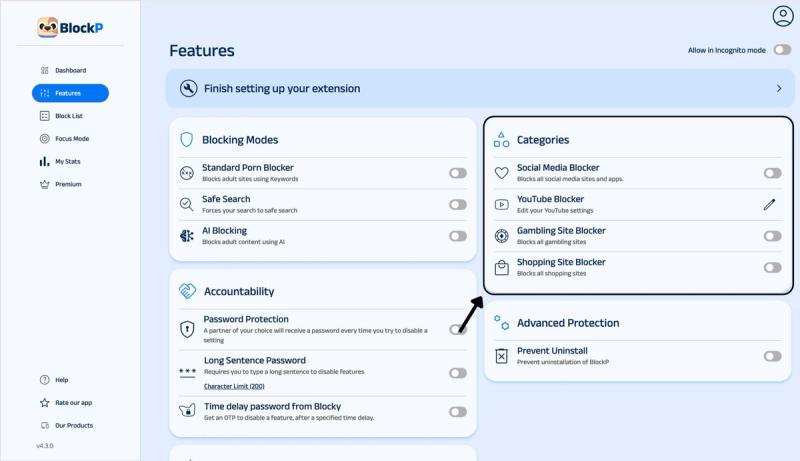
Open the BlockP extension and navigate to the Categories section on the right side of the Features page.
Step 7: Enable the YouTube Blocker
In the Categories section. Here you will find options for social media blocking, YouTube blocking, and gambling and shopping site blockers.
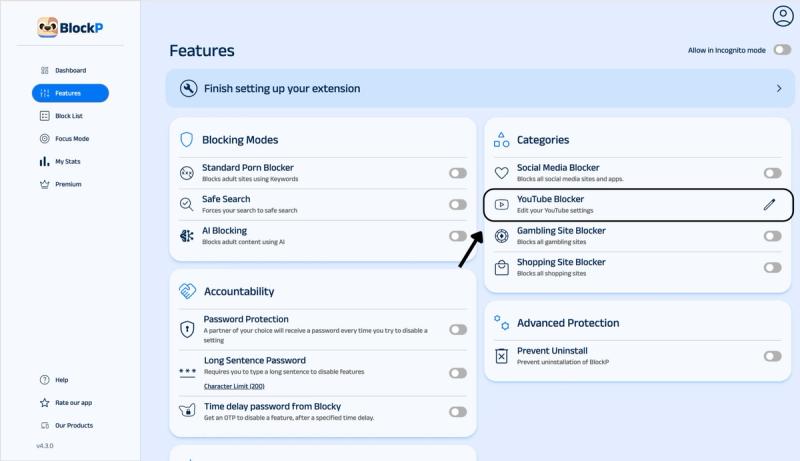
Click on the pen symbol next to the YouTube blocker settings. Now, BlockP will open the YouTube Blocker settings page.
Step 8: Configure YouTube Blocking Settings
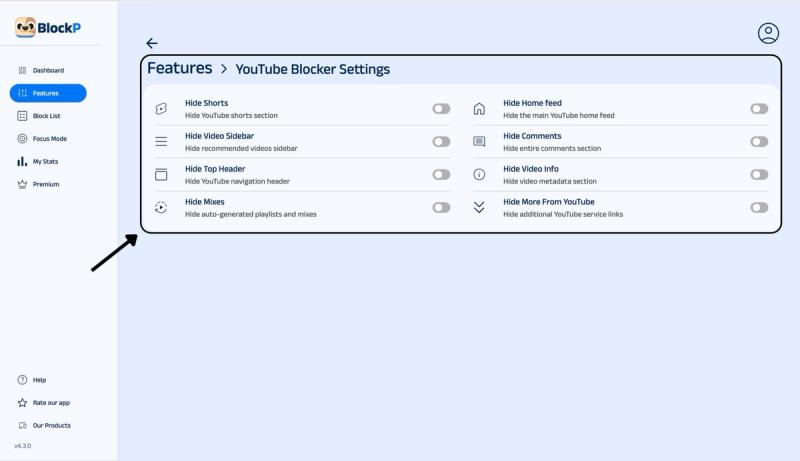
Slide the toggle next to the various custom YouTube blocking options listed, like hide shorts, hide comments, hide home feed, hide mixes, etc.
Why Block YouTube on Chrome?
9 in 10 US teenagers use YouTube, and 1 in 5 teenagers is on YouTube constantly.
More than 85% of American adults use YouTube, and an average American adult spends 52 minutes per day on YouTube, which adds up to an entire day (26 to 27 hours!) per month spent watching YouTube.
What makes YouTube so sticky?
The autoplay feature of YouTube eliminates the natural stopping point where the viewer can intentionally choose what to watch next.
Even YouTube's personalized recommendation systems often narrow towards a single category of videos to create a "rabbit hole" effect.
As a result, the users are led towards more and more extreme content but in such tiny incremental steps that they do not really notice until they cross a threshold and are watching something really extreme.
What Can You Hide or Block on YouTube with BlockP?
With BlockP YouTube blocker, you don’t have to worry about missing necessary access to YouTube. Here are the nuanced options you can get to block YouTube on Chrome:
- Hide Shorts: Lets you block YouTube Shorts on Chrome, which are one of the most distracting forms of content.
- Hide YouTube home feed: Prevents algorithm-driven browsing by hiding the home page feed that is generated by YouTube.
- Hide video sidebar: When you play a YouTube video, there is a sidebar that lists recommended videos. BlockP YouTube blocker hides this sidebar to remove the temptation.
- Block YouTube comments: The hide comment setting of BlockP hides the comment section below YouTube videos to prevent the distraction of unnecessary scrolling and arguments.
- Hide top header: Creates a distraction-free YouTube page by hiding the search bar and controls. So, if you are following a link to watch a work-related video, you will not be pulled to search for other content.
- Hide Mixes: Prevents YouTube-generated mixes and playlists that encourage autoplay.
- Hide More from YouTube: Hides promotional links and suggestions which can lead you to distracting content.
- Hide video info: BlockP hides the visual clutter below the video like the video title, description, channel name, links, etc. which encourage unplanned browsing.
Benefits of Using BlockP's YouTube Blocker
BlockP's YouTube blocker Chrome extension hides the shorts and recommendations features, which drive unplanned watch time. So, you can still keep watching the videos that are needed for your work or for a DIY project without any issues.
So, YouTube watching can be more intentional and not automatic.
BlockP’s YouTube blocking works with other features like password protection (to prevent impulsive setting changes) and AI-powered blocking and focus mode to create multiple layers of protection to improve your overall digital consumption.
For parents worried about their child’s YouTube watching, BlockP helps to put in safeguards that help the children stay regulated without constantly being monitored.
How YouTube Blocking Works in BlockP
In order to block YouTube on Chrome, you have to first go to the BlockP dashboard and enable hiding of specific features that you want to block. Once it is done, the features simply won’t appear when you go to YouTube.
For instance, if you ‘hide video description,' then you will see just a blank space below the video.
If you have enabled the ‘hide shorts’ option, the YouTube shorts won’t be visible at all.
Why Choose BlockP's YouTube Blocker?
When someone looks for how to block YouTube on PC, they are often disappointed to find that most mainstream blockers either block it completely or allow it fully. There are screen time restriction options, but users can override them easily.
The BlockP YouTube blocker Chrome extension stands out by giving you options for feature-level restrictions.
| Feature | BlockP | BlockSite | Cold Turkey | StayFocusd |
|---|---|---|---|---|
| Hide specific YouTube parts (Shorts, comments, and more) | Yes - 8 specific features | No | No | No |
| Smart blocking options that spots adult content, not just keywords | Yes | Limited | No | No |
| Free version available? | Yes | Yes | Yes | Yes |
| Works on phone and computer | Yes | Paid only | Paid only | No |
| Can you secure the settings with a password? | Yes | Yes | Yes | Yes |
| Made to help with compulsive scrolling? | Yes | No | No | No |
Frequently Asked Questions
How do I block YouTube on Chrome?
Block YouTube on Chrome with BlockP's YouTube blocker option.
Can I block only YouTube Shorts and keep the rest?
You can block only YouTube Shorts and keep the rest of the features in BlockP's YouTube blocking settings.
Can I hide the YouTube home feed and recommendations?
Use BlockP’s YouTube blocking settings to hide the home feed and recommendations.
Can I block YouTube comments on Chrome?
BlockP gives you the option to hide the comments on YouTube videos.
Does BlockP block YouTube completely or just parts of it?
You can do both -
- Block specific features of YouTube with its YouTube blocker settings.
- To completely block YouTube on Chrome, you can add YouTube to BlockP’s blocklist.
Can I choose which YouTube sections to hide?
Yes.
Will blocking YouTube elements slow down Chrome?
No.
Does YouTube blocking work with AI blocking and social media blocking?
Yes.
Can I temporarily unblock YouTube?
Yes.
Is the YouTube blocker included in the free BlockP Chrome extension?
Yes.