How to Block Adult Content on Android Using BlockP for Free in 2026
Learn how to block adult content on Android for free using BlockP. Follow our step-by-step guide to block websites, apps, and distractions in minutes on BlockP.
Get Started with BlockPLearning how to block adult content on Android should be a priority for all of us.
We often think that only people who are struggling to quit adult content should be worrying about how to block adult content websites on Android. What is the point of learning how to block adult content sites on Android if we are not going to visit any?
In reality, you don’t have to go searching for adult content - adult content will find you and distract you. And if you have young children at home, they will stumble into it without looking for it.
Adult Content often comes into our Android phones through pop-ups, clips that come up in the autoplay or search of social media apps, and as content on mainstream platforms.
The challenge with inbuilt Android filters is that they are not designed for keeping you safe from adult content. They are primarily productivity tools that can be easily bypassed and fooled.
Then what is the solution for the question of how to block adult content on Android reliably and effectively?
BlockP - the adult content blocker for Android, which can block adult content and also has guardrails that prevent bypass is the answer.
How to Block Adult Content on Android with BlockP (Step by Step)
Here is how to block adult content on Android with the BlockP adult content blocker app:
Step 1: Install BlockP.
Download the BlockP app from the Google Play Store and install it on your Android phone.
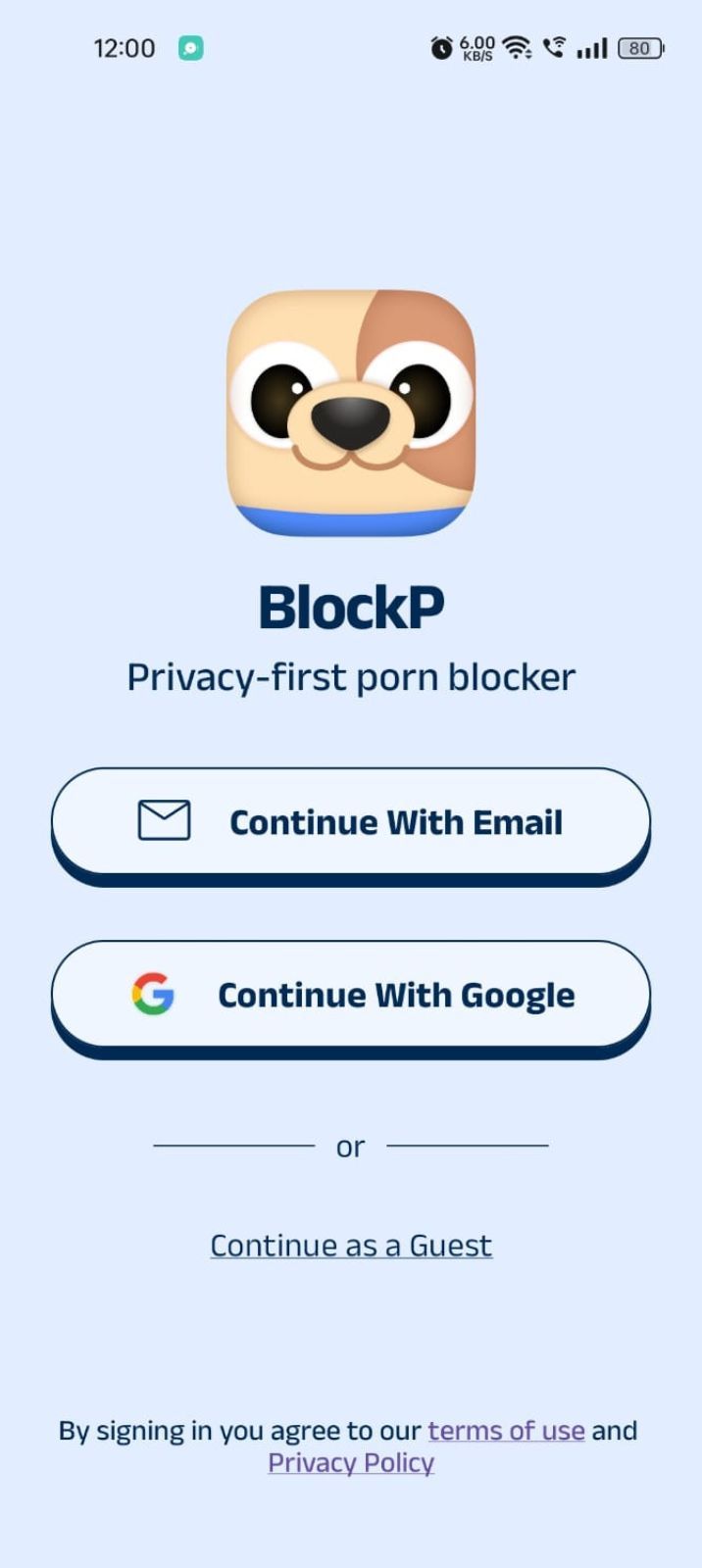
Step 2: Sign Up on BlockP
- Open the BlockP app.
- Sign up using Email or Google.
- Or tap Continue as a Guest to get started without creating an account.
Step 3: Give Necessary Permissions
1. Accessibility - Lets the Android adult content blocker see what you are watching on your screen. Here is how to let BlockP use it:
- Click on the Accessibility permission toggle.
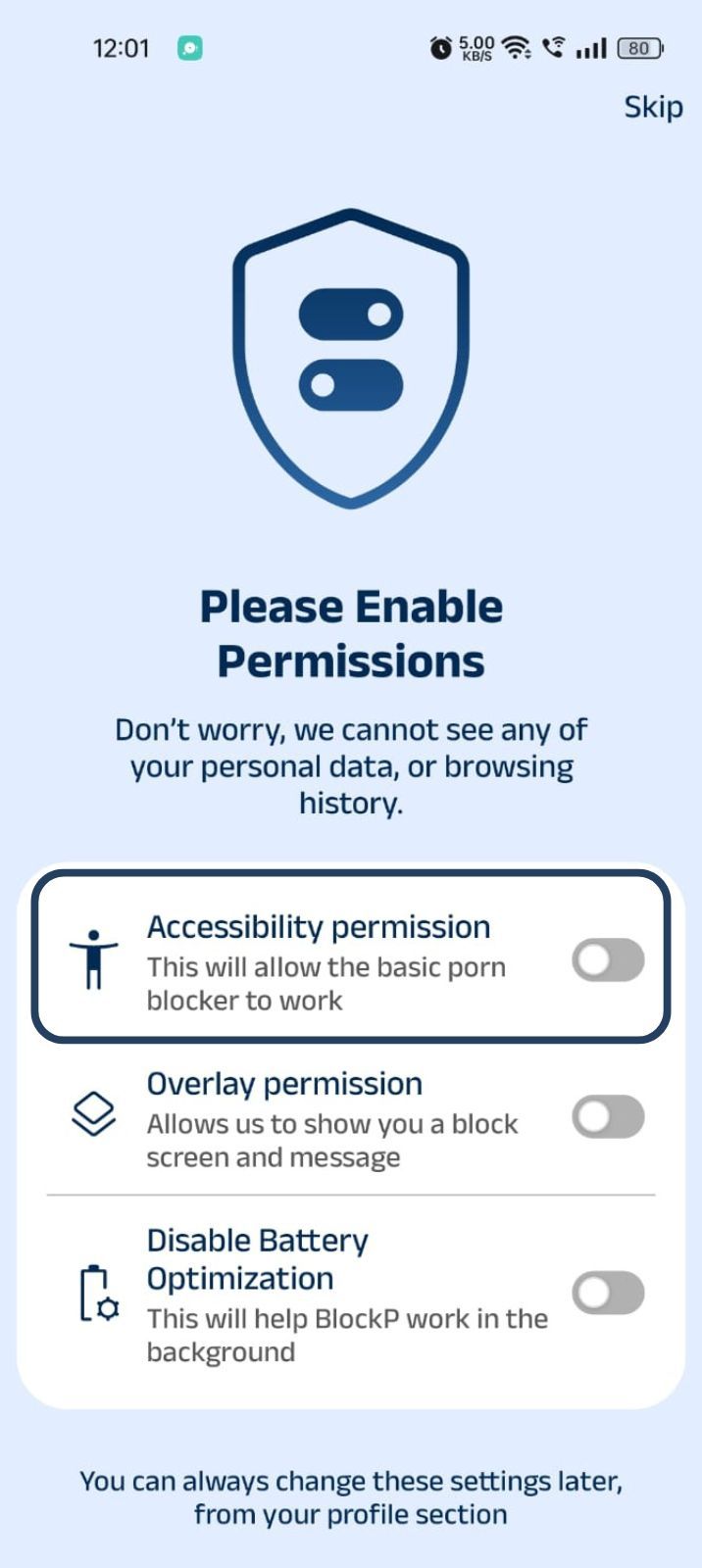
- Then click on "Let BlockP Access Accessibility Services"
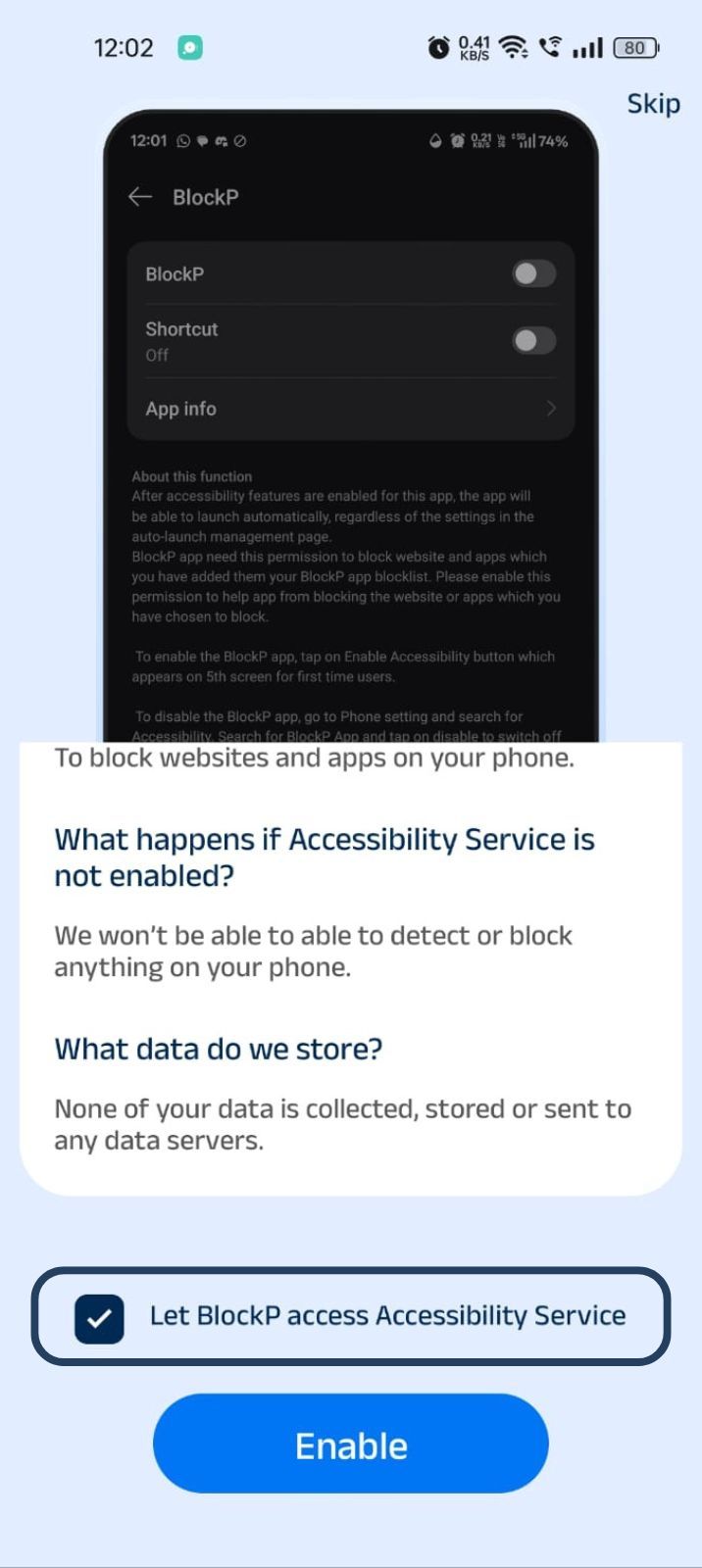
- Next, click on the Enable button
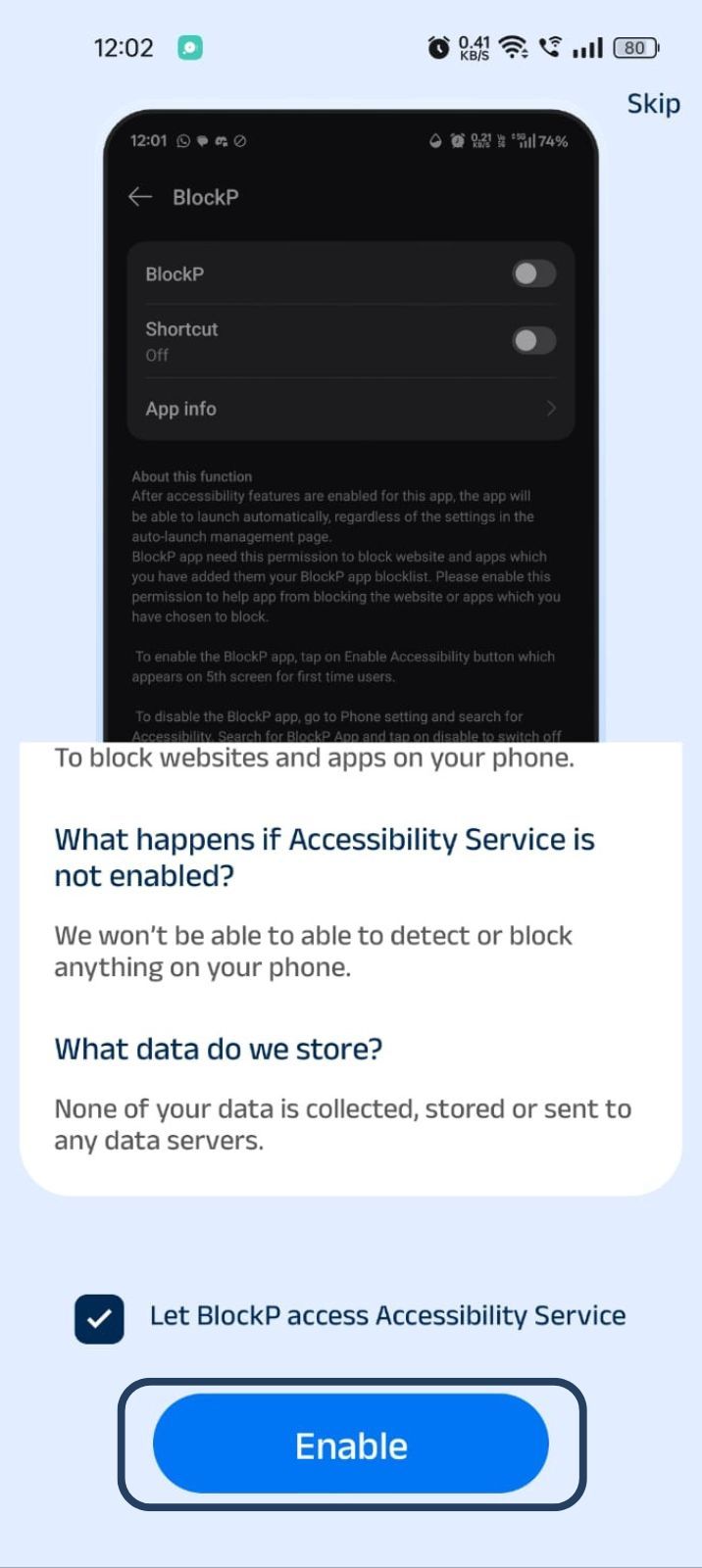
- Next, click on the downloaded apps button.
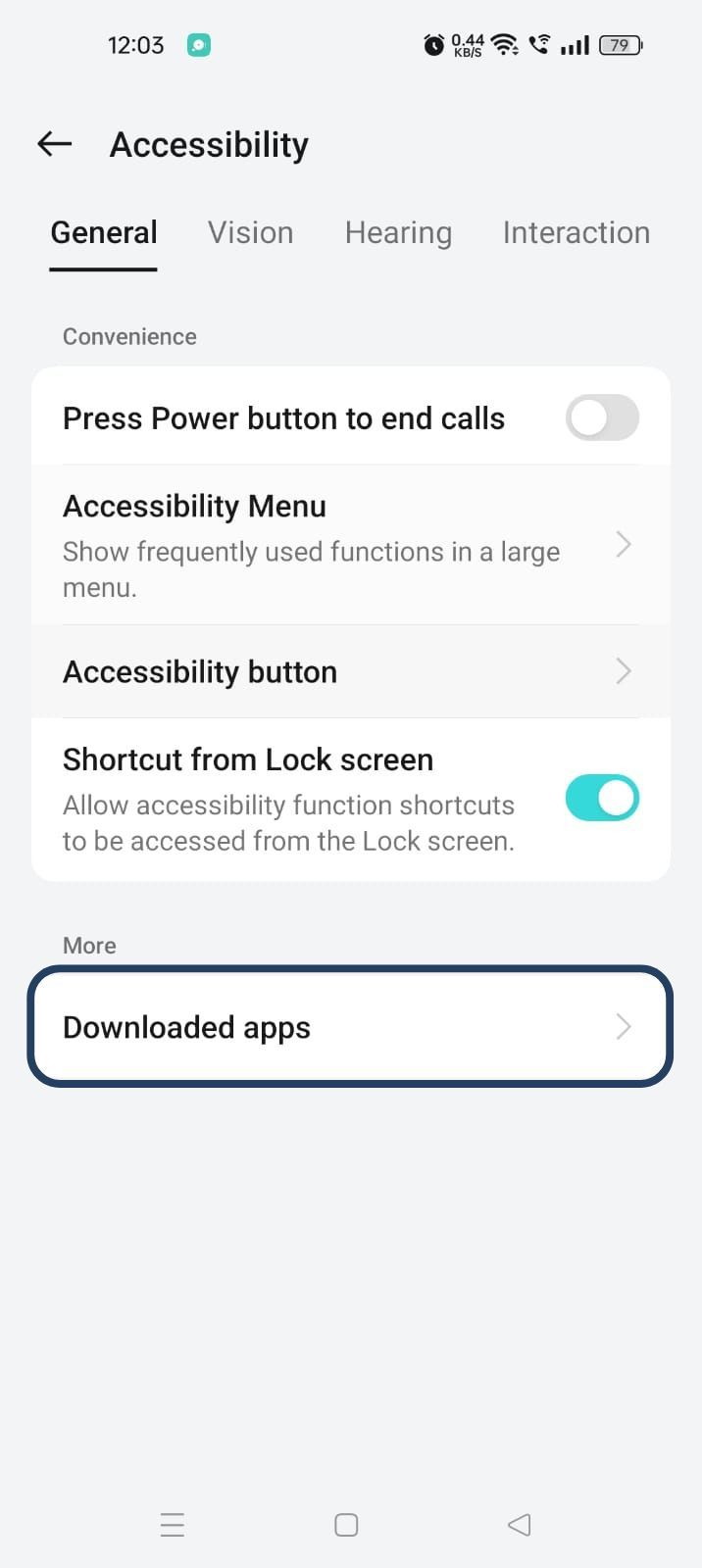
- Now, you will find Blockp - click on BlockP.
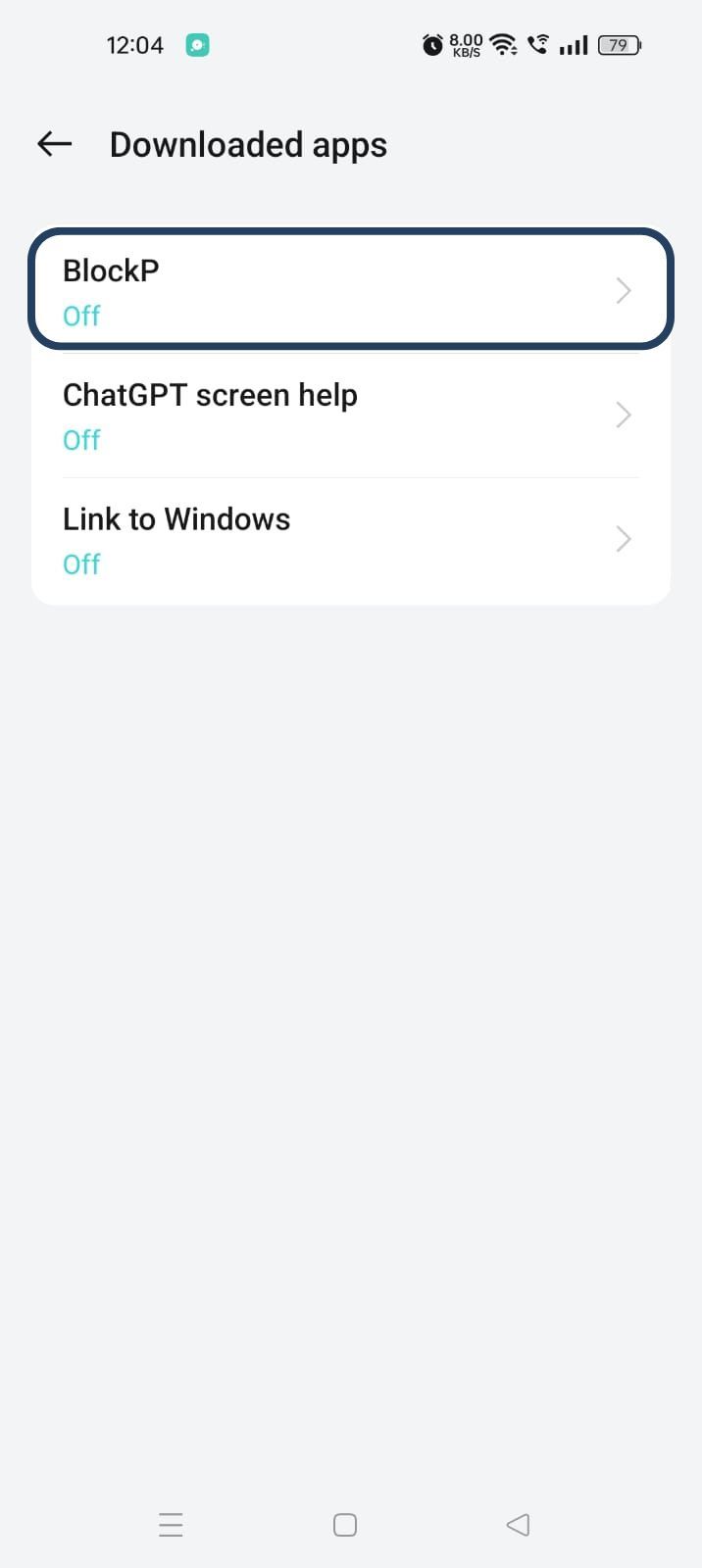
- The new screen will show a toggle in front of BlockP - enable the toggle and then click on the Allow button to complete the accessibility permission.
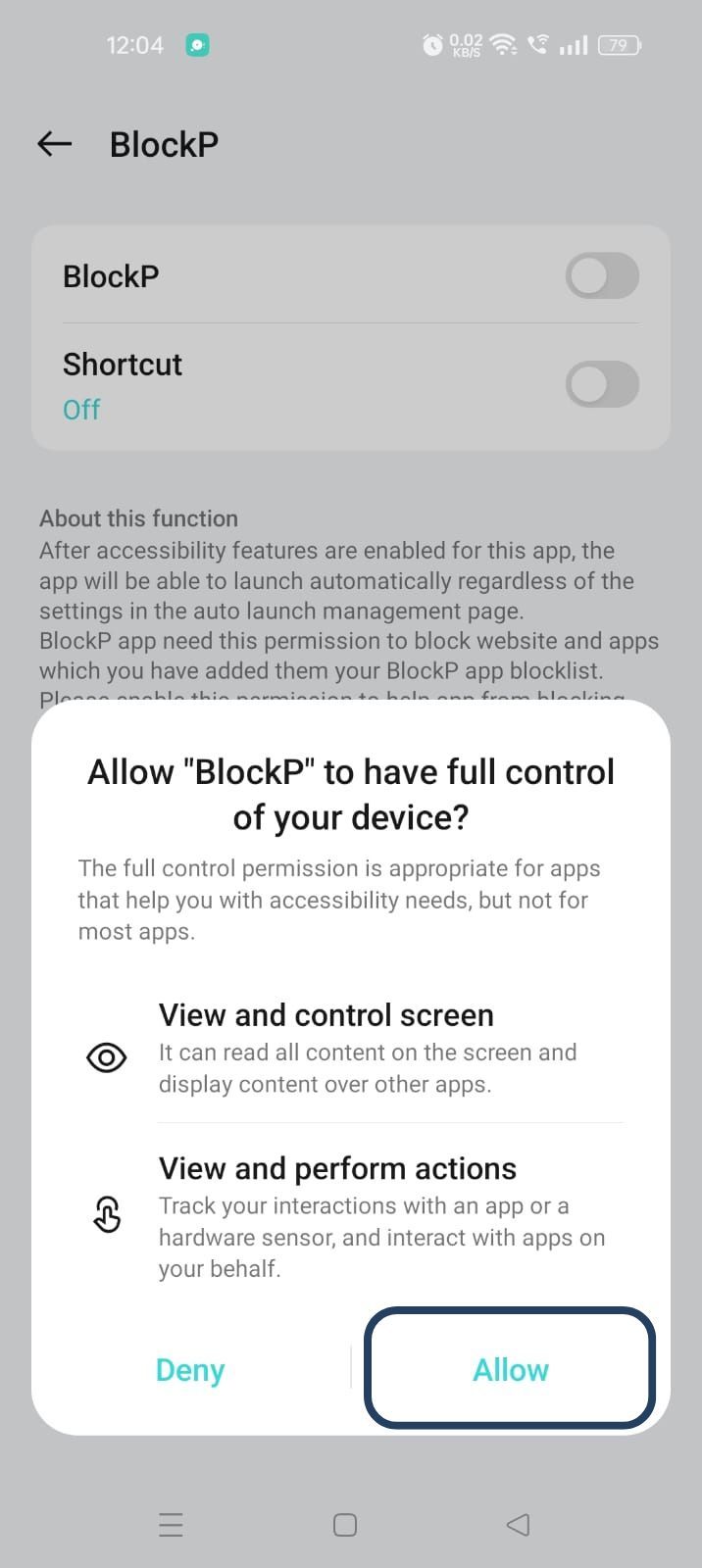
2. Overlay - lets BlockP show you a blocked screen and message when you try to access adult content.
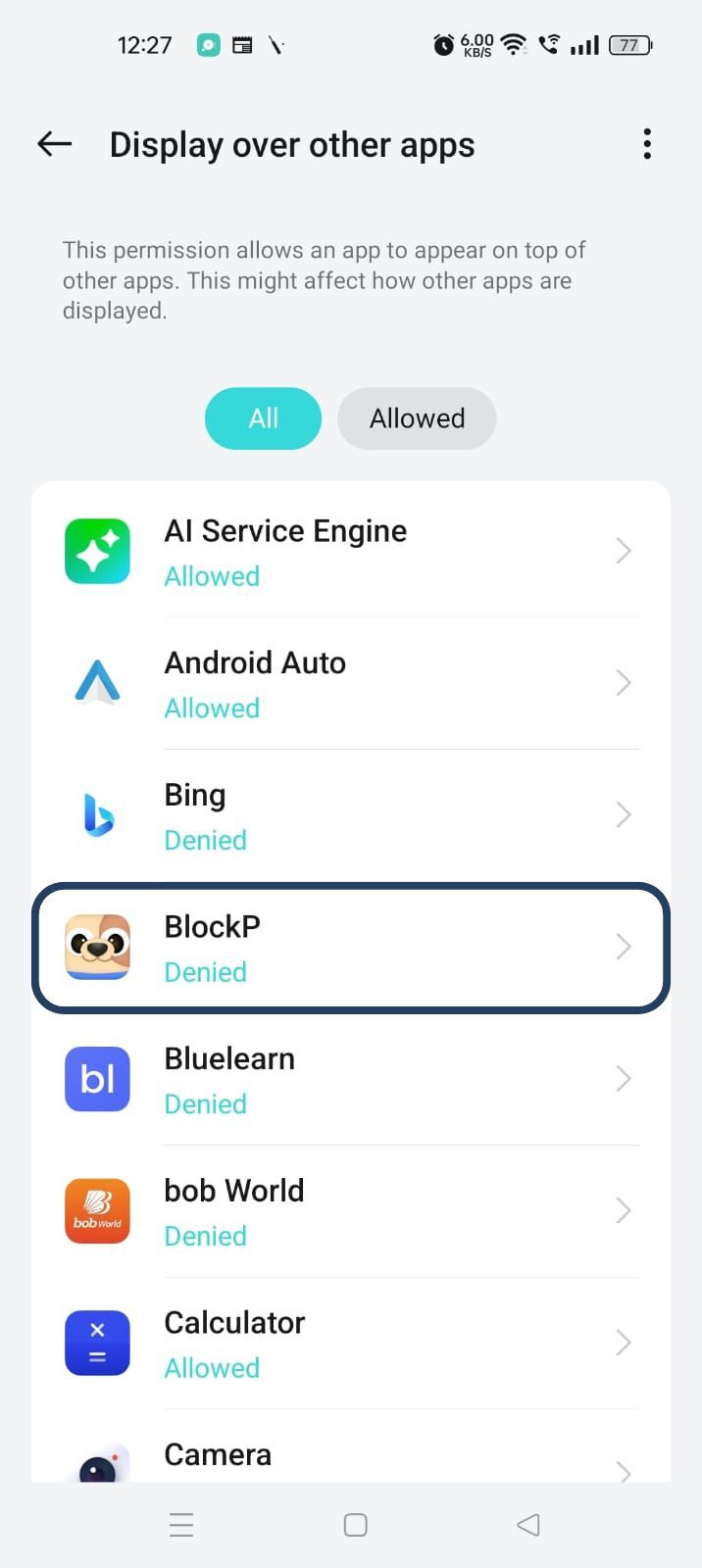
- Click on Overlay permission toggle.
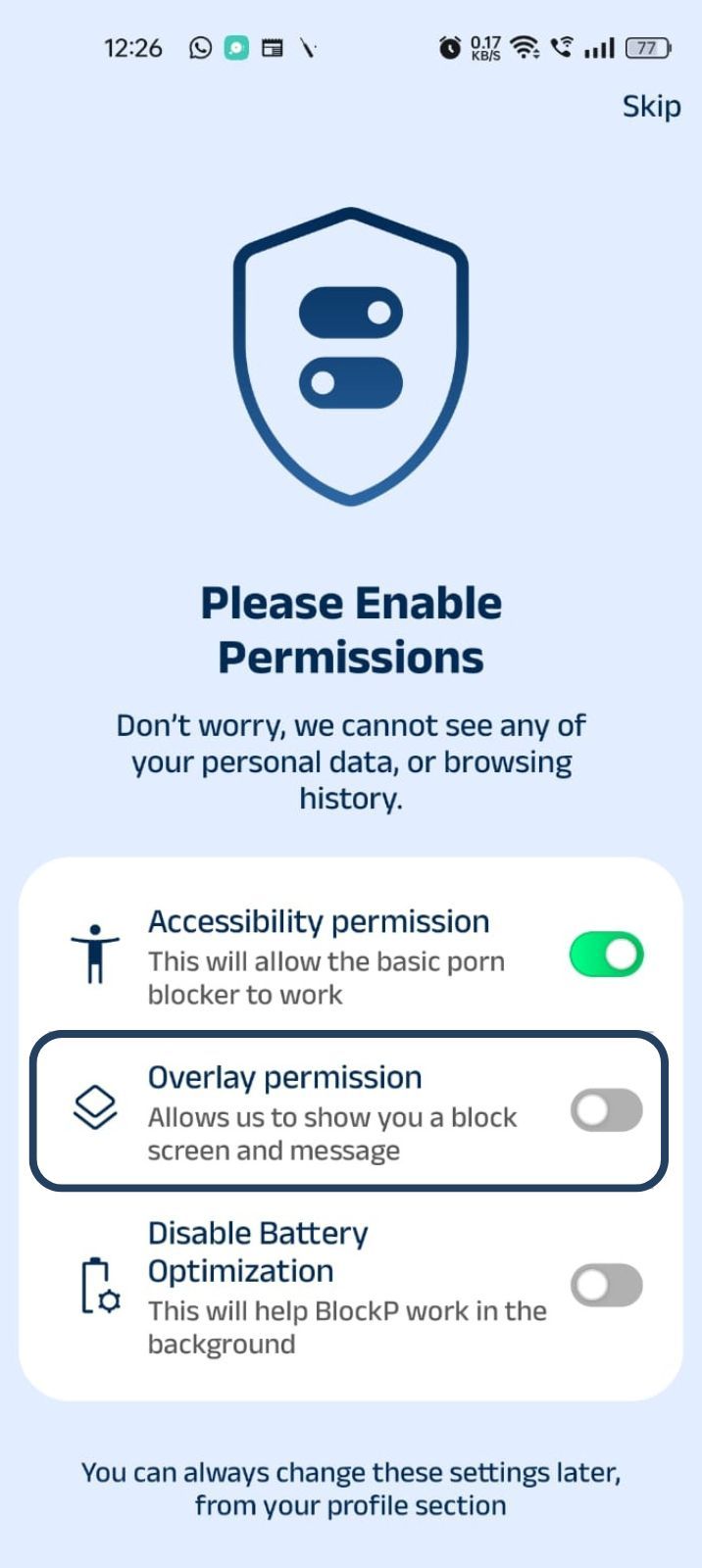
- You will get a menu with a list of apps titled - Display over other apps. Find BlockP in this list and click on it.
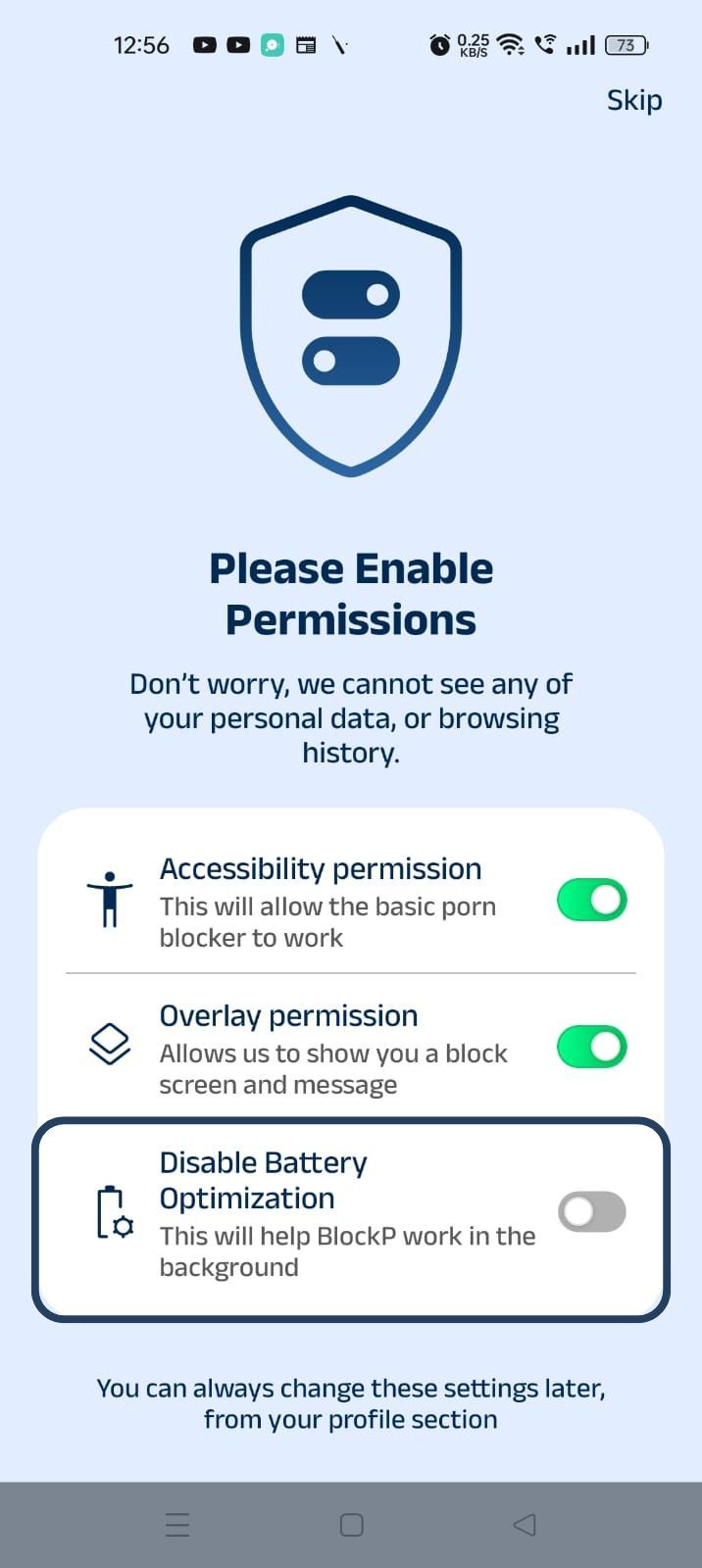
3. Disable battery optimization - so that BlockP can keep working in the background to filter adult content.
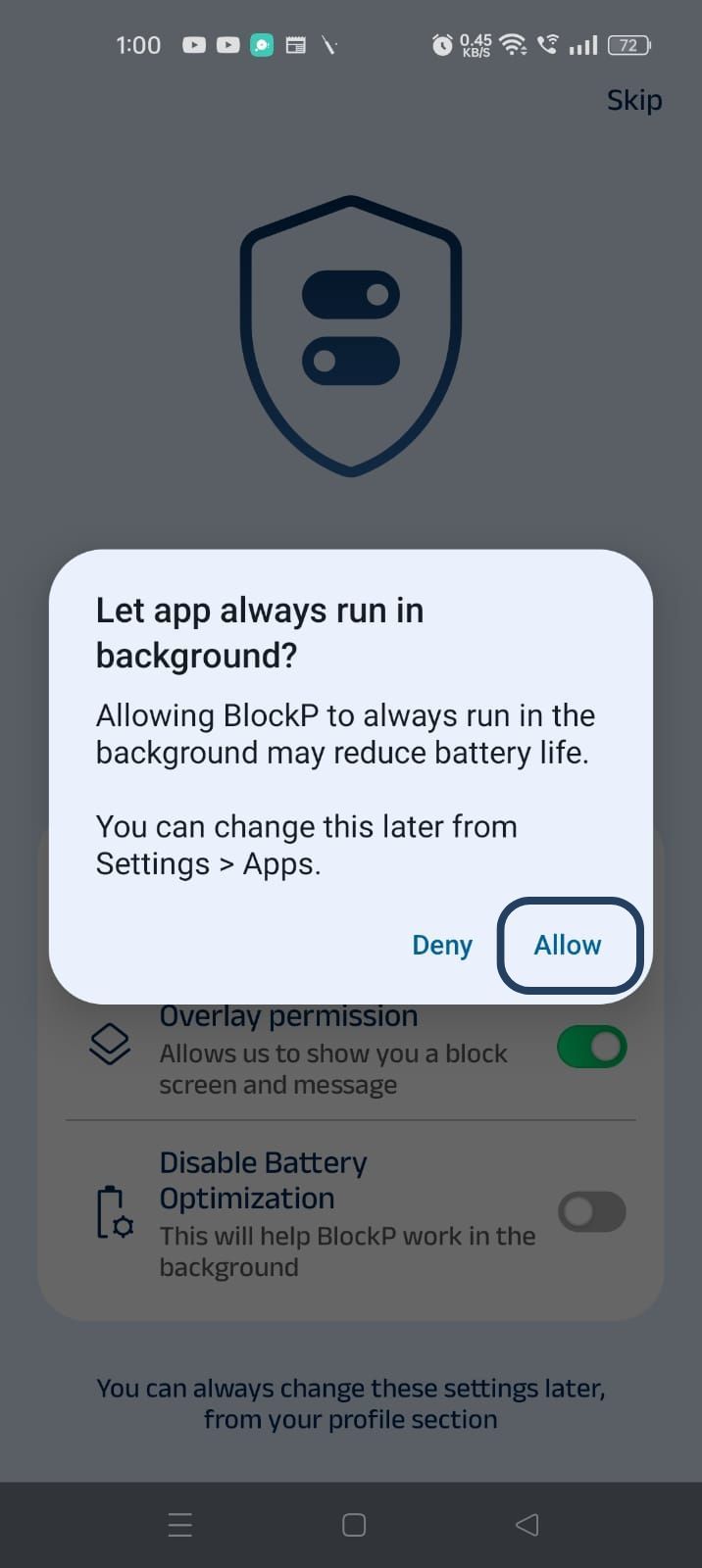
- Click on the Disable battery optimization toggle
- When prompted, tap Allow to let BlockP run in the background. This helps BlockP stay active and block content without interruption.
Step 4: Select Your Adult Content Blocking Mode
On the BlockP home screen, you will see three adult content blocking options:
- Off - There is no restriction; you can access the adult content freely.
- Normal Mode for basic adult content blocking (AI-powered blocking of all nude content, network-level blocking of URLs, keyword-based blocking, and blocking all unsupported browsers)
- Strict Mode for complete adult content blocking, including nudity and semi-nude content across your Android device.
Select the Normal or Strict Mode based on your preference.
Now BlockP will instantly begin to block adult websites on Android.
Why Android's Built-in Settings Aren't Enough
Are there any built-in tools that we can use to find an answer to the question, "How to block adult content on Android?"
Android phones have two built-in settings for controlling what you can see - Google Family Link and Digital Wellbeing settings.
Both these features are really useful for managing screen time limits and app approvals.
But these built-in settings are not designed as dedicated adult content blockers - and this gap is a major concern if you are trying to quit adult content or protect your children from adult content.
Ineffective Coverage
The Google Family Link depends on Google Safe Search and controls in the Chrome browser to filter adult content. But it cannot control what happens outside Chrome, i.e., if you use another browser.
SafeSearch is limited to Google Search, and it cannot stop you if you directly type an adult website address in the address bar. Platforms like Reddit and X, which carry a lot of sexually suggestive content, are often untouched.
Hard Age Cutoff
Once the child turns 13, Google’s policy itself requires a scaling back of the supervision.
So, right when the children are entering the most vulnerable age (most children come across adult content between the ages of 10 and 17), the protections end!
The Shortcuts
The built-in settings are often limited to device-level protections. So, you can always find workarounds to bypass the protections.
According to the Family Bond Analysis survey, 66% of children often successfully bypass the digital restrictions that their parents have put in place. The most common methods used are switching networks, resetting the device, using another browser, etc.
Only 47% of the parents actually use parental control settings that are there on their child’s smartphone. Many parents abandon the settings because they feel that the settings are too complicated or that they are too easy to bypass - so, why bother?
Digital Wellbeing - Not a Content Filter
The Digital Wellbeing tools are built to manage screen time and app usage limits. It does not prevent the adult content from loading on your phone. So, not at all useful as a protection for children.
These tools basically put the responsibility on the user, that they should exercise their willpower and respect the digital boundaries. Which is a very unrealistic expectation for someone struggling with cravings for adult content.
Why BlockP Works Where Built-In Settings Can Not
The greatest drawback of Android's built-in settings is that they are not specifically solving the problem of adult content. So, there will always be a risk of accidental exposure and overriding of the controls.
A specialized adult content blocker for Android like BlockP effectively addresses these gaps with AI-powered adult content detection in real-time.
Easy to set up and hard to bypass
How to block adult content on Android - the answer to this question becomes super simple with BlockP.
You can just download, install the app, and then pick either standard or strict adult content blocking. You don’t have to add a list of websites to be blocked or block any specific app that you feel is risky.
As it works at the network level, bypass techniques like guest mode or incognito mode or using another browser cannot let you slip past BlockP Android adult content blocker’s filters.
In the case of Android's built-in settings, you can override them with just a couple of clicks. But for BlockP you can enable settings to prevent uninstalling the app, reboot the app, and lock the settings with a password.
Why Choose BlockP Over Other Android Adult Content Blockers
| Feature | BlockP | Google Family Link | Bark | Covenant Eyes |
|---|---|---|---|---|
| Cost | Free (core features) | Free | Paid only | Paid only |
| Blocks adult content on-device with AI | Yes | No (search-level only) | No (alerts only) | No (alerts only) |
| Works across all browsers, not just Chrome | Yes | No | Partial | Partial |
| Blocks in Incognito/private mode | Yes | No | Partial | Partial |
| Usable by adults for self-control | Yes | No (child accounts only) | No | Yes |
| Prevents uninstall/tampering | Yes (Premium) | Yes, until age 13 | Yes | Yes |
Frequently Asked Questions
Can I block adult content on Android for free?
Yes. You can use the free version of BlockP to block adult content and adult content on Andriod.
Does BlockP work on Chrome for Android?
Yes. BlockP can block adult content on the Chrome browser for Android.
Can BlockP block Incognito Mode?
BlockP’s adult content filters run at the network level and at the device level. So, browser shortcuts like using guest mode or incognito mode will not work.
Can I block specific websites?
Sure. Just add the website address to BlockP’s blocklist (or even the keyword in the website’s name), and BlockP will instantly block the specific website.
Does BlockP work without rooting my phone?
Yes. BlockP works on the standard Android phones using the built-in accessibility features. You don’t have to root your phone or install any custom firmware; you can directly download the BlockP app from the Google Play Store.
Is BlockP safe to use?
BlockP does not share any of your browsing data with external servers. All adult content detection and filtering happens only on your device. It only needs permissions that are required to detect and block adult content across your apps.