How to Block Social Media on Chrome Using BlockP Extension
Learn how to block social media websites on Chrome using the BlockP Chrome Extension. Reduce distractions, improve productivity, and stay focused.
Get Started with BlockPWhen it comes to the time their teens spend on social media, parents have two major worries – that their child will get exposed to explicit content and that they will end up wasting a lot of time online. This worry often makes the parents look for ways to block social media websites on Chrome.
BlockP's social media blocker is made for protecting you from the distraction of social media.
It helps parents to protect their children, helps the students to stay focused when they are working on their computer, and helps professionals to stay free of distractions during work sessions.
How to Enable Social Media Blocking in BlockP Chrome Extension (Step by Step)
Step 1: Install the BlockP Chrome Extension
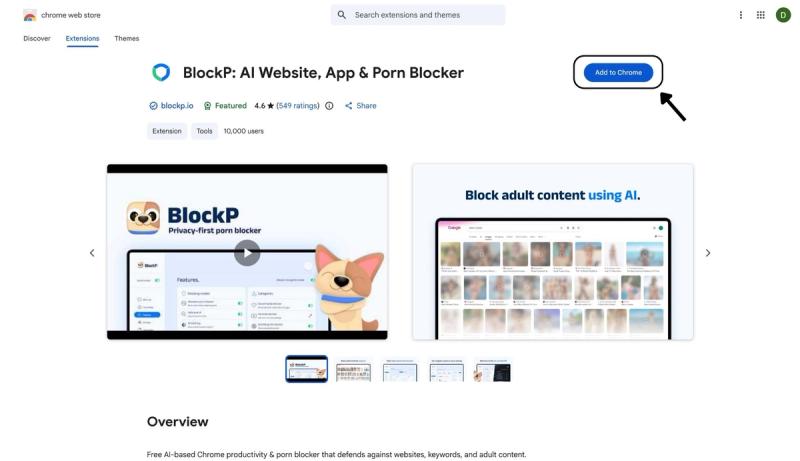
- Go to the Chrome Web Store and search for “BlockP,” or visit the BlockP Chrome Extension page directly.
- Select “BlockP: AI Website, App & Porn Blocker”
- Click “Add to Chrome.”
Step 2: Add Extension
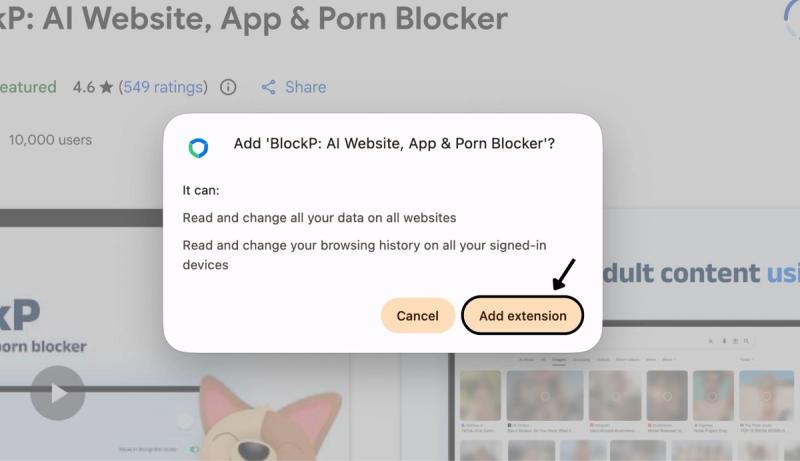
Click on ‘Add extension’ in the pop-up to add the BlockP - porn blocker extension
Step 3: Get Started with BlockP
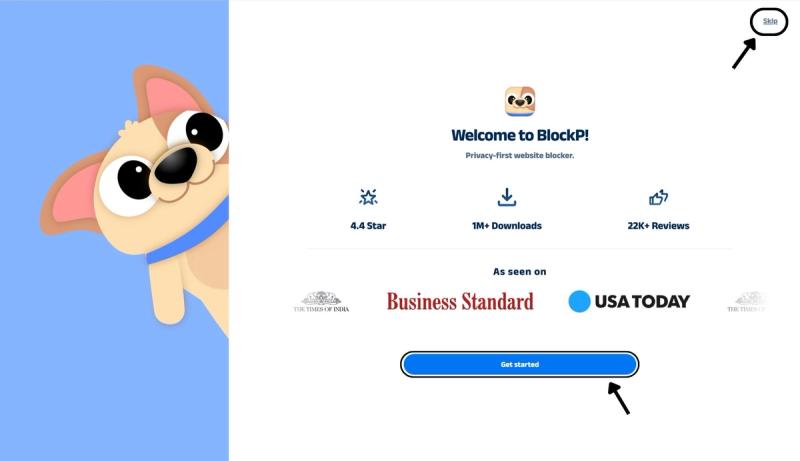
- A new web page will open – click on the “Get started” button at the bottom of the page.
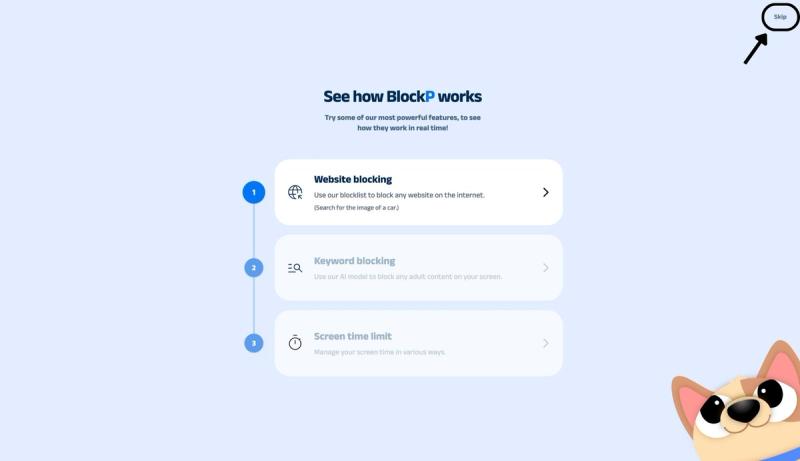
- If you don’t want to answer the questions, click “Skip” in the top-right corner. You’ll then be taken to the login or sign-up screen to continue using the extension.
Step 4: Sign In or Sign Up on BlockP Extension
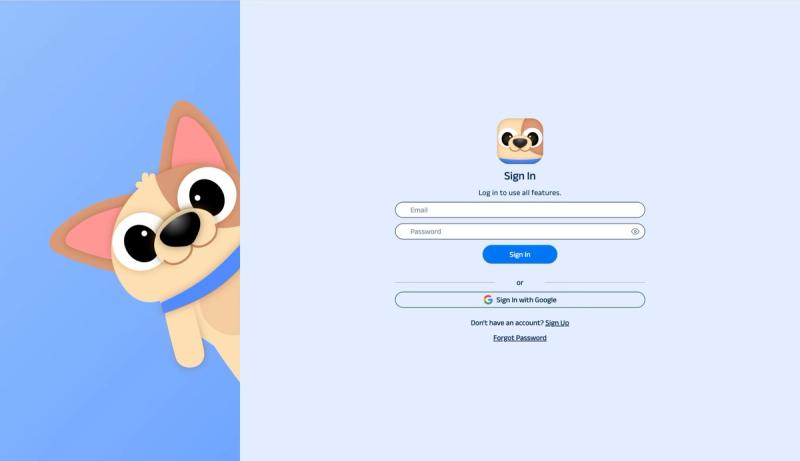
- Enter your email and password, then click “Sign In.” You can also click “Sign In with Google” to use your Google account.
- If you don’t have a BlockP account, click “Sign Up” to create one.
- After signing in, you’ll be automatically redirected to “See How BlockP works” Screen
Step 5: See How BlockP Works
After signing in or creating an account, you’ll see the “See how BlockP works” screen.
- You can explore the interactive guide to learn how features such as Website Blocking, Keyword Blocking, and Screen Time Limits work.
- If you already know how BlockP works or want to skip the guide, click “Skip” in the top-right corner.
After exploring how BlockP works or clicking the “Skip” button, you’ll be redirected to the extension dashboard, where you can access and manage features.
Step 6: Enable the Social Media Blocker
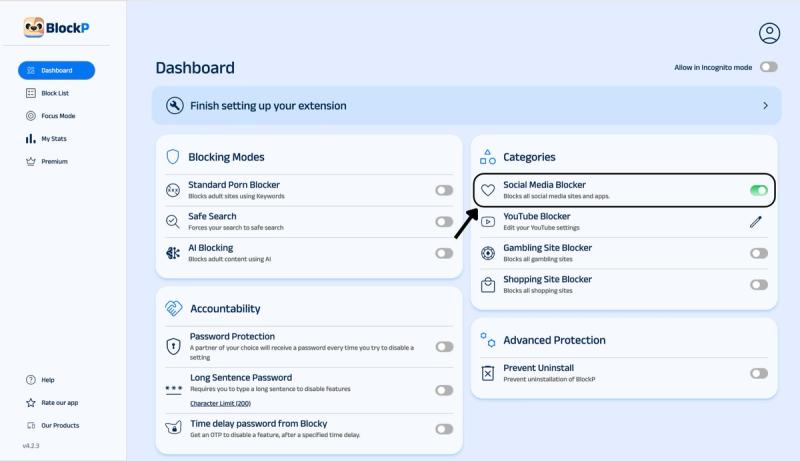
In the BlockP dashboard, navigate to the Categories section. Here you will find options for social media blocking, YouTube blocking, and gambling and shopping site blockers.
Slide the toggle next to the Social Media Blocker option to Block Social Media Websites on Chrome.
Why Block Social Media Websites on Chrome?
Have you thought about how much time we are spending on social media?
Teens are spending close to 4.8 hours per day on social media, and 45% of teens admit that they feel like they are spending too much time on social media.
This increasing social media use is concerning because the amount of time you spend on social media platforms has direct consequences on mental health.
- Teens who restricted their social media use to 10 minutes per platform per day were less lonely and less depressed than teens who browsed social media as usual.
- Teens who limit their social media use to 30 minutes per day are less anxious, depressed, and lonely (even if they occasionally go over the limit).
And this social media watching does not happen in contained sessions. The fact that one in five US teenagers admits to being constantly on TikTok and YouTube shows that social media keeps running in the background throughout the day.
The near-constant checking and the infinite scroll design of social media make it very hard to resist. So, will power or good intention alone often fail to limit our social media use.
That is why we need the protection of BlockP to block social media websites on Chrome.
Benefits of Using BlockP's Social Media Blocker
We have powerful habit loops that compel us to keep repeating patterns out of familiarity rather than a real desire. So, you will often find mindlessly opening a social media website even when there is no notification or there is no real update to be checked.
When you block social media websites on Chrome with BlockP, you don’t have to resist this impulse of staying hypervigilant. BlockP removes the necessity for willpower in your digital environment.
Social media often triggers comparison with others and makes us anxious about our lives. When you use BlockP to restrict social media, it saves you from the comparison trap.
BlockP helps parents to protect their children from getting addicted to social media. Equally importantly, it reduces the risk of exposure to the sexual content that is increasingly becoming common on social media.
BlockP’s social media blocker works with other features like AI-powered porn blocking for a focused digital environment that boosts productivity.
H2: Which Social Media Websites Can You Block Through BlockP Extension?
BlockP’s social media blocker covers all the major social media websites.
- Snapchat
- X (Twitter)
- TikTok
P.S. BlockP has a separate setting option for YouTube where you can hide specific features like shorts and autoplay instead of completely blocking YouTube.
Why Choose BlockP's Social Media Blocker?
| Feature | BlockP | BlockSite | StayFocusd | Cold Turkey |
|---|---|---|---|---|
| Price for core blocking | Free | Free tier capped at 3 sites | Free, unlimited sites | Free, limited features |
| AI-based porn detection | Yes | No | No | No |
| One-click social media category block | Yes | Manual, one site at a time on free plan | Manual, one site at a time | Manual, one site at a time |
| Works on Android app too | Yes | Yes (paid tiers add sync) | No, Chrome only | No, desktop only |
| Password-protected settings | Yes | Premium only | No | Yes |
Frequently Asked Questions
How do I block social media websites on Chrome?
You can Block Social Media Websites on Chrome with BlockP’s social media blocker settings.
Can BlockP block Instagram on Chrome?
You can block Instagram on Chrome with BlockP social media blocker
Can I block Facebook, X, and Reddit using BlockP?
Yes. You can block Reddit on Chrome and also block Facebook on Chrome along with X using BlockP.
Can I block YouTube on Chrome?
BlockP has a separate setting to manage YouTube and its features on Chrome.
Can I choose which social media websites to block?
BlockP lets you Block Social Media Websites on Chrome as a whole and does not give separate controls for each social media platform.
Does Social Media Blocking work automatically after setup?
Yes.
Can I temporarily unblock a website?
If you have set up an accountability partner feature, then you need to get the password from your partner every time you want to unblock social media.
Does Social Media Blocking work with AI Blocking?
You can use both BlockP features together.
Will blocking social media websites slow down Chrome?
No.
Is Social Media Blocking included in the free BlockP Chrome Extension?
Yes.