How to Enable Long Sentence Password in BlockP Extension
Learn how to enable Long Sentence Password on the BlockP Chrome Extension. Type a long sentence before disabling any block to stop impulsive unblocking.
Get Started with BlockPMost of the time porn blockers fail not because they are technologically weak but because they are easy to turn off. That is exactly why we need a porn blocker that's hard to disable.
When we are trying to quit any habit, we come across moments where our habit loops and impulses get an upper hand.
If you can disable the porn blocker with a couple of clicks, things fall apart immediately. But if you have a blocker with disable friction feature, it creates a pause, a moment where your choice and awareness can come online. So, the impulse loses the urgency, and you are able to stick to your resolutions.
The BlockP long sentence password feature is built to interrupt this impulse and help you stay in control.
How to Enable Long Sentence Password in BlockP Chrome Extension (Step by Step)
Step 1: Install the BlockP Chrome Extension
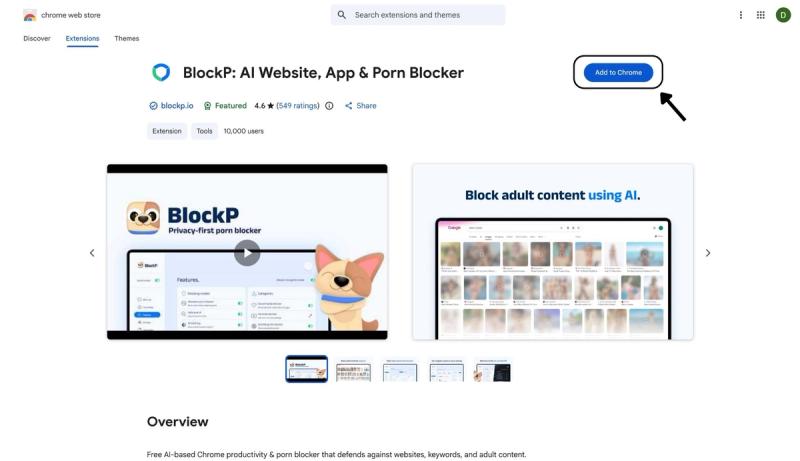
- Go to the Chrome Web Store and search for “BlockP,” or visit the BlockP Chrome Extension page directly.
- Select “BlockP: AI Website, App & Porn Blocker”
- Click “Add to Chrome.”
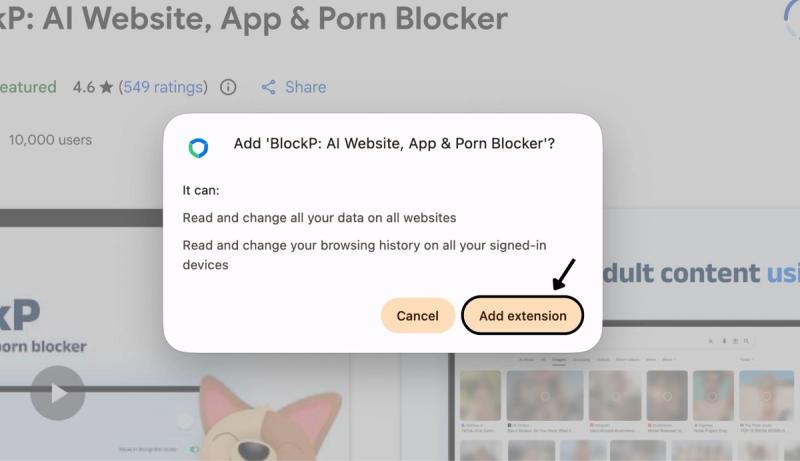
Step 2: Add Extension
Click on ‘Add extension’ in the pop-up.
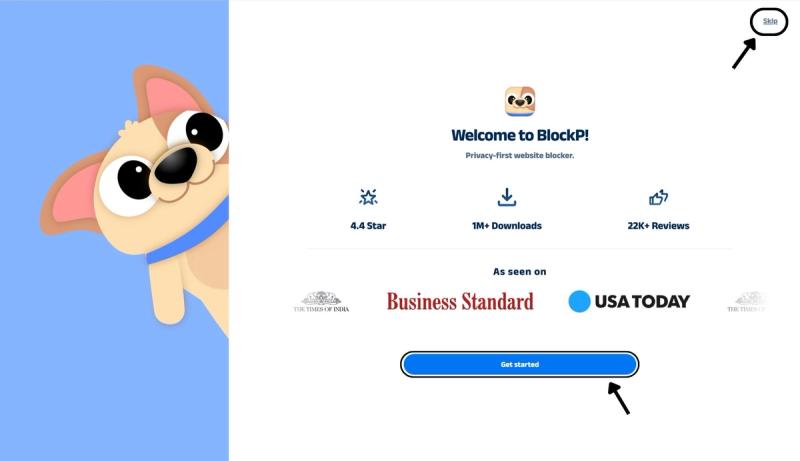
Step 3: Get Started with BlockP
- A new web page will open – click on the “Get started” button at the bottom of the page.
- If you don’t want to answer the questions, click “Skip” in the top-right corner. You’ll then be taken to the login or sign-up screen to continue using the extension.
Step 4: Sign In or Sign Up on BlockP Extension
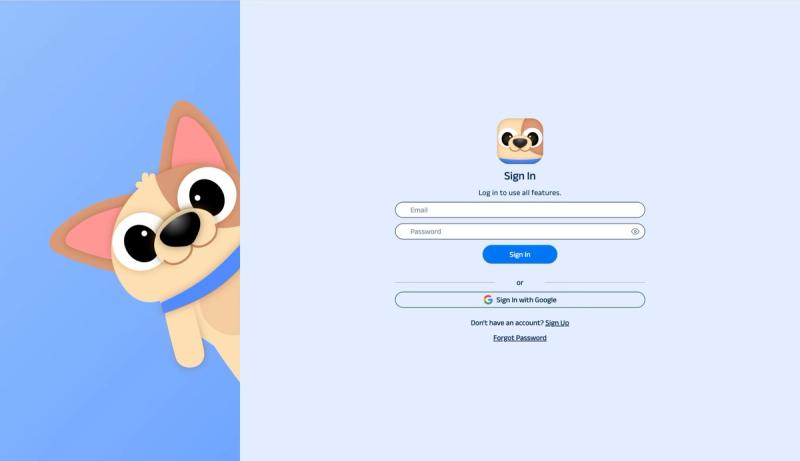
- Enter your email and password, then click “Sign In.” You can also click “Sign In with Google” to use your Google account.
- If you don’t have a BlockP account, click “Sign Up” to create one.
- After signing in, you’ll be automatically redirected to “See How BlockP works” Screen
Step 5: See How BlockP Works
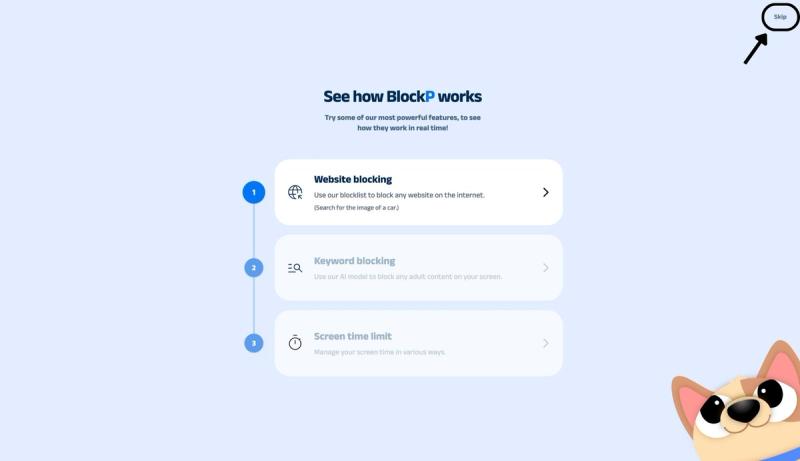
After signing in or creating an account, you’ll see the “See how BlockP works” screen.
- You can explore the interactive guide to learn how features such as Website Blocking, Keyword Blocking, and Screen Time Limits work.
- If you already know how BlockP works or want to skip the guide, click “Skip” in the top-right corner.
After exploring how BlockP works or clicking the “Skip” button, you’ll be redirected to the extension dashboard, where you can access and manage features.
Step 6: Enable Long Sentence Password in the Accountability Section
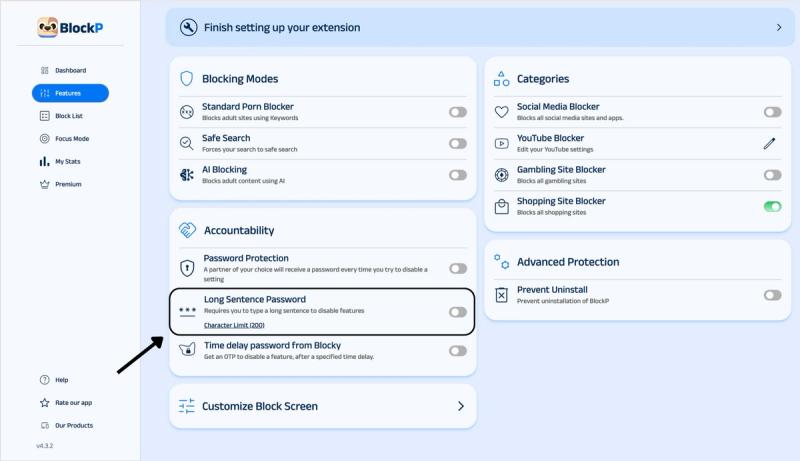
Find the accountability section in the BlockP features (you can see it below the 3 porn blocking modes).
The accountability section will have two options: Password Protection, Long Sentence Password, and Time-delay Password from Blocky. Slide the toggle next to the Long Sentence Password option to activate it.
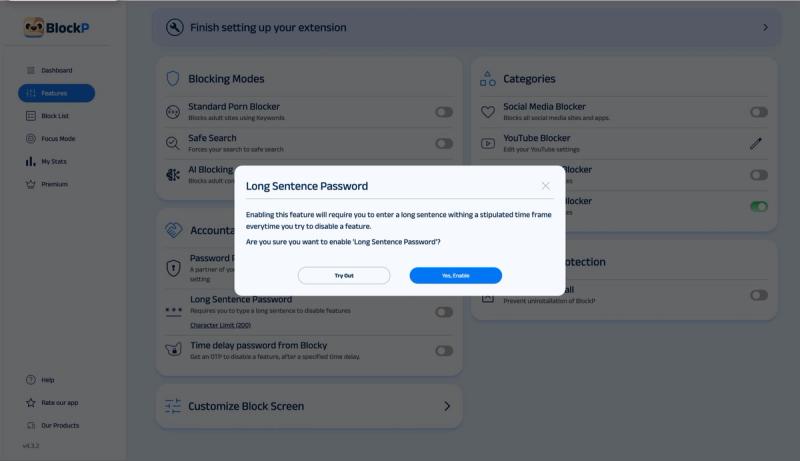
Turn on the Long Sentence Password toggle, then click “Yes, Enable” in the pop-up to activate it.
What Is the Long Sentence Password on BlockP?
The BlockP long-sentence password sentence puts a deliberate obstacle between the impulse and the action that satisfies the impulse. The long password is long and hard enough to create a pause but still feels doable, like you are still in charge.
Another key twist is that the long sentence is not a literal sentence. It is a jumble of random uppercase and lowercase letters.
You can not type it without paying deliberate attention. You cannot autofill. You can not copy and paste. It is not a simple password that you get from your accountability partner and enter within seconds.
When you are under the influence of your cravings, you are making a ‘hot decision.'
When there is a long password to be typed, it creates enough friction to break the impulse and turn the decision into a ‘cold’ one where you are more conscious of the consequences and the aftermath of your choice.
Benefits of Using BlockP's Long Sentence Password
Overcome Impulse Waves
Our urges come in waves; they hit a peak and then subside. The peak is the most intense and most vulnerable point, but given time it will often pass even when you don’t indulge the impulse. When you have to type a sentence to disable the blocker, it gives you the time when the peak of the wave can pass through.
Stops Automatic Action
A password becomes familiar when you have typed in a hundred times. But an unfamiliar long password will make a porn blocker harder to turn off because you cannot do it automatically; your brain has to engage and come out of the craving haze.
A Private Safeguard
Not all of us are yet ready to tell someone else or ask for help from someone else during recovery. A long-sentence password helps you prevent impulsive unblocking on your own.
Reduces the Frequency of Relapse
When you have a porn blocker that's hard to disable, it reduces the frequency of relapse, which over time improves confidence in recovery.
How Long Sentence Password Works in BlockP
Once you have activated the impulse control porn blocker feature with the long-sentence password, you cannot change any setting without typing in the long sentence.
So, let us say the user wants to remove uninstall protection or disable incognito mode protection. They will go to the dashboard and move the toggle - immediately BlockP displays a pop-up with the long sentence password and the text box where it has to be typed.
Until the user types it - painstaking letter by letter - the setting stays locked.
Long Sentence Password vs Password Protection: Which Should You Use?
The BlockP Blocker with disable friction feature gives you two choices for accountability. Both are designed to make BlockP a porn blocker that's hard to disable, but both options work in different ways.
Option #1: Password Protection
When you enable BlockP’s password protection, you are putting a trusted friend or a parent in control. Every time you try to change a setting, they get a 6-digit OTP in their email. Until you get this OTP from them and enter it, the settings remain locked.
If you have a person in your life that you can trust to support you and not judge you during the moments of vulnerability, then password protection is the option you should choose.
Option #2: Long-sentence Password
BlockP’s long-sentence password is a solo friction layer that you can use on your own. It creates an internal pause between you and the impulse. No one gets notified, and nobody has to approve.
If you are not yet comfortable with looping in another person, then the long-sentence password is a solid starting point to keep you safe.
PS: On BlockP, options 1 and 2 are not either/or choices. Many users enable them together to create a stronger failsafe.
Why Choose BlockP's Long Sentence Password?
| Feature | BlockP | BlockerX | Cold Turkey | Freedom |
|---|---|---|---|---|
| Long-sentence typing challenge before disabling a feature | Yes | No | No | No |
| Partner-controlled password protection | Yes | Yes | No | No |
| AI-based content detection | Yes | Partial | No | No |
| Free tier available | Yes | Limited | Limited | No (trial only) |
| Works across Chrome, Android, iOS | Yes | Partial | Desktop-focused | Yes |
Frequently Asked Questions
What is the long sentence password in BlockP?
BlockP’s long-sentence password is an accountability feature where a pause is created by asking you to type in a long sentence, letter by letter.
How do I enable Long Sentence Password?
Long-sentence password setting is available on the accountability section of the BlockP dashboard.
What happens when I try to disable a feature?
BlockP triggers a pop-up with the long sentence and the text box where you have to type the long sentence.
How long is the sentence I have to type?
200 characters.
Can I set my own sentence, or is it random?
It is a random set of letters.
What is the difference between long-sentence passwords and password protection?
Password protection: Your accountability partner gets the 6-digit password in their email, and you have to enter it if you want to change a setting.
Long-sentence password: You have to manually type a long sentence within the BlockP dashboard.
Can I use Long Sentence Password and Password Protection together?
Yes.
Does Long Sentence Password work with AI Blocking and Social Media Blocking?
Yes.
Will Long Sentence password slow down Chrome?
No.
Is Long Sentence Password included in the free BlockP Chrome Extension?
Yes.