How to Lock BlockP Extension Settings with an Accountability Partner
Learn how to enable Password Protection on the BlockP Chrome Extension. Add an accountability partner who holds your password so blocks can't be turned off.
Get Started with BlockPUsing a porn blocker with accountability partner adds a layer of real-life protection to your digital environment.
No matter how good your porn blocker is or how strong you think your intentions are, there will come a moment of temptation so overwhelming that only technology barriers cannot keep you safe anymore.
BlockP password protection steps in during that exact moment so that your partner or a parent can intervene and prevent a relapse. So, you cannot disable the password-protected porn blocker on a 30-second impulse and undo months of progress.
Having an accountability partner app like BlockP also ensures that when there is a genuine need, you can still access features like social media or use incognito mode without risking a relapse by uninstalling the extension itself.
How to Enable Password Protection in BlockP Chrome Extension (Step by Step)
Step 1: Install the BlockP Chrome Extension
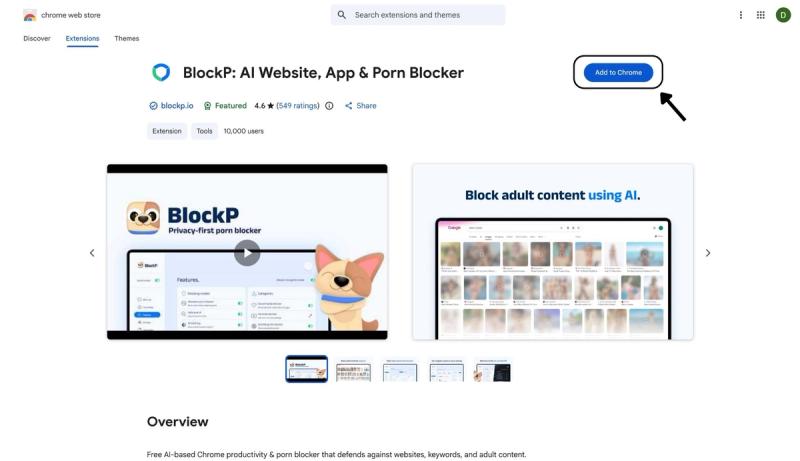
- Go to the Chrome Web Store and search for “BlockP,” or visit the BlockP Chrome Extension page directly.
- Select “BlockP: AI Website, App & Porn Blocker”
- Click “Add to Chrome.”
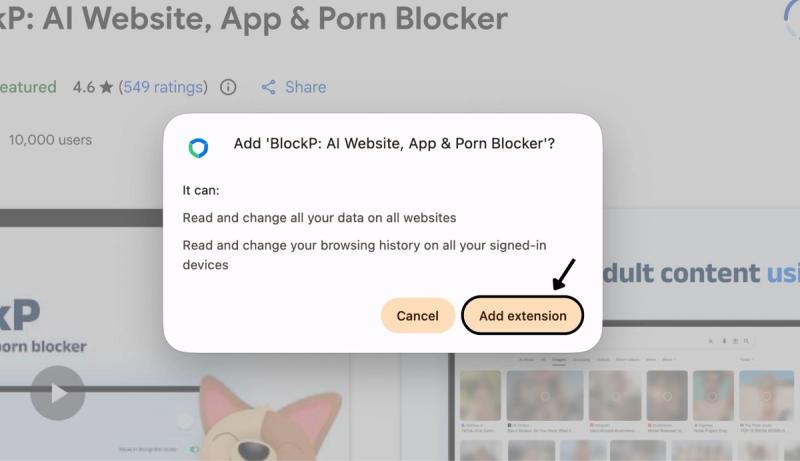
Step 2: Add Extension
Click on ‘Add extension’ in the pop-up.
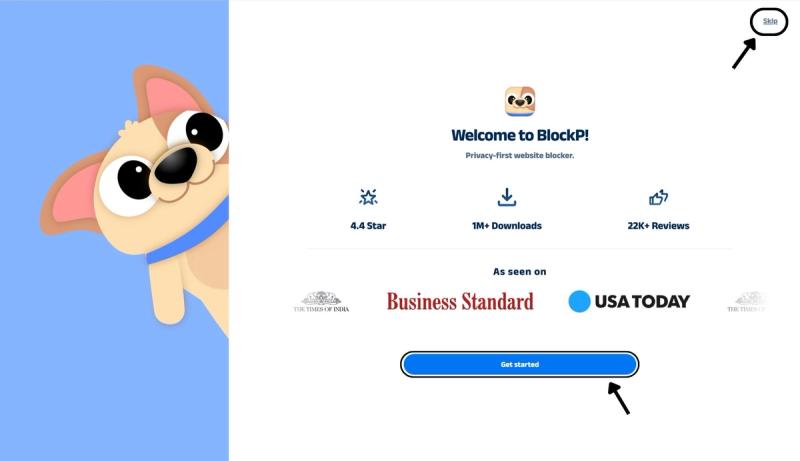
Step 3: Get Started with BlockP
- A new web page will open – click on the “Get started” button at the bottom of the page.
- If you don’t want to answer the questions, click “Skip” in the top-right corner. You’ll then be taken to the login or sign-up screen to continue using the extension.
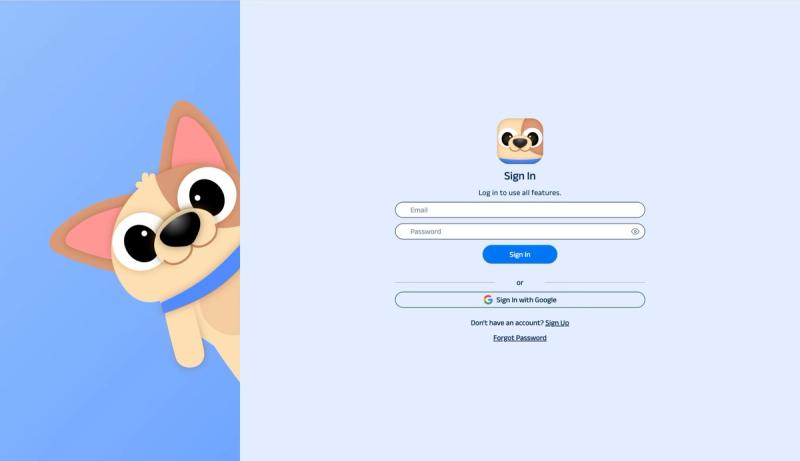
Step 4: Sign In or Sign Up on BlockP Extension
- Enter your email and password, then click “Sign In.” You can also click “Sign In with Google” to use your Google account.
- If you don’t have a BlockP account, click “Sign Up” to create one.
- After signing in, you’ll be automatically redirected to “See How BlockP works” Screen
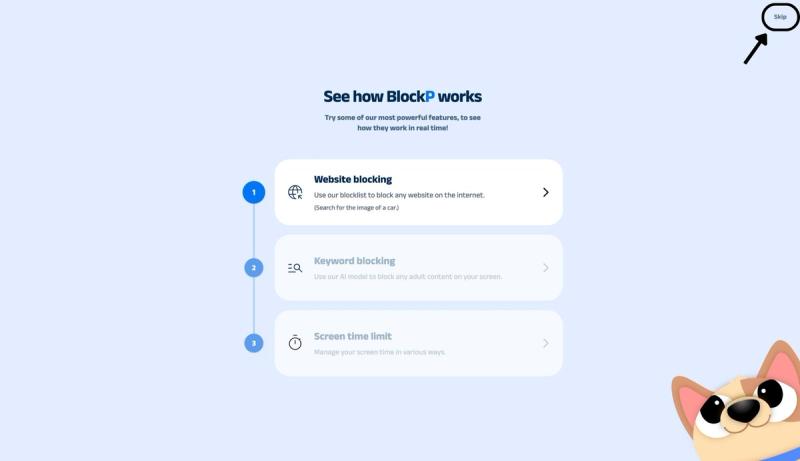
Step 5: See How BlockP Works
After signing in or creating an account, you’ll see the “See how BlockP works” screen.
- You can explore the interactive guide to learn how features such as Website Blocking, Keyword Blocking, and Screen Time Limits work.
- If you already know how BlockP works or want to skip the guide, click “Skip” in the top-right corner.
After exploring how BlockP works or clicking the “Skip” button, you’ll be redirected to the extension dashboard, where you can access and manage features.
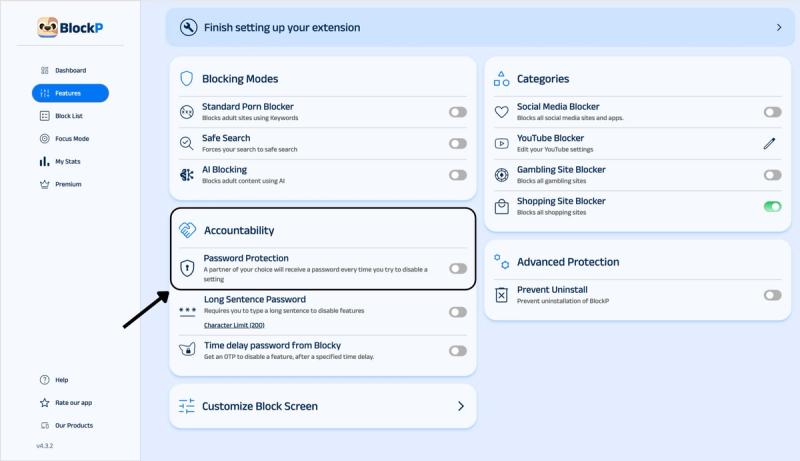
Step 6: Enable Password Protection in the Accountability Section
Find the accountability section in the BlockP dashboard (you can see it below the 3 porn-blocking modes).
The accountability section will have three options – Password Protection, Long Sentence Password, and Time delay password from Blocky.
Slide the toggle next to the password protection option to activate it.
Step 7: Add Accountability Partner Details and Confirm with OTP
Now BlockP will give you a pop-up where you have to enter your partner’s email ID and confirm it.
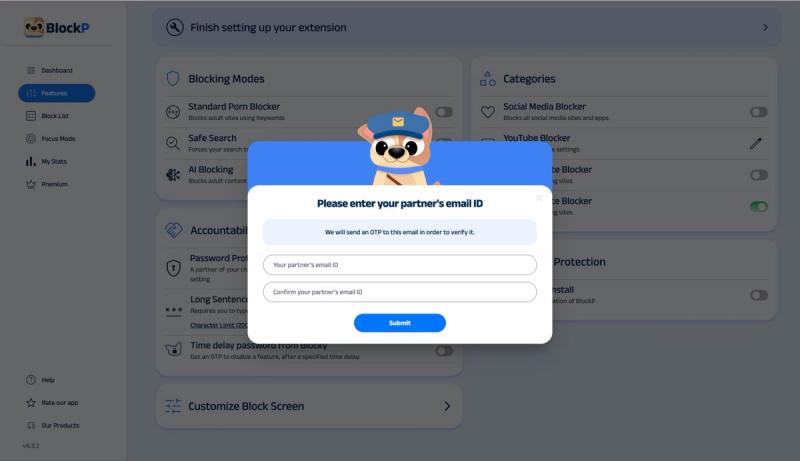
Then click on the send OTP button.
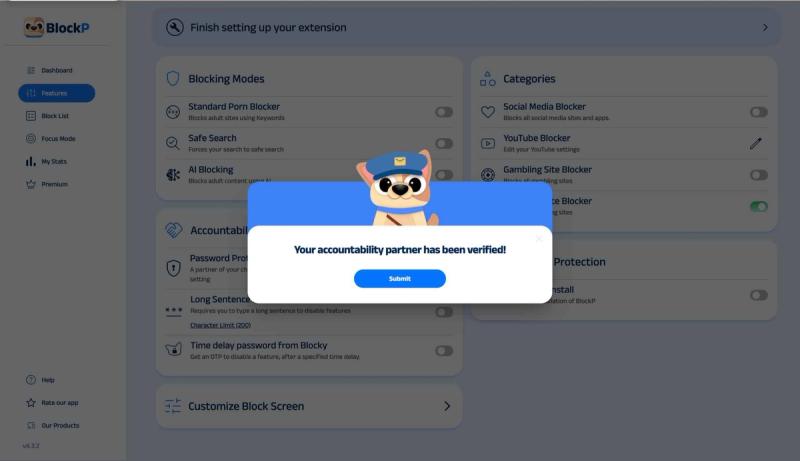
Ask the accountability partner to check their email and share the OTP. Once you have entered the OTP, you will get the confirmation message from BlockP “Your accountability partner has been verified!”
What Is Password Protection on BlockP?
When someone is trying to quit porn, there are two versions that will be making decisions.
A present version that desperately wants to quit porn and therefore installs a porn blocker extension and carefully sets up all the filters.
A future version, not essentially weak but powerless and impulsive and reeling under the dopamine habit loop that will override the present version during a moment of vulnerability.
BlockP’s porn blocker settings are designed to support the first version.
And BlockP password protection is in place to safeguard the second version.
When you turn on the password protection, you can add a trusted friend, your spouse, partner, or a parent as your accountability partner. Every time you want to change any BlockP setting, they will get a password on their email, and only when they share that password can you make changes to BlockP settings.
Why Use an Accountability Partner?
We all know that our judgment often gets compromised and our resolve often shifts when we are under stress or craving.
Your porn blocker with accountability partner is a strategy for restricting your own future choices. Instead of taxing your willpower and risking relapse, you are asking someone else to make that decision for you.
An accountability partner app like BlockP is not about someone else controlling you. It is about
Benefits of Using BlockP's Password Protection
- A porn blocker with accountability partner feature like BlockP closes the just-this-once loophole that keeps you in an endless cycle of relapse and restart.
- A human check-in with the password-protected porn blocker opens a conversation rather than making failure a silent and secret event.
- Decision fatigue is one of the main reasons why our best intentions fail. Sometimes our mental resources are so exhausted that making another choice feels overwhelming. When you lock blocker settings with password, you have to make that difficult decision once and it's done.
- Protects settings like preventing uninstallation or blocking incognito mode to stop you from finding a loophole.
- For parents, having a porn blocker that can't be disabled is a huge relief because they don’t have to monitor their children’s browsing constantly.
How Password Protection Works in BlockP
Here is exactly what happens when a child or someone who is trying to quit porn tries to disable a BlockP setting after password protection is in place.
The user tries to disable a setting.
BlockP immediately triggers an OTP (one-time password) sent to their chosen accountability partner’s email.
For the user, a pop-up appears asking them to enter the 6-digit OTP, and the setting stays locked until their partner shares the OTP and they enter it.
Why Choose BlockP's Password Protection?
| Feature | BlockP | Covenant Eyes | Accountable2You | EverAccountable |
|---|---|---|---|---|
| Partner-held password to unlock settings | Yes (OTP) | No (activity reports only) | No (monitoring, not locking) | No (reports, not locking) |
| AI image/video content detection | Yes | Limited | No | Yes |
| Free tier available for accountability partner feature? | Yes | No (paid only) | No (paid only) | Limited trial |
| Chrome extension + mobile apps | Yes | Mobile/desktop app | Mobile/desktop app | Mobile/desktop app |
| Prevents uninstall without partner | Yes | Varies by plan | No | No |
Frequently Asked Questions
What is password protection in BlockP?
When you enable BlockP password protection, your accountability partner receives a 6-digit OTP in their email, and you have to enter it to change any Block setting.
How do I set up an accountability partner?
Here is how to add an accountability partner on BlockP:
- Go to the BlockP dashboard > Accountability section
- Slide the toggle next to the accountability partner option.
- Add the email of your choice of accountability partner in the pop-up.
- Confirm with the 6-digit OTP sent to your accountability partner.
What happens when I try to disable a setting?
You will get a pop-up asking you to enter the OTP, and your accountability partner will get the OTP in their email. Only when they share it with you and you enter the OTP will you be able to disable the setting.
Can I choose who my accountability partner is?
Yes
Can I change or remove my accountability partner?
Yes
What if I forget my password?
There is no password to be remembered, as a new OTP is generated and emailed to the accountability partner with every request to change BlockP settings.
Can I disable BlockP settings without my partner knowing?
No.
Does password protection work with AI blocking and social media blocking?
Yes.
Will password protection slow down Chrome?
No.
Is password protection included in the free BlockP Chrome extension?
Yes.