How to Make BlockP Work in Chrome Incognito Mode
Learn how to enable Allow in Incognito mode on the BlockP Chrome Extension so your blocking stays active in Incognito and closes the private browsing loophole.
Get Started with BlockPIf you are not using a porn blocker that works in incognito mode, then you are not alone. Incognito mode is one of the most common gaps in home internet safety. Because in the case of Chrome, even the most advanced porn blocker has to be explicitly told to keep working in incognito mode.
Switching to incognito mode is not some clever hacking trick - it requires no skill, and most people discover its potential for sneaking porn by accident.
BlockP's incognito mode blocking intervenes exactly at this point to close this gaping loophole. So, even if you switch to private browsing mode, your porn filters and productivity features continue to work as usual.
How to Enable BlockP in Incognito Mode (Step by Step)
Step 1: Install the BlockP Chrome Extension
- Go to the Chrome Web Store and search for “BlockP,” or visit the BlockP Chrome Extension page directly.
- Select “BlockP: AI Website, App & Porn Blocker”
- Click “Add to Chrome.”
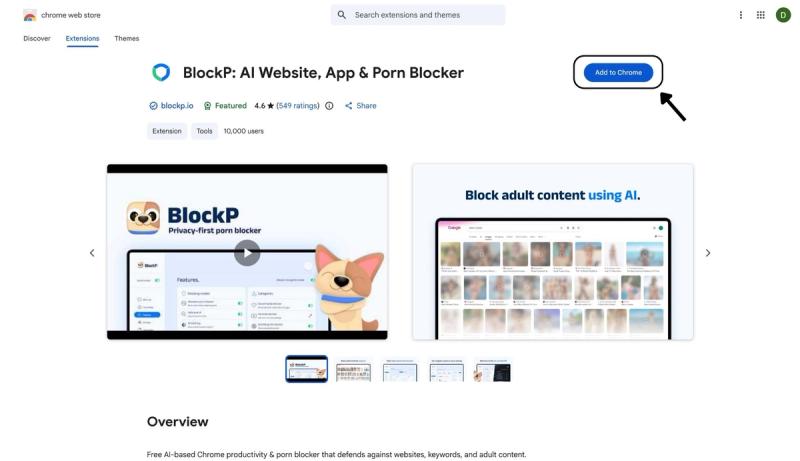
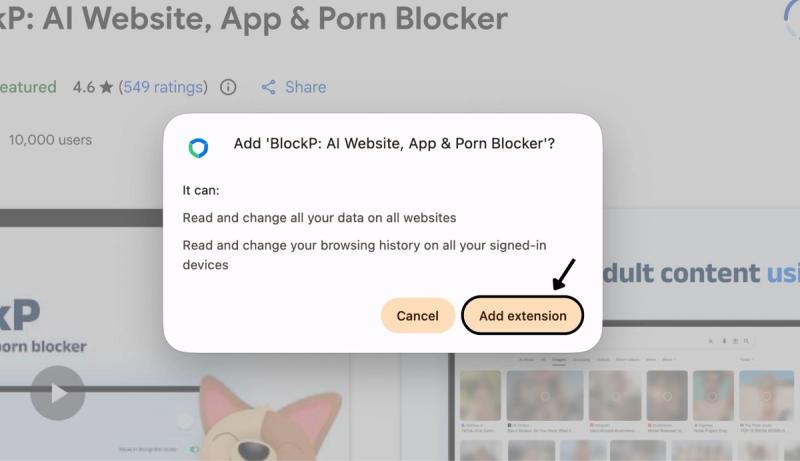
Step 2: Add Extension
Click on ‘Add extension’ in the pop-up.
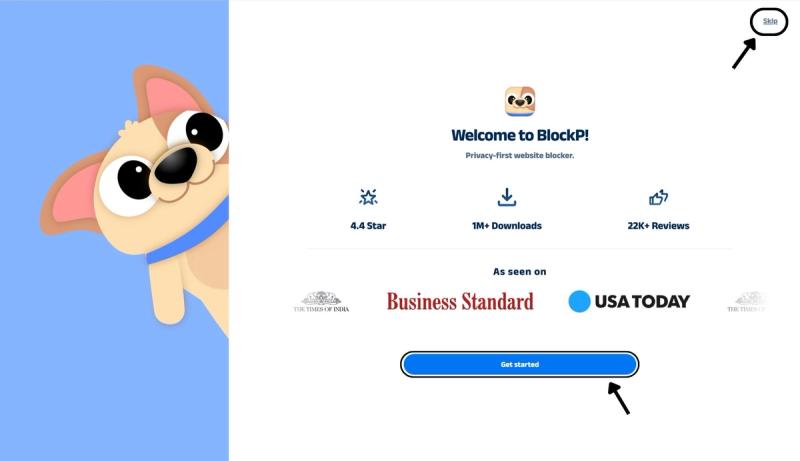
Step 3: Get Started with BlockP
- A new web page will open – click on the “Get started” button at the bottom of the page.
- If you don’t want to answer the questions, click “Skip” in the top-right corner. You’ll then be taken to the login or sign-up screen to continue using the extension.
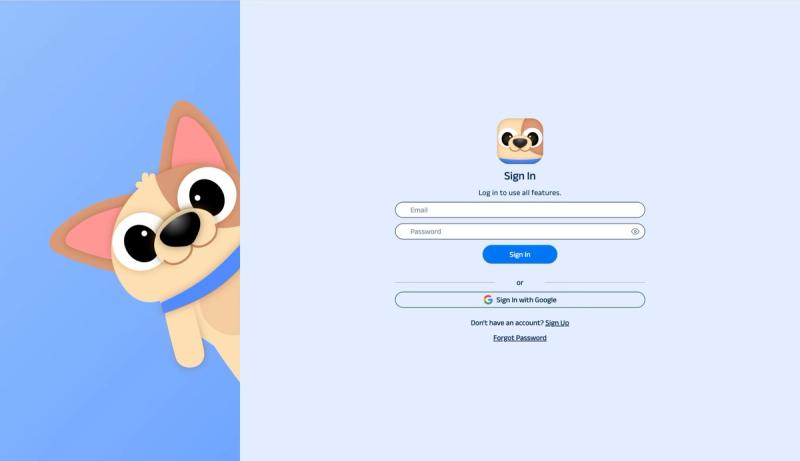
Step 4: Sign In or Sign Up on BlockP Extension
- Enter your email and password, then click “Sign In.” You can also click “Sign In with Google” to use your Google account.
- If you don’t have a BlockP account, click “Sign Up” to create one.
- After signing in, you’ll be automatically redirected to “See How BlockP works” Screen
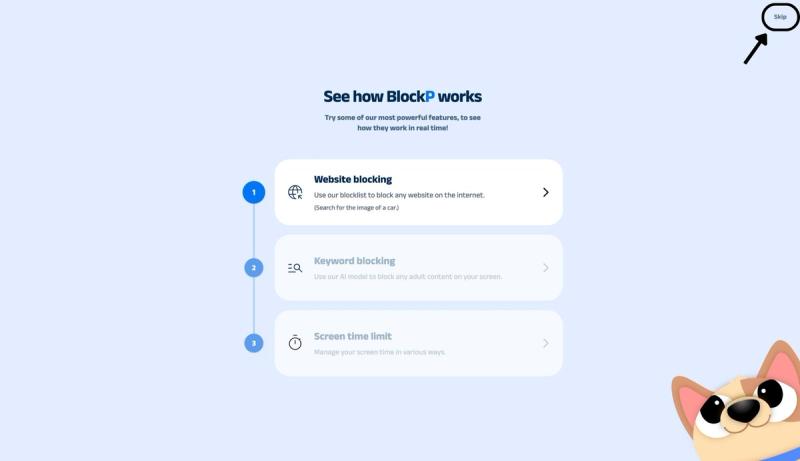
Step 5: See How BlockP Works
After signing in or creating an account, you’ll see the “See how BlockP works” screen.
- You can explore the interactive guide to learn how features such as Website Blocking, Keyword Blocking, and Screen Time Limits work.
- If you already know how BlockP works or want to skip the guide, click “Skip” in the top-right corner.
After exploring how BlockP works or clicking the “Skip” button, you’ll be redirected to the extension dashboard, where you can access and manage features.
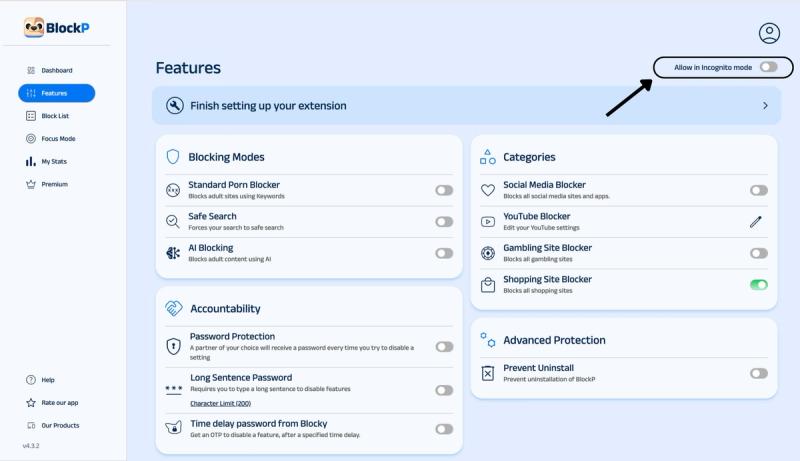
Step 6: Enable Allow in Incognito Mode
In the top right corner of the BlockP dashboard, you will find the Allow in Incognito mode option. Slide the toggle to activate it.
Now,the BlockP Chrome extension settings page will open at chrome://extensions.
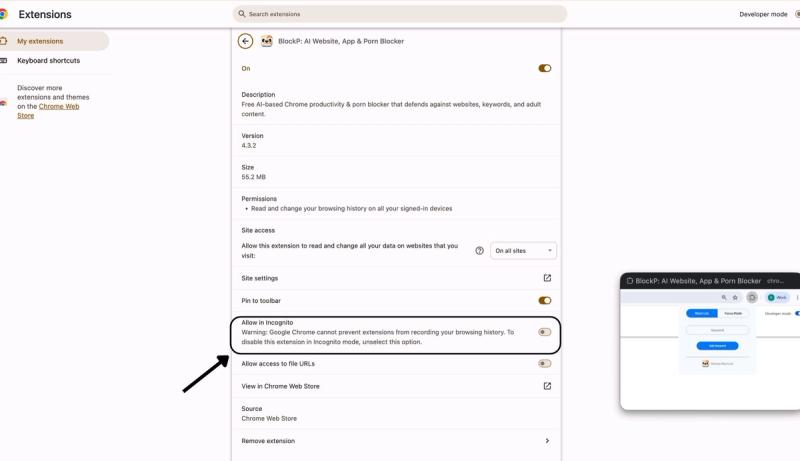
Scroll down to the Allow in Incognito option in the Chrome extension settings and slide the toggle next to it to enable the option.
What Does "Allow in Incognito Mode" Do?
When you open a Chrome tab in private or incognito mode, Chrome disables all extensions by design. So, unless you expressly grant permission for an extension to keep running in incognito mode, Chrome ditches it the moment you enter incognito mode.
When you enable BlockP Incognito mode, it tells Chrome to load the BlockP filters also in incognito mode. So, whatever BlockP protections you have set up continue working in the background even if you switch to a private tab.
Why Blocking in Incognito Mode Matters
In case of the usual extensions, the incognito feature protects privacy.
But in the case of porn, the extension being disabled in Incognito mode unless specified creates an accidental backdoor where your porn filters go offline. So, switching to incognito mode is one of the most common methods used to bypass a porn blocker.
When you enable a porn blocker that works in incognito mode, like BlockP, it closes this gap.
Can browsing in private mode protect your data?
Many people assume that private browsing mode keeps their data private, but in reality, all it does is simply stop your computer from keeping a record of your browsing data.
A joint study by Microsoft and Carnegie Mellon University and the University of Pennsylvania analyzed more than 20 thousand adult websites. One of the major findings of the study was that 93% of these sites leaked user data and tracking info. Using the private browsing mode is no protection against tracking.
For parents and families that use shared systems, the risk is even higher.
The average age of exposure to explicit content online is twelve and even ten years in many cases. And 60% of the teens say their first exposure to porn was accidental. So, if you do not have a porn blocker that works in incognito mode, your child is at risk.
Benefits of Enabling BlockP in Incognito Mode
- When a porn blocker gets between porn and their cravings, incognito mode is one of the most common workarounds available on Chrome. When you let BlockP block websites in Incognito mode, you shut down the easiest bypass method.
- When you close the Incognito loophole, BlockP ensures consistent protection to prevent slip-ups.
- Parents, schools, and many workplaces often share a single browser profile among many users. If you use the BlockP Chrome extension incognito blocking, then you don’t have to worry about someone using a private window to view explicit content and creating a risky environment for everyone else.
- If someone is using BlockP for recovering from porn addiction, then closing the loophole of incognito mode reduces the risk of relapse.
- You have to enable the content blocker Incognito Chrome only once, and it will keep working through browser updates and restarts.
How Incognito Blocking Works in BlockP
When you are using incognito mode, the end of each session means a clean slate. Your browser will not save any of your browsing history. It clears all cookies and also does not save any password or autofill information used during incognito browsing.
When you allow BlockP to keep working in incognito mode, it does not affect any of the advantages of incognito mode. It only allows BlockP inside the private browsing session.
Now BlockP can use keyword blocking, safe search enforcement, AI-powered blocking, social media blocking, etc., just like it does in a regular browsing session. So, it analyzes the web pages and content and blocks porn as usual. If you try to access an adult website in incognito mode, BlockP simply redirects you to its custom page.
Why Choose BlockP?
| Extension | Incognito Coverage | How It Handles Incognito Mode | Free Tier | Best For |
|---|---|---|---|---|
| BlockP | Yes, once enabled | One toggle in the dashboard plus the matching Chrome extension toggle activates AI-based filtering in private windows | Yes | Individuals and families wanting AI-based filtering without a monthly monitoring fee |
| BlockSite | Yes, once enabled | Requires manually opening Manage extensions > Details > Allow in Incognito | Yes, limited | Basic keyword/domain blocking across multiple browsers |
| Covenant Eyes | Yes, built-in | Scans the screen itself rather than filtering browser traffic, so incognito mode does not hide anything from it | No | Faith-based accountability groups and recovery communities |
| StayFocusd | Requires manual setup | Same Chrome "Allow in Incognito" toggle applies, but StayFocusd is built for time-limiting, not content filtering | Yes | Limiting time on distracting (non-explicit) sites like social media |
| Leech Block NG | Requires manual setup | Blocks based on schedules or total time limits with password-protected settings, but incognito needs the standard Chrome toggle turned on manually | Yes | Scheduling-based site blocking for productivity, not primarily adult content |
| FocusGuard | Requires manual setup | Explicitly notes that users must activate "Allow run in incognito mode" on the chrome://extensions page for incognito blocking to work | Yes | Lightweight distraction blocking with password protection |
Frequently Asked Questions
How do I make BlockP work in Incognito mode?
You can enable ‘allow in incognito mode’ in the BlockP dashboard and then enable 'allow in incognito' in the BlockP extension settings when you are redirected to make sure that BlockP keeps working in incognito mode also.
Does BlockP block websites in Incognito by default?
No.
Why doesn't my blocker work in incognito mode?
Unless you give explicit permission, your porn blocker cannot work in incognito mode.
Can I still be protected during private browsing?
If you enable BlockP in incognito mode also, then your private browsing sessions will be protected just like regular browsing sessions.
Does enabling Incognito blocking affect my normal browsing?
No.
Will this feature stop someone from bypassing BlockP with Incognito?
Yes.
Can I turn Incognito blocking off later?
Yes.
Does Incognito blocking work with AI blocking and social media blocking?
Yes.
Will enabling BlockP in Incognito slow down Chrome?
No.
Is Incognito mode blocking included in the free BlockP Chrome extension?
Yes.