

One looks for blocking porn on Mac to reduce problematic porn use, protect your children, or keep a work laptop clean. Often, willpower isn’t enough. You need a tool that can stay with you, even on days you want to uninstall it or switch it off.
We tested each tool on a Mac, reviewed official feature pages, help documentation, pricing pages, and user reviews. Based on our research, we covered the 7 best porn blockers for Mac in 2026.
Key Takeaways
- The right choice of porn blocker for Mac depends on whether you’re protecting yourself, a child, or every device in a household.
- For individuals working on problematic porn use, BlockP can be useful.
- Apple Screen Time, which is built into macOS, is a good free option
- For multi-device coverage, CleanBrowsing filters at the DNS level.
- Covenant Eyes sends activity reports to a trusted ally. Canopy offers the same with real-time AI filtering.
- BlockSite and Porn Block Plus protect the browsers where they’re installed.
Quick Comparison: Best Porn Blockers for Mac
Here is how the seven porn website blockers compare at a glance.
| Tool | Price (Starts from) | Browsers | Filtering | Bypass protection | Ideal Use Case |
|---|---|---|---|---|---|
| BlockP | Free; $3.33/mo | Safari, Arc, Chrome, Opera | AI | Password, uninstall prevention, partner | Personal porn use control with AI |
| Screen Time | Free | Safari | Apple list | Passcode | No-install blocking |
| CleanBrowsing | $75/yr | All (DNS) | Category lists | Blocks VPN and proxy | Multi-device coverage |
| BlockSite | Free; $39.99 | Chrome, Firefox, Edge | Keywords | Password | Browser-only blocking |
| Covenant Eyes | $18/mo | System-wide | Screenshot review | Capture cannot be disabled | Trusted ally activity reports |
| Canopy | $8.33/mo | System-wide | AI | Removal Prevention | AI filtering with a partner |
| Porn Block Plus | Free; $9.99 | Safari | Auto list | Locks system permissions | Lightweight Safari extension |
What Makes a Good Mac Porn Blocker?
To choose a good Mac porn blocker, you must first be clear on your specific needs. We picked the best software to block porn websites in 2026 based on these five criteria.
- Must work on all devices and browsers you want.
- Often, domain lists miss new sites. So go for one with real-time scanning checks.
- Easy to install and use in the long run, with a good number of features.
- Find a tool that is difficult to bypass.
- You can only trust a porn blocker that states what browsing data it collects transparently.
7 Best Porn Blockers for Mac
The 7 best porn blockers for Mac are:
- BlockP
- Screen Time
- CleanBrowsing
- BlockSite
- Covenant Eyes
- Canopy
- Porn Block Plus
1.BlockP - All-in-one recovery protection
BlockP is a website and keyword blocking tool with AI filters. It is the porn blocker for Mac in this list that puts uninstall prevention, AI filtering, and an accountability partner into a single app with a free plan.
Why BlockP Is Our #1 Pick
Apart from the list-based tests, BlockP scans page content with AI. You get uninstall prevention, an accountability partner, and all browser coverage. focuses on helping users quit porn through both blocking and accountability. It also has a free plan, which some tools lack.
Key Features
- AI-Powered Content Blocking: Checks for explicit and AI-generated content in real time, so it can block even sites no list has seen.
- SafeSearch and Explicit Content Protection: Lets you block porn on Mac in Safari, Arc, Chrome, and Opera.
- Website, Keyword, and App Blocking: You can create a list of websites or keywords that can be blocked or allowed.
- Bypass Protection: Password protection, uninstall prevention, and an accountability partner make it harder to remove the app impulsively.
Pros
- Accountability is built in, so no browsing data is shared outside.
- AI detection for real-time blocking as you keep working.
Cons
- Stronger protection and priority support sit behind Premium.
Price
- Free Plan available
- Paid plan starts at $3.33/month
Best for
- Adults working on problematic porn use and who want filtering and accountability together.
How to Block Porn on Mac With BlockP
A guided app like BlockP is the easiest way to block adult websites without technical knowledge. You can install it in five steps.
- Download the BlockP software from the site.
- Then move BlockP from Downloads to Applications and launch it.
- Create your account using an email address or Google account.
- Grant the requested permissions to allow BlockP to monitor your Mac.
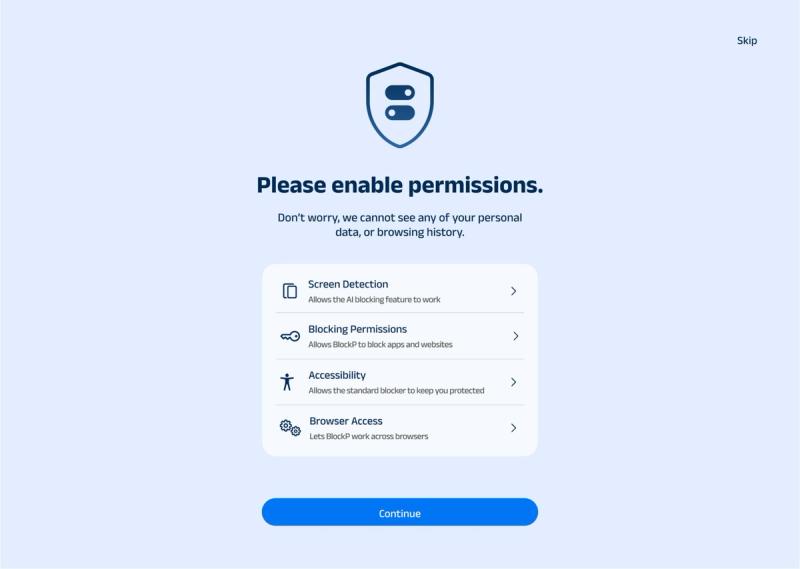
Finally, in the Dashboard, click on Features and then enable Limit adult content and safe search.

2. Apple Screen Time: Best Free Option
Screen Time is the best free porn blocker for Mac because it comes built into macOS. This can work best for anyone who wants a no-install first layer.
Pros
- Uses Apple’s list for porn blocking and also allows manual addition to the list.
- Passcode keeps the restrictions from being removed.
- You can block adult websites on a child’s computer from your Mac.
Cons
- No AI filtering and no accountability partner; a passcode is not a person.
Price
- Free, built into macOS.
Best For
- Anyone who wants a free blocker with no installation issues.
How to Block Porn on Mac With Screen Time
- Choose Apple menu > System Settings, then click Screen Time in the sidebar (you may need to scroll).
- If you’re setting up a child’s Mac, choose a family member from the pop-up menu.
- Click Content & Privacy and turn it on.
- Click App Store, Media, Web, & Games.
- Under web content, select Limit Adult Websites, then click Customize to add your own sites.
Menu names change between macOS releases, so follow Apple’s current guide.
3. CleanBrowsing - Best for network filtering
CleanBrowsing offers network-level protection for Mac. It relies on DNS filtering rather than an app. It uses your router as its server, and its free filters block any adult content for every device that uses them.
Pros
- Works in every browser and app because it filters at the network level.
- The Family Filter blocks adult sites, proxy and VPN domains, and mixed-content sites such as Reddit, and applies SafeSearch to Google, Bing, and YouTube.
- macOS is supported through a configuration profile (Big Sur or later).
Cons
- No accountability partner and no AI scanning.
- DNS settings can be changed back easily without Application Uninstall Protection.
Price
- Starts at $75/year, and a custom plan is also available
Best For
- Households wanting every device covered.
Setting Up CleanBrowsing for DNS-level filtering
- Sign in to CleanBrowsing
- On the free filters page, choose Family Filter
- Generate the macOS profile, open it, and approve it in System Settings.
4. BlockSite - Best Browser Extension
BlockSite works as a browser extension. It can block porn on Mac in Chrome, Firefox, or Edge, but only inside those browsers.
Key Features
- It uses site address, category, or keywords in a URL to block sites.
- Add blacklist and whitelist modes.
- Password protection and a custom block page, both paid.
Cons
- Protects only browsers where the extension is installed.
- No AI filtering
Price
- The free version allows 3 sites on the block list.
- Premium starts at $39.99
Best For
- Users who want a simple blocklist limited to browsers.
Set Up BlockSite
You can set up a website blocker with custom filtering in a few clicks.
- Install BlockSite from your browser’s official extension store.
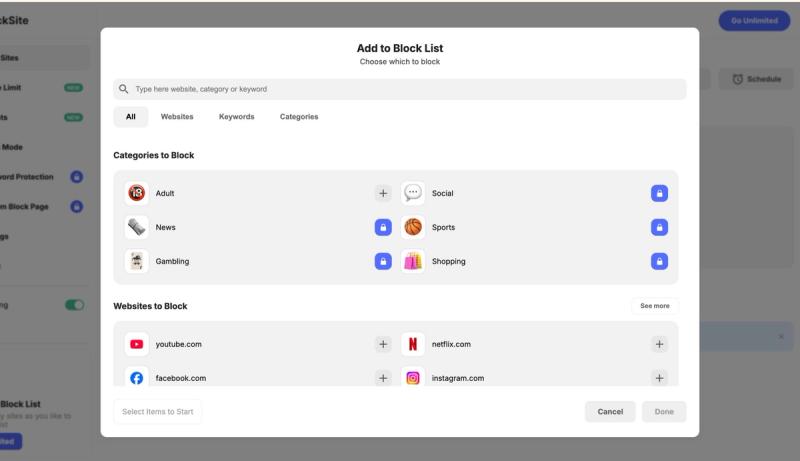
- Click Edit block lists, and Add to Block List under Block Sites to enter sites and categories you want to add.
- Once selection is over, click Done.
5. Covenant Eyes
Covenant Eyes, now sold as Victory, is best for porn recovery around accountability. The Victory Shield app runs in the background, takes screenshots of device activity, and sends them to a chosen ‘ally’. A routine of check-ins will happen, and reports will be sent to a chosen friend or family member.
Pros
- Screenshots, activity feeds, and notifications are sent to a chosen friend for monitoring.
- You can block particular domains or allow a few domains across browsers and apps.
- Support for Mac 11 or later and iOS
Cons
- Only as effective as your ally’s response.
- Screen capture cannot be disabled.
Price
- Starts at $18/month, with a lifetime subscription cost of $950
Best For
- For people who want a trusted ally to see activity reports.
Steps to Block Porn on Mac With Covenant Eyes
- Sign up for a Victory account.
- Download the Victory app.
- Install Victory Shield on every device.
- Invite your ally through the app.
6. Canopy
Canopy filters explicit content in real time with AI across websites, social platforms, and chatbots. Adults can use it alone or with a human or AI ally. It does not require sharing your private browsing history.
Pros
- Explicit images and videos are replaced with white rectangles
- Filtering of lingerie and swimwear.
Cons
- Requires two apps: Canopy and Canopy Shield.
Price
- Essential - $8.33/month
- Plus - $9.99/month
- Premium - $12.50/month
Best For
- Parents and adults who want AI filtering with a partner.
Steps to Blocking Porn With Canopy
- Download the Canopy app, where protection settings live.
- Log in using your credentials.
- Download the Shield app on each device you want to protect.
- Set your filtering level and accountability partner in the Canopy app.
7. Porn Block Plus
Porn Block Plus is a Safari extension that automatically tries to block adult sites, images, and links. It is a simple option for blocking porn on Mac inside Safari.
Pros
- Automatic blocking of porn sites, images, and links.
- A custom block list.
- Compatibility with all Mac computers running Safari.
Cons
- Available for Safari only
- No accountability or uninstall protection
Price
- Free download, but in-app purchases start at $9.99.
Best For
- Safari-only users wanting a light add-on.
Set up Porn Block Plus
- From Safari Extensions, get Porn Block Plus.
- Then, go to Settings and select the Extensions tab.
- Check the box next to Porn Block Plus.
How to Block Porn on Mac: Which Method Should You Use?
If you have specific goals for a porn blocker for Mac, then your options will narrow. To help you map your specific need for a porn blocker to the right tool, refer to the following table.
| If you want... | Use... |
|---|---|
| Comprehensive AI protection | BlockP |
| Free built-in protection | Screen Time |
| Browser-only blocking | BlockSite |
| Network-wide blocking | CleanBrowsing |
| Accountability | Covenant Eyes |
| Parental controls | Canopy |
| Safari Friendly | Porn Block Plus |
How Effective Are Porn Blockers for Mac?
Before finalizing an adult content blocker for Mac, understand their shortcomings. For instance, a domain blacklist may miss new sites, or a Chrome extension may miss other browsers. Apple’s own support threads include users reporting that “Limit Adult Websites” failed to block a major adult site.
A reliable way to avoid explicit content is to find a tool that meets most of your needs. For this, the blocker must bring together all the best approaches like network-level filtering, content-level filtering, an accountability partner, and AI. Such layering lets you avoid porn websites.
Final Verdict: What Is the Best Porn Blocker for Mac?
The right adult website blocker depends on who needs protection. For individual users, BlockP is a strong fit. If you would rather have a person review your activity, choose Covenant Eyes.
If you don’t want to install anything new on your Mac, start with Screen Time, which requires no installation. CleanBrowsing is good for Multi-device protection. For browser-only or Safari-only needs, BlockSite or Porn Block Plus suits best.
FAQs on Best Porn Blockers for Mac
1. How do I block porn on Mac?
You can block porn by installing dedicated tools such as BlockP, Covenant Eyes, Porn Block Plus, or using built-in options like Screen Time.
2. What is the best porn blocker for Mac?
It depends on your needs. BlockP suits individuals wanting AI filtering and uninstall protection, Canopy suits parents, and CleanBrowsing covers every device on your network.
3. Can I block porn on Mac for free?
Yes. Screen Time is built into macOS, and BlockP has a free plan.
4. Does Mac have a built-in porn blocker?
Screen Time is the built-in porn blocker in macOS. However, it filters Safari only.
5. Can porn blockers work on Safari and Chrome?
Porn blockers like BlockP can work on Safari and Chrome.

Written By:

BlockP Editorial Team is a group of researchers, behavioral health experts, and digital wellness specialists dedicated to helping people overcome adult content addiction and build healthier online habits. Our content is grounded in scientific research, expert insights, and real-world recovery experiences. Every article is carefully reviewed to ensure accuracy, practicality, and trustworthiness, empowering readers with evidence-based strategies for lasting change.