

How to block porn websites on Chrome - this is a question on top of every American parent’s mind because today 90% of parents in the United States are more worried about the safety of their children online than the children’s physical or mental well-being.
- When they first come across online porn, most children are as young as 11 to 12 years. And 15% of children see it before they turn 10.
- According to the National Center for Missing and Exploited Children, more than 100 million images of child sexual abuse online were reported in 2023.
- Roughly one in six young adults experience some form of online sexual abuse before they turn 18. And children often share their online experiences with parents only as a last resort, which increases their vulnerability.
- 86% of parents do establish strict screentime rules, but only 19% are able to enforce them consistently.
This combination of the increasing penetration of adult content into the mainstream and children’s reluctance to confide in parents creates the need for stronger safeguards that can block adult content in Chrome.
Why the specific focus on Chrome on Windows and Mac? Why should you learn how to block porn websites on Chrome?
53% of people who watch porn on their desktops watch it on Chrome, and most young people encounter porn on shared systems. In spite of these risks, Chrome does not provide any built-in tools that can reliably block adult content across its browser ecosystem.
Why Chrome Doesn't Block Adult Content by Default
Chrome is the most popular browser. And when we see that there is a rampant increase in porn and explicit content, it may feel odd that Chrome does not have a native feature to block porn sites.
The answer is simple because this decision is driven by Chrome's core philosophy - it wants to take you where you want to go quickly and efficiently. It's not in Chrome's job description to judge the content you are searching for or restrict your access.
There are basic tools in Chrome (e.g., like SafeSearch, which filters adult content in search results) that aim to protect your privacy and keep you safe from malicious sites or data thefts rather than policing the content.
So, inevitably, you have to go for a porn blocker extension if you want to block porn sites in Chrome. Additionally, having a device-level blocker along with the browser-level blocker ensures that you stay completely safe on your computer.
Method 1: Use a Chrome Extension to Block Porn Sites (Fastest)
A key Chrome extension for you is the porn blocker extension because, as we have seen, Chrome does not have any tools for adult content filtering.
Use BlockP Chrome Extension
BlockP is the best porn blocker extension for Chrome that provides comprehensive adult content blocking along with productivity tools. It is one of the simplest extensions to install and will start blocking porn instantly.
Block Porn
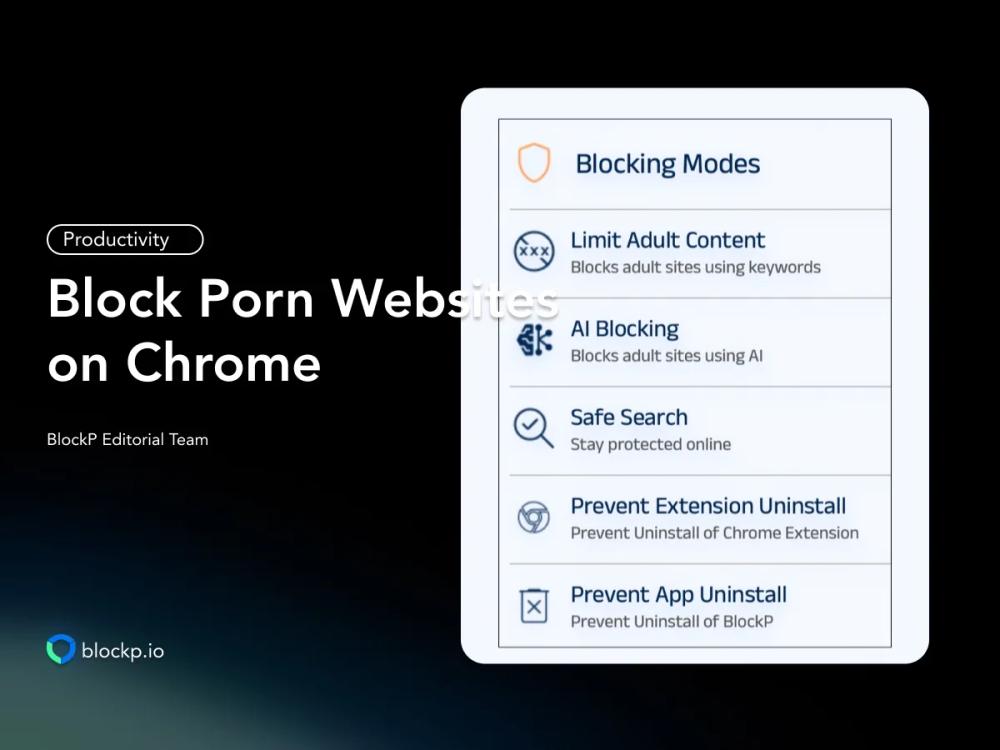
BlockP Chrome extension gives 3 porn blocking modes:
- Standard porn blocker: The keyword-based blocker that acts as your primary filter layer.
- Safe search: Enforces adult content blocking across all search engines.
- AI blocking: Advanced filtering layer that uses AI to detect and block sexual content across Chrome.
Along with the porn filter options, BlockP also gives you
- Blocklist: Customize the porn blocking by adding any number of websites to the list.
- Whitelist: Keep access open to only essential websites that you need for work or your child requires for study. Block everything else.
Accountability
- BlockP lets you add a parent or a trusted friend as an accountability partner. They will receive a password every time you try to change BlockP settings to access porn. So, you can’t sneak without your partner knowing about it.
- BlockP has support communities on Reddit and Discord dedicated to helping those trying to quit porn.
Prevent Bypass
When a strong urge hits, it creates an urgency to bypass the porn blocker. BlockP ensures that porn blocking still works during those moments of temptation, with options to
- Prevent uninstall
- Block incognito mode
- Block guest mode
- Long-sentence password - to create friction and pause during moments of temptation.
- Password protection - to prevent making impulsive changes to settings.
- Blocks all unsupported browsers.
Productivity Tools
Not all of us want to block porn because we are addicted.
Many times the sexual content and nudity are distractions that tank your productivity. Also, when we are constantly distracted by online content, our attention gets fragmented and our digital habits become unhealthy.
To solve this, the BlockP Chrome extension gives you productivity tools:
- Focus mode - restricts access to specific websites in the pre-approved list.
- Usage limits for capping the time you spend on distracting websites and social media pages.
- My Stats dashboard that shows your computer use so that you can clearly identify where you are losing focus.
- Block sites like gambling and shopping websites.
- Block social media.
- Restrict specific features of YouTube, like short videos and autoplay.
Method 2: Enable Google SafeSearch on Chrome
The SafeSearch feature on Chrome can be a good starting step for someone looking for just basic protection and not struggling with porn addiction. But you should have realistic expectations because there are things it can do and it cannot do.
What SafeSearch does is it blocks any explicit images, videos, and links on Google Search.
What SafeSearch can not do is stop someone from directly typing the adult website URL and visiting the site. Also, even the basic filtering is limited to Google Search; it cannot filter explicit content from other websites and social media.
How to enable Google SafeSearch:
- Open the Chrome browser and sign in to your Google account.
- Check in the top right corner of the browser - you will find your profile picture. Click on it.
- Select “Manage your Google account” and go to Search settings.
- Under SafeSearch you will have 3 options:
- Filter - to remove explicit search results
- Blur - to blur explicit search results
- Off - turns off the SafeSearch filter so that adult content shows up in your search results.
- Set your SafeSearch to “Filter”
- Save your settings.
PS: You have to do these steps for every Chrome account that uses the computer.
Method 3: Block Adult Websites at the System Level
Browser extensions and SafeSearch have obvious weaknesses - they can be easily turned off, bypassed, and uninstalled. So, you need another layer of filtering to protect you at the system level on your Mac or Windows that is much harder to bypass.
First, let us look at how to block porn websites on Chrome if you are a bit tech-savvy.
On Windows (Using Microsoft Family Safety or Hosts File)
The hosts file is like a personal address book that your Windows maintains. When you type in a web address, your computer asks the internet where this address is and takes you there.
When you alter a host's file to 127.0.0.1, your computer thinks that the website is located on your computer itself and takes you there.
Here is how to block adult content on Chrome using the host's file setting.
- Search for the Notepad and right-click on it to choose “Run as administrator."
- In Notepad go to File → Open.
- Go to C:\Windows\System32\drivers\etc\
- Currently the file filter will be set for text files (.txt). Change the dropdown to All Files.
- Now you will see - “hosts” - open it.
- Add the website addresses that you want to block.
- Press Ctrl+S to save the settings.
The biggest drawback of altering the host’s file is that you have to literally add every website you want to block. So, you have to take up the headache of creating your own blocklist! And any website you have not added will remain accessible.
Moreover, if someone has admin access, they can undo it in 30 seconds!
Microsoft Family Safety is a little harder to bypass than editing the host's file. Here you create a Windows account that has fewer permissions and ask Microsoft to act like a strict parent and enforce those limits.
So, there will be a parent account that can change settings and decide what should be allowed, etc., and a child account that can use Chrome within the restrictions set by the parent.
Here is how to block adult websites on Google Chrome using Microsoft Family Safety.
- Go to Microsoft's family page and sign in. It's like a control panel for you.
- Add another account like focusmode@gmail.com. Your main account will be the parent account, and this new account will be the child account. You have to use this new account for everyday browsing.
- The next step is to put filtering restrictions. So, open the Family Safety app on Windows.
- Select the new account/child account and choose content filters.
- Turn on the "Filter inappropriate websites" switch.
- Now Microsoft will automatically block many adult websites, and you can even add more websites to the blocklist.
With Microsoft Family Safety, also, there is always a chance that you will miss a new or disguised porn site. And again, if someone has access to the parent account, they may not be able to resist the temptation of disabling the settings.
On Mac (Using Screen Time for Chrome)
Apple’s screen time can be a powerful protection against adult websites, but only on its native Safari browser. On Chrome it is available, but the protection is often inconsistent because Chrome may not always obey Apple’s restrictions.
- Go to the Apple menu.
- Navigate to System Settings - Screen Time.
- Inside System settings, find Content & Privacy and turn it on.
- Under Web Content, select “Limit Adult Websites."
- There is also an option, Never allow - you can add any adult website address here. It’s like a personal blocklist.
- Finally, create a screen time passcode to lock the settings.
Again, as Apple’s screen time is not reliable on Chrome, a workaround like the BlockP Windows/Mac app can be used as a system-level companion for full adult content filtering on Chrome.
Did that sound a bit complicated, or do you still have doubts about the effectiveness? Then here is how to block porn websites on Chrome much more simply and effectively with BlockP.
Use BlockP Software for Windows
BlockP porn blocker software on Windows is another powerful filtering layer that reinforces the protections of your Chrome extension.
Along with the porn-blocking, accountability, and productivity features of the BlockP Chrome extension, the BlockP Windows software also lets you add a password to prevent bypass.
Use BlockP Software for Mac
As we have seen while discussing the Apple Screen Time feature, adding the BlockP porn blocker to Mac makes porn blocking on Chrome more robust.
It basically makes all the features of the BlockP Chrome extension available on your Mac along with system-level protections like blocking porn across all browsers, not just Safari or Chrome.
How to Make Your Adult Content Blocker Tamper-Proof
When you are struggling with an urge, it will be very tempting at that moment to bypass the porn blocker and find a way to watch porn. But porn blockers like BlockP give features that block the shortcuts and keep you safe during vulnerable moments.
- BlockP lets you add an accountability partner. They will receive a password every time you try to disable a setting. There is also an option where you can prevent uninstalling the porn blocker.
- On both Mac and Windows make sure that your kids are using standard accounts. As only administrator accounts can remove the porn blocker extension or uninstall the app, keep the admin controls to yourself.
FAQs on How to Block Porn Websites on Google Chrome in Windows and Mac
Does Chrome have a built-in adult content blocker?
Chrome does not have any built-in tools or features that let you block adult websites.
Is Google SafeSearch enough to block porn on Chrome?
Google SafeSearch can only block adult content on the Google Search page. If someone directly types the address of a porn site in the address bar, it can not block the access.
Will the BlockP Chrome extension block adult sites in incognito mode?
BlockP Chrome extension lets you block porn sites in incognito mode.
Does BlockP work on both Windows and Mac?
BlockP has a desktop application that blocks porn on Windows and Mac.
What is the best free way to block porn sites on Chrome desktop?
The core porn-blocking features of BlockP are available for free. So, you can use the BlockP Chrome extension along with the BlockP for Windows/Mac.

Written By:

BlockP Editorial Team is a group of researchers, behavioral health experts, and digital wellness specialists dedicated to helping people overcome adult content addiction and build healthier online habits. Our content is grounded in scientific research, expert insights, and real-world recovery experiences. Every article is carefully reviewed to ensure accuracy, practicality, and trustworthiness, empowering readers with evidence-based strategies for lasting change.