
Gambling Site Blocker for Mac: How to Block Gambling Sites with BlockP
Use BlockP's gambling site blocker for Mac to block betting, casino and poker websites in one click and take control of your gambling habits.
Get Started with BlockPEasy access to betting sites that leads to compulsive use is dangerous for individuals and their loved ones. A gambling blocker for Mac removes that threat by cutting off your access to these sites.
Epic Research reviewed records for more than 197 million US adults and found that diagnosed gambling disorder is on the rise from 3.0 to 4.8 per 100,000 patients per quarter between early 2018 and early 2026. This means that despite awareness of the disadvantages, gambling addiction is growing, and the need for blockers like BlockP for Mac is greater now.
How to Block Gambling Sites on Mac with BlockP (Step by Step)
Two steps in BlockP to complete setup.
Step 1: Download BlockP
Go to the BlockP website and download the porn blocker software for Mac.

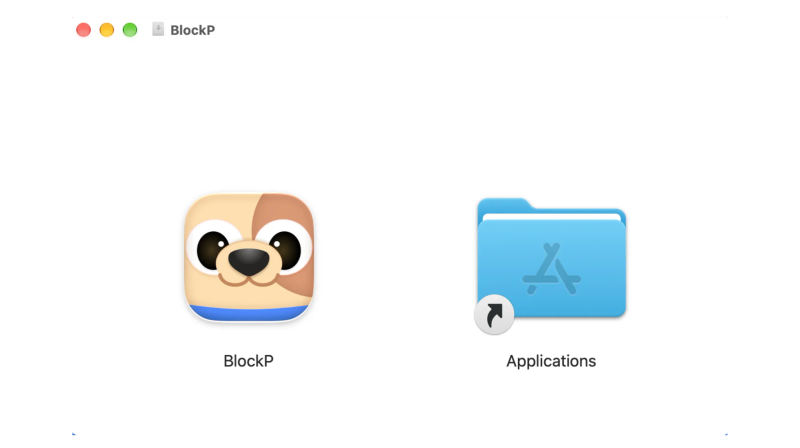
Step 2: Install and Open the App
You can find the BlockP icon in the Downloads folder. Move it into Applications and open BlockP from there.
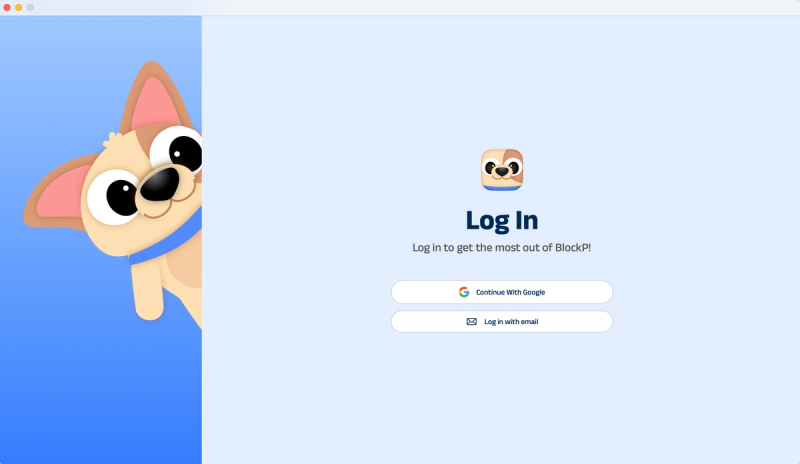
Step 3: Create Your Account
Sign up for BlockP using your email address or your Google account to get going.
Step 4: Give Necessary Permissions
BlockP will request four permissions on your Mac.
- Screen Detection
- Accessibility
- Blocking Permission
- Browser Access
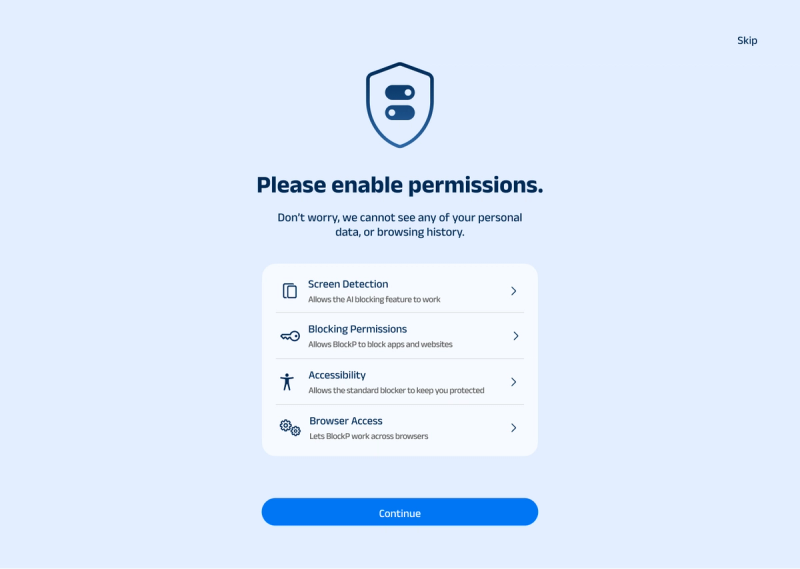
Click on each permission tab, and your Mac Settings page will open. Slide the toggle next to the BlockP icon to the on position. Do this for each of the permissions on the list.
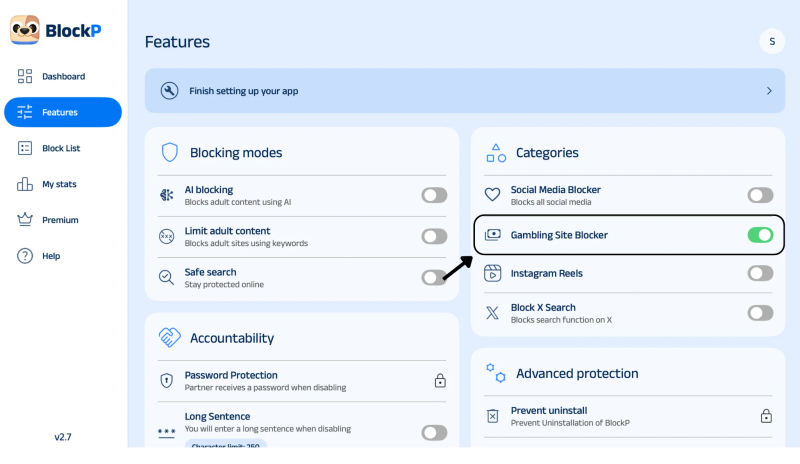
Step 5: Go to Features and Turn On
Inside the dashboard, click the Features tab. Under categories, locate Gambling Site Blocker and toggle it on.
What Is a Gambling Site Blocker for Mac?
A gambling blocker is a way to deny access to any betting or casino websites before that page can load on a device. It can work by maintaining a list of known operators and also creating a custom list built by the user. Both the lists can work together.
Some blockers can extend blocking beyond a single browser and across the full device. This will depend on the tool configuration. A user can block betting sites on Mac for gambling restriction by using software like BlockP with uninstall protection that makes it hard to reverse the setting.
Benefits of Blocking Gambling Sites on Mac
- Helps you stay away from online casinos, betting sites, and poker sites.
- Block gambling sites on Mac to reduce the amount of gambling distraction you get when you're studying or working.
- When you have a blocker, it helps you avoid the urge to bet online and spend money.
- You can build your self-control by limiting your visits to gambling sites even if you're feeling the urge.
- You can block gambling sites on all supported browsers, depending on the tool.
- Sharing your progress can give your family some useful info to talk about as a family.
- * The same rules apply to every account on your Mac.
How the BlockP Gambling Site Blocker Works on Mac
The BlockP gambling blocker is easy to set up, as the software interface is user-friendly. Apart from the gambling websites it covers, you can add further addresses or keywords. Households that need to block gambling sites on more than one device or OS can install BlockP as it’s available for Android, iOS, Windows and Chrome.
Since password protection and other supported restrictions for uninstalling or turning off blocking are available, it's harder to disable any settings impulsively. The accountability feature is aimed at helping users stick to their browsing limits and minimize the distractions of online gambling.
BlockP vs Screen Time: Which Is Better to Block Gambling Sites on Mac?
Screen Time comes with macOS and includes features to reduce screen time and access to any websites. By adding gambling sites to the lists, you can easily block them. It is a free starting point for a household already having Apple devices.
A dedicated app to block gambling sites like BlockP works from popular gambling-focused lists and also lets you add your own names. BlockP also lets you use its gambling site blocking feature on its free version.
Screen Time may not automatically identify and block every gambling website or related domain. Blocking multiple casinos and betting platforms can also be time-consuming when new sites appear.
A gambling blocker for Mac like BlockP with AI detection and blocking can work without much intervention from humans. Screen Time suits light limits. BlockP suits a user who wants stronger friction.
Why Choose BlockP as Your Gambling Blocker for Mac?
Gambling controls in BlockP are available in one dashboard, with website blocking and keyword blocking in the free version. So, with one install, you can have many functionalities. Choosing a fully functional gambling blocker for Mac like BlockP is better than using gambling-only tools.
| Feature | BlockP | Gamban | BetBlocker | Net Nanny |
|---|---|---|---|---|
| Blocks gambling apps | Selected apps (varies by platform) | Yes on mobile | Yes on mobile | Yes |
| Add sites/keywords | Yes | Limited | Limited | Yes |
| Remove / bypass | Hard | Limited | Self-restriction from 24 hours up to 5 years | Limited |
| Accountability partner/streaks | Yes | No | No | Parental reporting |
| Best for | One tool for gambling, adult content and social media, plus accountability | Gambling-only | Free gambling blocking with a set exclusion period | Families filtering several content types |
Frequently Asked Questions
How do I block gambling sites on Mac?
You can block betting websites through BlockP by selecting the Features tab from the dashboard and toggling it on to start blocking.
Is the BlockP gambling site blocker free on Mac?
BlockP allows blocking of gambling sites in its free version.
Can I block betting and online casino websites on Mac with BlockP?
Yes. You can block existing gambling sites in BlockP and also add more domains.
Does the gambling blocker work in Safari, Chrome, and other browsers on Mac?
The macOS software can run at the desktop level, and some can also filter at the browser level.
Can I stop myself from turning off the gambling blocker on Mac?
Yes. You can add authorization for any changes to settings, so gambling blocking can’t be turned off.
Does BlockP block every gambling website?
BlockP allows you to block gambling sites on Mac precisely. If new ones show up, you can add additional operators or mirror domains to blocking lists.